How to Sell a Digital Product With a Faceless YouTube Channel in 2027
By Alex Stevens

You can sell a digital product with a faceless YouTube channel by making a product that solves a specific problem, listing it on a store like Gumroad or Etsy, then publishing videos that solve the same problem and point viewers straight to the product link. Digital Maker AI (digitalmaker.ai) is an AI video platform for faceless YouTube videos, AI presenter videos, animated podcasts, 3D animated films and digital products. Its built-in tools let you build the product and the videos in the same place, which makes this strategy very practical heading into 2027.
Key takeaways
- A faceless YouTube channel is a channel where the creator never appears on camera; AI visuals and a voiceover carry every video.
- The strongest digital products to sell through YouTube are ones that solve the exact problem your videos cover, for example a budget planner sold through a personal finance channel.
- Digital Maker AI's Ebook Writer, AI Spreadsheet and Website Maker let you build a sellable product without any design software.
- List your product on Gumroad, Etsy, Stan Store or Shopify, then put the link in the video description, a pinned comment and the end screen.
- A consistent 30-day publishing plan is enough to generate your first sales before 2027 begins.
Why does a faceless YouTube channel sell digital products so well in 2027?
YouTube is a search engine. When someone watches a ten-minute video about budgeting and the description links to a budget spreadsheet template, the path from viewer to buyer is one click. No paid ads, no email list required at the start. The channel builds trust with free, helpful content, and the digital product is the natural next step for viewers who want to go deeper.
Faceless channels have an extra advantage: they scale. Because you never appear on camera, you can publish in any niche, keep your identity private, and use AI to produce videos faster than a traditional creator. The combination of consistent video output and a low-effort digital product creates a compounding income stream that grows as the channel grows.
The niche that works best is one where the viewer has a clear problem and a clear goal. Personal finance, productivity, health and fitness, and business side hustles all fit this pattern perfectly, and they are all topic areas where a well-made planner, tracker or guide sells reliably.
Step 1: Pick a niche and a product idea that fit together
Choose a niche first. The niche drives both your video topics and your product. A good niche for this strategy has three qualities: viewers have a specific problem, they are willing to pay for a solution, and there is enough search volume on YouTube to attract traffic.
A concrete example used throughout this guide: a personal finance channel for people in their 20s and 30s. Video topics include budgeting for beginners, paying off debt fast, and building an emergency fund. The product is a Monthly Budget Planner, a printable and digital planner that guides buyers through tracking income, expenses and savings goals each month.
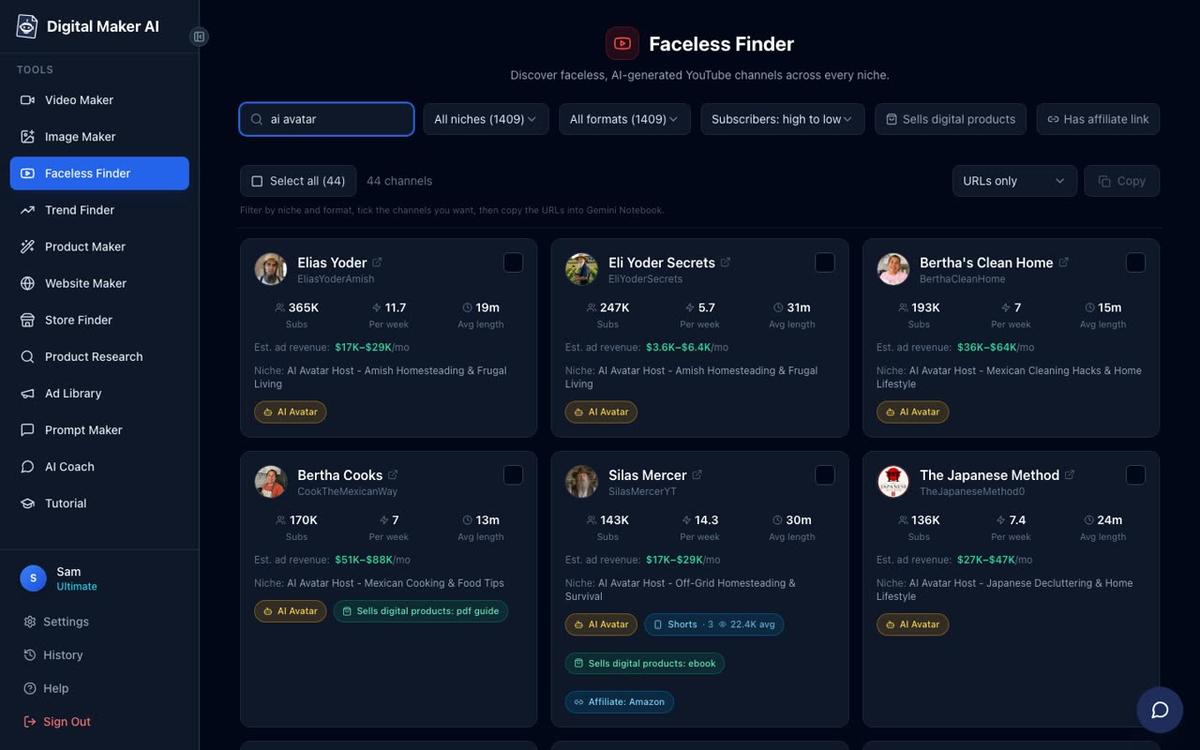
Use Digital Maker AI's Faceless Finder to research this niche before you commit. It shows real faceless channels by niche, with subscriber counts, uploads per week, average video length and an estimated monthly ad revenue. That data tells you whether the niche is already working for other creators, which is a strong signal before you invest time in a product.
You can also use the Product Research and Competitor Analyzer inside Digital Maker AI to generate digital product ideas and see what competitors in your niche are already selling. This stops you from building something nobody wants.
Step 2: Make your digital product with Digital Maker AI
Build the product before you film a single video. Having the product ready means every video you publish from day one can include the buy link. Digital Maker AI includes three tools that cover the most common digital product formats:
- Ebook Writer: creates ebooks, lead magnets, workbooks and printable planners as finished downloadable documents. For the personal finance niche, this is where you build the Monthly Budget Planner.
- AI Spreadsheet: builds spreadsheets, trackers and templates. A debt payoff tracker or a savings goal calculator made here is a natural companion product or upsell.
- Website Maker: builds a Shopify store theme for your digital products, ready to download and install. Useful if you want your own branded storefront rather than a marketplace.
For the personal finance example, start with the Ebook Writer. Give it a brief description of the planner you want, the sections you need (income, fixed expenses, variable expenses, savings targets, a monthly review page), and the tone. It returns a finished, formatted document you can export and sell immediately. No design software, no Canva account required.
Once your product file is ready, create a simple product mockup image using Digital Maker AI's Image Maker. A clean mockup of your planner on a desk makes your store listing look professional and increases conversion.
Step 3: List your product on a store
Choose one store to start. Each platform has a different audience and fee structure, so pick the one that fits your situation best. The table below compares the four main options.
| Store | Best for | Key note |
|---|---|---|
| Gumroad | Creators just starting out | Free to list; Gumroad takes a percentage of each sale. Simple setup, instant payouts after a short hold. |
| Etsy | Printable planners and templates | Built-in search traffic for digital downloads. Listing fee per item plus a transaction fee on each sale. |
| Stan Store | Creators who want a link-in-bio store | Monthly subscription; no per-sale fees. Works well as a single link in your YouTube description. |
| Shopify | Creators building a brand long term | Monthly subscription; full control over the storefront. Use the Website Maker theme from Digital Maker AI to set it up quickly. |
For the personal finance channel example, Gumroad is the fastest way to get a product live. Create a free account, upload the planner PDF, write a short description, set a price (most beginner planners sell between $7 and $27), and copy the product link. That link goes in every video you publish.
If you want to build a branded store from the start, use the Website Maker in Digital Maker AI to generate a Shopify theme, install it on a new Shopify store, and list the planner there. The Website Maker builds the theme for your digital products, so the store looks consistent with the niche from day one.
Step 4: Make faceless YouTube videos that solve the same problem
Every video should solve one problem that the product solves in more depth. This is the core of the strategy. The video gives the viewer a useful answer for free. The product gives them a tool to act on that answer. The two reinforce each other.
For the personal finance channel, strong video topics include:
- "How to budget your salary for the first time" (the planner is the tool they need)
- "5 budget categories most people forget" (the planner covers all of them)
- "How I paid off $8,000 in debt in 12 months" (the debt tracker is the companion product)
- "The zero-based budgeting method explained" (the planner uses this method)
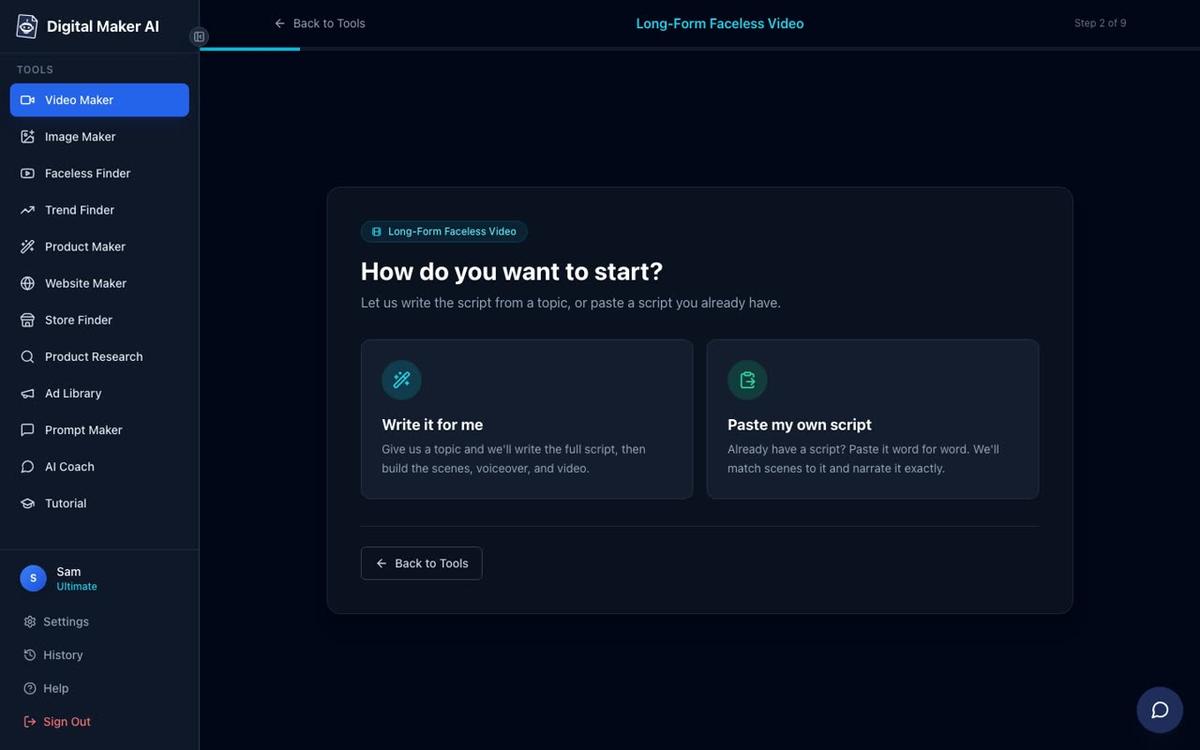
To make each video, open the long form faceless video maker inside Digital Maker AI. The tool writes the script from your topic, generates a unique AI scene image for every scene, adds a narration voice from over 100 options, burns in captions and returns a finished MP4 ready to upload to YouTube. On paid plans you can paste your own script if you prefer to write it yourself.
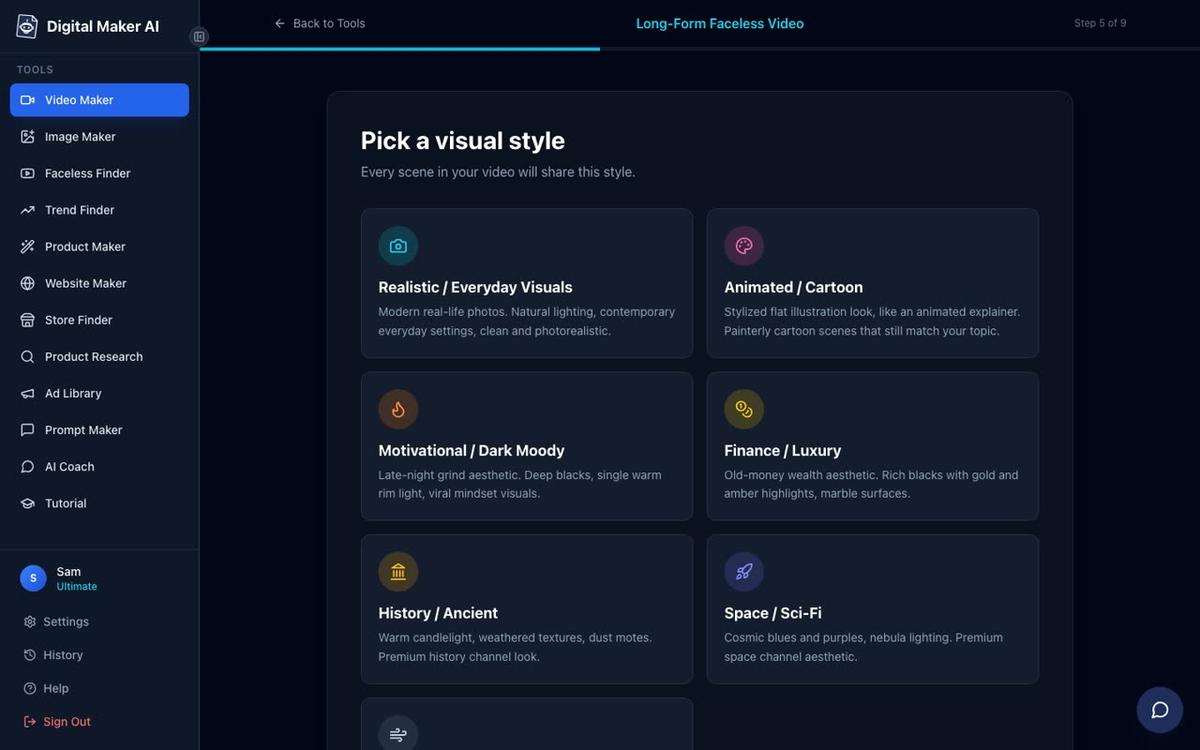
For the Finance or Luxury visual style, pick the Finance or Luxury option at step 5. This gives every scene a clean, aspirational look that matches the personal finance niche. Pair it with a calm, authoritative US or UK voice and Standard pacing for a professional result.
Once the video is ready, Premium and Ultimate users can post it straight to YouTube from the "Post to socials" button, or schedule it for a specific time, after connecting the YouTube account once in Account Settings. Free and Pro users download the MP4 and upload it manually. See the AI video publishing guide for the full connection steps.
Step 5: Place your product link in three spots on every video
Three placements drive the most clicks from a YouTube video to a product page. Use all three on every upload:
- Video description, first line. Put the product link before the fold, so viewers see it without scrolling. Write one sentence that names the product and what it does: "Get the free Monthly Budget Planner here: [link]."
- Pinned comment. Pin a comment from your channel that repeats the product link. Viewers who finish the video and scroll to comments see it immediately.
- End screen. Add an end screen card in YouTube Studio that links to the product. This catches viewers who watch to the end and are most likely to buy.
You can also mention the product inside the video itself. A natural line near the end works well: "If you want a ready-made template to put this into practice today, the link is in the description." Keep it brief and genuine, not a hard sell.
A 30-day plan to sell a digital product with a faceless YouTube channel
This plan is built around the personal finance niche example and assumes you are starting from scratch in late November 2026, ready to have your channel running before 2027.
| Week | Tasks | Output |
|---|---|---|
| Week 1 | Research niche with Faceless Finder. Build Monthly Budget Planner with Ebook Writer. Create product mockup with Image Maker. List product on Gumroad. | Product live on Gumroad with a buy link ready to paste. |
| Week 2 | Set up YouTube channel. Make 2 long form videos (budgeting basics, zero-based budgeting). Add product link to description, pinned comment and end screen on both. | 2 videos published, product link in place. |
| Week 3 | Make 2 more videos (5 budget categories, debt payoff method). Create 2 vertical Shorts from the same topics using the Shorts maker. | 4 videos and 2 Shorts live; 6 pieces of content pointing to the product. |
| Week 4 | Publish 2 more long form videos. Review YouTube Analytics for watch time and click-through rate. Adjust video titles and thumbnails based on data. | 8 videos total. First sales data to learn from going into 2027. |
By the end of day 30 you will have eight videos on a channel that all point to one product. That is enough content for the YouTube algorithm to start surfacing your videos in search results. The goal in month two is to double the library and create a second product (a debt tracker spreadsheet made with the AI Spreadsheet tool) as an upsell.
To learn more about building a full channel strategy, read how to start a faceless YouTube channel in 2027 for a step-by-step channel setup guide.
What to avoid when you sell a digital product with a faceless YouTube channel
- Selling before you have any videos. Even one or two published videos build credibility. A bare channel with only a product link in the bio converts very poorly.
- Making a product that is too broad. A "complete guide to personal finance" is harder to sell than a "Monthly Budget Planner for Beginners." The more specific the product, the easier it is to write a video that pre-sells it.
- Hiding the product link. Put it first in the description, every time. Viewers who want it will not hunt for it.
- Posting inconsistently. Two videos a week is better than five in one week and none the next. Consistency signals to YouTube that the channel is active.
- Ignoring thumbnails. The thumbnail is the first thing a viewer sees. Use the Image Maker in Digital Maker AI to generate YouTube thumbnails that match your visual style and include a clear, readable title.
Frequently asked questions
How many videos do I need before I start making sales from a faceless YouTube channel?
There is no fixed number, but most creators see their first sales after publishing 8 to 12 videos consistently. The key is that every video points to the product and solves a problem the product addresses. Quality and keyword targeting matter more than sheer volume.
What is the best digital product to sell through a faceless YouTube channel?
The best product is the one that solves the exact problem your videos cover. Printable planners, spreadsheet templates and short ebooks sell well because they are low-priced, instantly delivered and directly useful. Match the product to the niche: a budget planner for finance, a workout tracker for fitness, a content calendar for business channels.
Do I need a large audience to sell digital products on YouTube?
No. Even a channel with a few hundred views a month can generate sales if the videos target specific search queries and the product link is prominent. A small, focused audience with a clear problem converts better than a large, general one. Start with search-optimised video titles and one strong product.
Can I sell digital products on YouTube without showing my face?
Yes. A faceless channel uses AI visuals, stock-style scenes and a voiceover instead of a presenter. Tools like Digital Maker AI generate the entire video from a topic, so you never need to appear on camera. The product is sold through the description link and end screen, not through personal brand recognition.
How do I price a digital product for a YouTube audience?
Most impulse-buy digital products for YouTube audiences are priced between $7 and $37. Start at the lower end to generate reviews and social proof, then raise the price once you have five or more positive reviews. A bundle of two products (for example a planner plus a tracker) can be priced 20 to 30 percent higher than each item sold alone.
Which plan do I need on Digital Maker AI to make videos for a digital product channel?
The Free plan lets you make five videos to test the tool with no card required. For a consistent publishing schedule you will need a paid plan, which unlocks more video minutes, longer videos, custom topics and the ability to paste your own script. See the current plan options at digitalmaker.ai/pricing.
The fastest way to get started is to sign up for a free account, build your first product with the Ebook Writer or AI Spreadsheet, then make your first video in the Video Maker. Everything you need to sell a digital product with a faceless YouTube channel is in one place. Start with the free course at Digital Maker AI to walk through the full setup in under an hour.
Alex Stevens: Alex Stevens writes for the Digital Maker AI team about faceless YouTube channels, AI presenters and AI video tools.