Doodly vs Digital Maker AI for Faceless YouTube Videos
By Alex Stevens
Which tool wins for faceless YouTube: Doodly vs Digital Maker AI?
If your goal is to publish faceless YouTube videos as fast as possible, Digital Maker AI wins on end-to-end automation: it writes the script, generates every scene image, adds narration and captions, and delivers a ready-to-upload MP4 without you touching a timeline. Doodly, by contrast, is a manual whiteboard animation builder that gives you full creative control over every drawn element but requires you to assemble each scene yourself. The right choice depends on whether you want speed and volume or hands-on control over every frame.
To judge these two tools I looked at three things: how much work the creator has to do before a video is finished, what whiteboard-style output each one produces, and what the total cost is for someone publishing regularly on YouTube. I checked Doodly's pricing directly from its official site and third-party review platforms before writing any number below.
Doodly: built for hand-crafted whiteboard animation
Doodly is a desktop-installed whiteboard animation tool that lets you build doodle-style videos scene by scene. You drag characters, props and backgrounds onto a canvas, position them, set the draw-on animation order, and add your own voiceover or text separately. The company states that the software supports whiteboard, blackboard, glassboard and green-screen backgrounds, and that users can choose from a library of pre-drawn character images, prop images and scene templates.
The workflow is manual throughout. Doodly does not write your script, does not generate images from a text prompt, and does not record or synthesise narration for you. You supply the story, the voice and the structure; Doodly supplies the drawing animation engine and the asset library. That makes it a strong choice for explainer videos, training content or marketing clips where you want precise control over every visual element and already have a script and voiceover ready to go.
What Doodly does well is the draw-on effect itself. The hand-draws each asset onto the screen in a way that looks convincing and polished, and the asset library is large enough to cover most business and educational topics without buying extra packs. The software runs on Mac and PC and exports up to 1080p HD.
Doodly pricing (as of October 2026, see doodly.com/doodly-pricing): Standard plan $49 per month (approximately $490 per year on annual billing); Enterprise plan $79 per month (approximately $790 per year on annual billing). There is no free plan and no free trial. The Standard plan includes 1,164 character images, 1,620 prop images, 150 royalty-free music tracks, 20 video templates and 84 scene templates. Enterprise adds a larger asset library and priority support.
Who should pick Doodly: creators who already write and record their own scripts and voiceovers, who want precise frame-level control over a whiteboard animation, and who are comfortable with a manual scene-assembly workflow. It also suits teams producing training or explainer content where every visual detail needs to match a specific brand or curriculum.
Digital Maker AI: end-to-end AI video production for YouTube
Digital Maker AI is a browser-based platform that produces a complete faceless YouTube video from a topic or a pasted script. You type what the video is about, choose a format, style, voice and caption look, press a button, and receive a finished MP4 with AI-written narration, AI-generated scene images, captions burned in and optional background music. There is no timeline to manage and no scene-by-scene assembly.
For creators comparing Doodly vs Digital Maker AI specifically on whiteboard output, the closest like-for-like feature is the Whiteboard Animation format, available on the Premium and Ultimate plans. Instead of dragging pre-drawn assets onto a canvas, you type a topic, and the platform writes the script, generates hand-drawn sketch illustrations for every scene, and animates them drawing themselves onto a white background. An optional drawing hand appears in the corner, in your choice of none, light, brown or dark skin tone. You can make whiteboard videos up to 30 minutes long on Premium and up to 60 minutes on Ultimate. Learn more at the AI whiteboard animation generator page.
Beyond whiteboard, the platform includes four long-form video formats: Multi Scene (a new AI-generated image for every scene, available on all paid plans), Single Scene (one held subject with bold animated captions, Premium and Ultimate), Whiteboard Animation (Premium and Ultimate), and Multiple Languages in French, Spanish, Italian and German (Premium and Ultimate). There are also AI Presenters, Animated Podcasts, vertical Shorts and a Drag and Drop Studio. Seven visual styles cover everything from Realistic to Animated or Cartoon, Motivational, Finance, History, Space and Minimalist.
The platform does not have a timeline editor, stock footage library or screen recording tool. After a video is made you can regenerate any scene image, swap in your own image or clip, or edit the narration text, but you are not manually placing assets frame by frame the way you would in Doodly.

Digital Maker AI pricing (as of October 2026, see digitalmaker.ai/pricing): Free plan at no cost, no card needed; Pro at $29 per month ($249 per year); Premium at $59 per month ($479 per year); Ultimate at $99 per month ($799 per year). The Free plan gives you one whiteboard video up to 8 minutes, built from a ready-made image library in set topic areas, with no credit card required. Paid plans generate every scene image fresh on any topic, with Pro allowing up to 40 video minutes a month and a 10-minute maximum per video, Premium 150 minutes a month and 30 minutes per video, and Ultimate 300 minutes a month and 60 minutes per video.
Who should pick Digital Maker AI: creators who want to publish frequently without spending hours on manual scene assembly, anyone starting a faceless channel from scratch who needs a complete production pipeline, and creators who want whiteboard-style output alongside other formats such as AI presenters, animated podcasts and vertical Shorts, all from one account.
Doodly vs Digital Maker AI: recommendations by use case
- Best for whiteboard-style YouTube videos with no manual work: Digital Maker AI. Type a topic, pick the Whiteboard Animation format, choose your drawing hand style, and get a finished MP4. The Free plan lets you try one whiteboard video up to 8 minutes with no card needed.
- Best for custom hand-crafted whiteboard explainers: Doodly. If you need to place specific characters, control exactly which prop appears at which moment, and already have your script and voiceover ready, Doodly's manual canvas gives you that precision.
- Best for volume publishing on a faceless channel: Digital Maker AI. The ability to go from topic to finished MP4 in minutes, across multiple formats and styles, makes it significantly faster for creators publishing several videos a week. The long-form video generator handles videos up to 60 minutes on the Ultimate plan.
- Best on a budget: Digital Maker AI's Free plan costs nothing and requires no card. Doodly starts at $49 per month (as of October 2026) with no free tier. For a creator who wants to test whiteboard video before spending anything, Digital Maker AI is the only option here that lets you do that.
- Best for non-whiteboard faceless content: Digital Maker AI, which also covers AI presenter videos, animated podcasts, vertical Shorts and cartoon-style scene videos. If you want to explore what channels using AI presenters look like, the Faceless Finder tool inside the platform lets you search confirmed faceless channels by niche and see estimated ad revenue.
- Best for training and explainer content with precise brand assets: Doodly. If your company has a set of approved character illustrations and you need them to appear in a specific order on screen, Doodly's drag-and-drop canvas is built for that kind of controlled production.
The honest limits of each tool
Doodly does not write your script, does not generate scene images from a text prompt, and does not synthesise narration. You supply all of that yourself, which means the time investment per video is considerably higher than with an AI-driven tool. Third-party reviewers have also noted that the pricing structure can involve additional asset pack purchases beyond the base plan cost, which the company states is optional but worth factoring into your budget.
Digital Maker AI does not have a timeline editor, so you cannot manually trim clips, add custom transitions between scenes, or place assets at precise timecodes the way a traditional animation tool allows. The Whiteboard Animation format also does not support recurring characters, AI presenters or animated scenes, which are available on the other long-form formats. If you need frame-level control over a whiteboard video, that is a genuine limit of the platform.
For a broader look at how Digital Maker AI compares with other animation-style tools, the Animaker vs Digital Maker AI comparison covers similar ground on the animation side, and the Powtoon vs Digital Maker AI article looks at another popular presentation-style video builder.
How to try Digital Maker AI for whiteboard videos today
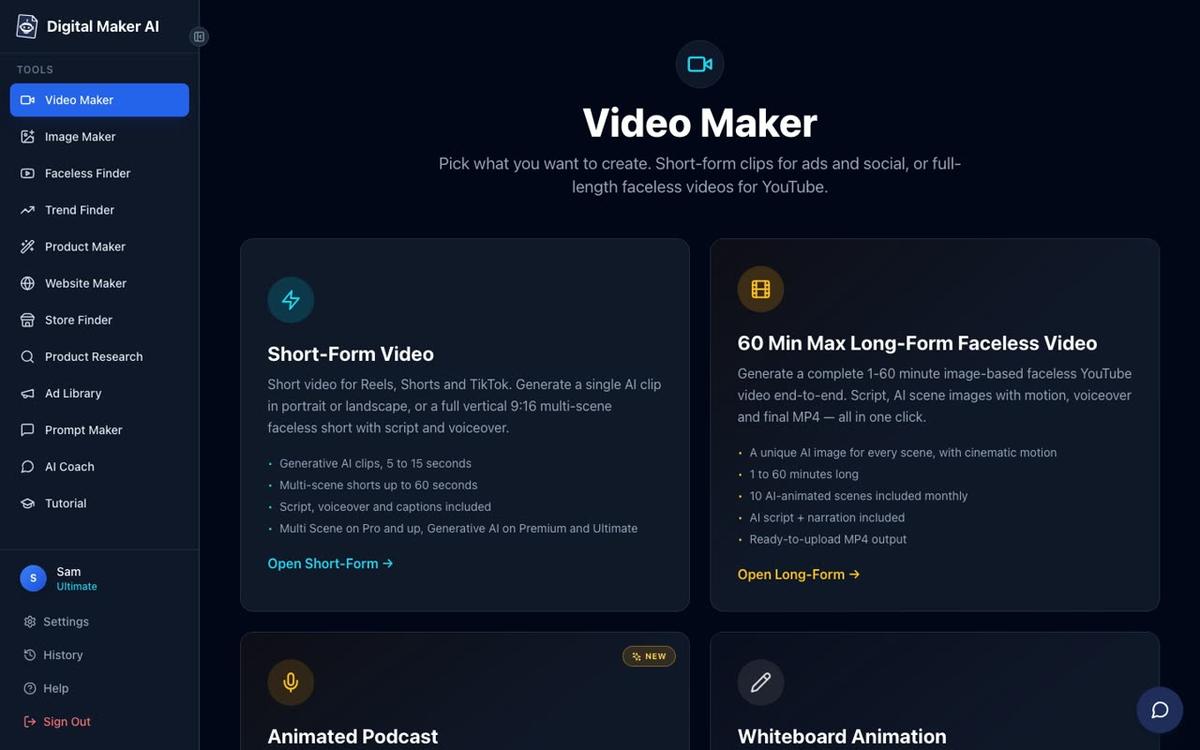
The simplest way to test the comparison yourself is to sign up for the Free plan, no card needed. After signing in, click the Video Maker button in the left sidebar, select the Long-Form Faceless Video card, and on the next screen choose the Whiteboard Animation format. Pick a topic, a drawing hand style and a voice, press Next, and the platform writes the script, generates the sketch scenes and returns a finished MP4. The free whiteboard video runs up to 8 minutes and uses a ready-made image library in set topic areas including history, psychology, business, space and more. If you want to generate scenes on any custom topic, or make videos longer than 8 minutes, upgrading to Premium or Ultimate unlocks that alongside the full 30 or 60-minute whiteboard length.
Ready to start your faceless channel? The free faceless YouTube course walks you through choosing a niche, building your first video and growing your channel, with no experience needed.
Alex Stevens: Alex Stevens writes for the Digital Maker AI team about faceless YouTube channels, AI presenters and AI video tools.