Best Way to Sell Digital Products on YouTube in 2027
By Alex Stevens

The best way to sell digital products on YouTube in 2027 is a three-part loop: make a useful product, list it on a store, then publish faceless videos that solve the exact problem your product fixes and link to it in the description. You never need to appear on camera, and Digital Maker AI (digitalmaker.ai) is an AI video platform for faceless YouTube videos, AI presenter videos, animated podcasts, 3D animated films and digital products that handles every part of this loop in one place.
Key takeaways
- The loop is: product first, store second, videos third. Getting the order right means every video you publish works as a permanent sales page.
- Digital Maker AI's Ebook Writer, AI Spreadsheet and Website Maker let you build and package a digital product without any design experience.
- Platforms like Gumroad, Etsy, Stan Store and Shopify each suit a different seller. You only need one to start.
- A faceless YouTube channel is a channel where the creator never appears on camera. AI visuals and a voiceover carry every video.
- A focused 30-day plan can take you from zero to a live product with four published videos pointing to it.
Why YouTube is still the best way to sell digital products in 2027
YouTube is a search engine as much as a video platform. When someone types "how to budget on a low income" or "best productivity planner for ADHD", they are already looking for a solution. A video that answers that question and links to your product in the description converts far better than a cold social media post, because the viewer has already self-selected as someone with the problem your product solves. Unlike paid ads, that video keeps working for years after you upload it.
The faceless format makes this even more practical. You record nothing, appear on screen for nothing, and the AI writes and narrates the video for you. The only thing you supply is the topic and a product worth buying.
Step 1: Make the digital product first
Most people start with the channel and add a product later. Flipping the order is the single biggest improvement you can make. When the product exists first, every video you make has a clear purpose and a link to put in the description from day one.
Digital Maker AI includes four tools for building a product without hiring a designer or a developer.
- Ebook Writer. Produces ebooks, lead magnets, workbooks and printable planners as finished downloadable documents. Good for guides, checklists and how-to books.
- AI Spreadsheet. Builds spreadsheets, trackers and templates. Ideal for budget calculators, habit trackers and project planners.
- Website Maker. Generates a Shopify store theme for your digital products, ready to download and install. Useful if you want your own branded storefront.
- Image Maker. Creates product mockups so buyers can see what they are getting before they purchase.
You can also use the AI Coach inside your account to research which products are selling in your niche. Open it from the left sidebar, switch to Expert mode (Premium and Ultimate), and ask it to run a Product Research and Competitor Analyzer on your topic. It returns real product ideas and what competitors are already selling.
Concrete example niche: personal finance for freelancers. A freelancer income tracker spreadsheet is a product that solves a real, searchable problem. It can be priced as a one-off purchase, it is easy to explain in a two-minute video, and the same audience keeps searching for related topics every month. Every example in this guide uses this niche.
Step 2: List the product on a store
You need somewhere to send buyers. The four most popular options for digital product creators are Gumroad, Etsy, Stan Store and Shopify. The table below shows which suits which type of seller.
| Platform | Best for | Key point |
|---|---|---|
| Gumroad | First-time sellers, simple products | Free to start, takes a percentage per sale, no monthly fee on the free tier |
| Etsy | Printables, planners, templates | Built-in search traffic, listing fee per item, transaction fee on each sale |
| Stan Store | Creators who want a link-in-bio store | Flat monthly fee, no per-sale cut, works well with YouTube description links |
| Shopify | Sellers who want full branding control | Monthly subscription, Digital Maker AI's Website Maker builds a theme for it |
For the freelancer finance niche, Gumroad is the fastest way to get a product live. Create a free account, upload the spreadsheet as a PDF or XLSX file, write a short description that matches the words people search for, set a price, and copy the product link. That link goes in every video description you publish.
Step 3: Build a faceless YouTube channel around the same problem
Your channel is not a shop window. It is a free resource that earns trust, and the product is what people buy when they want to go further. Every video should answer a specific question that your target buyer is already searching for on YouTube.
For the freelancer finance niche, good video titles look like this:
- "How to track freelance income and expenses (free spreadsheet)"
- "5 tax mistakes freelancers make every year"
- "How much should a freelancer save for tax?"
Each of those titles is a real search query. Each one leads naturally to a video that mentions the tracker in the description. None of them require you to be on camera.
How to make the videos with Digital Maker AI
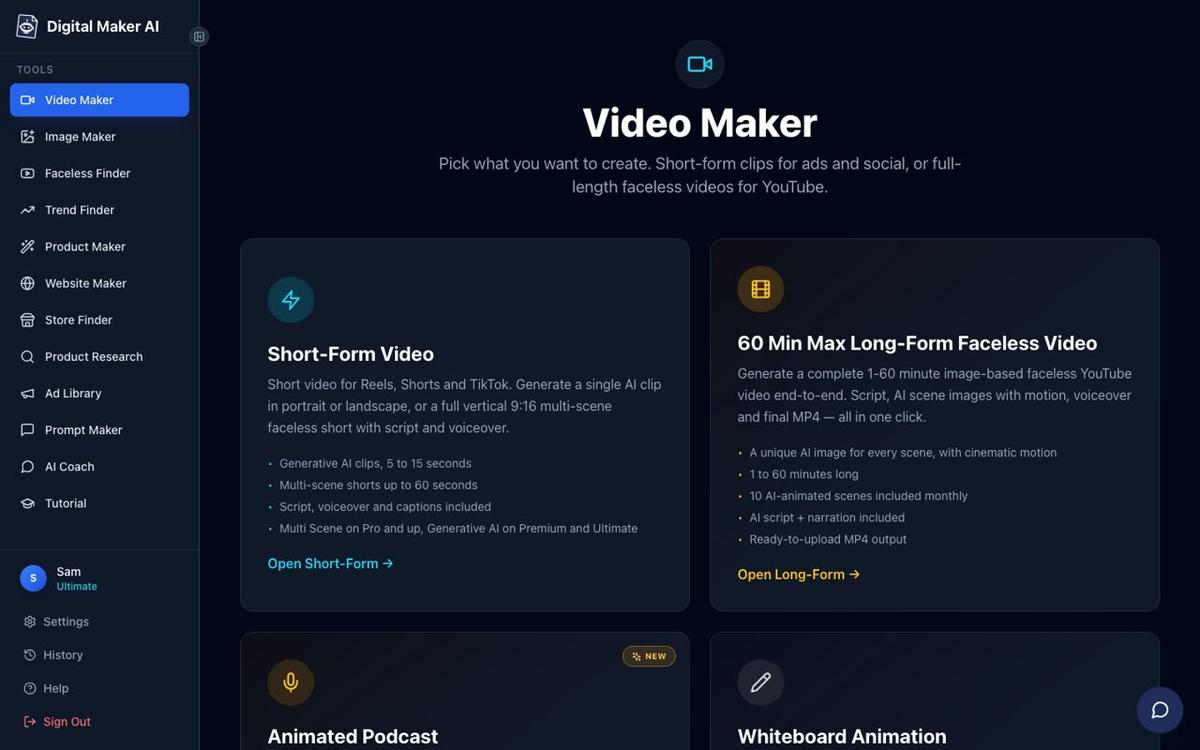
The long form faceless video is the core format for a product-selling channel. It produces a complete YouTube video end to end: the AI writes the script, generates a scene image for every scene, adds narration and captions, and returns a ready-to-upload MP4. Here is the flow.
- Create your account. Go to digitalmaker.ai/faceless and sign up. The Free plan gives you five videos to try the tool with no card needed. Commercial usage rights are included on every plan.
- Open the Video Maker. Click "Video Maker" in the left sidebar, then choose Long-Form Faceless Video.
- Choose your format. Select Multi Scene Video. This generates a fresh AI image for every scene and works on all paid plans. Free users get one long form video from a ready-made image library in set topic areas including money and personal finance and business and side hustles.
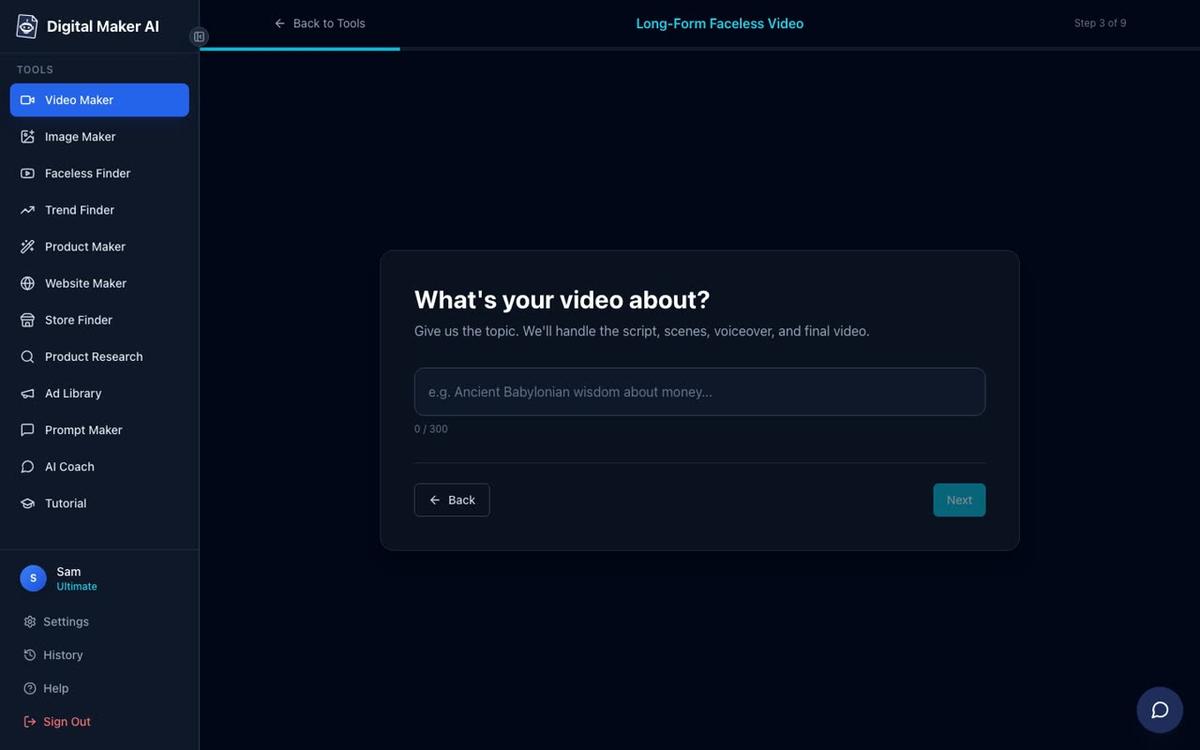
- Set the topic. Type the video title as your topic, for example "How to track freelance income and expenses". The AI writes the full script.
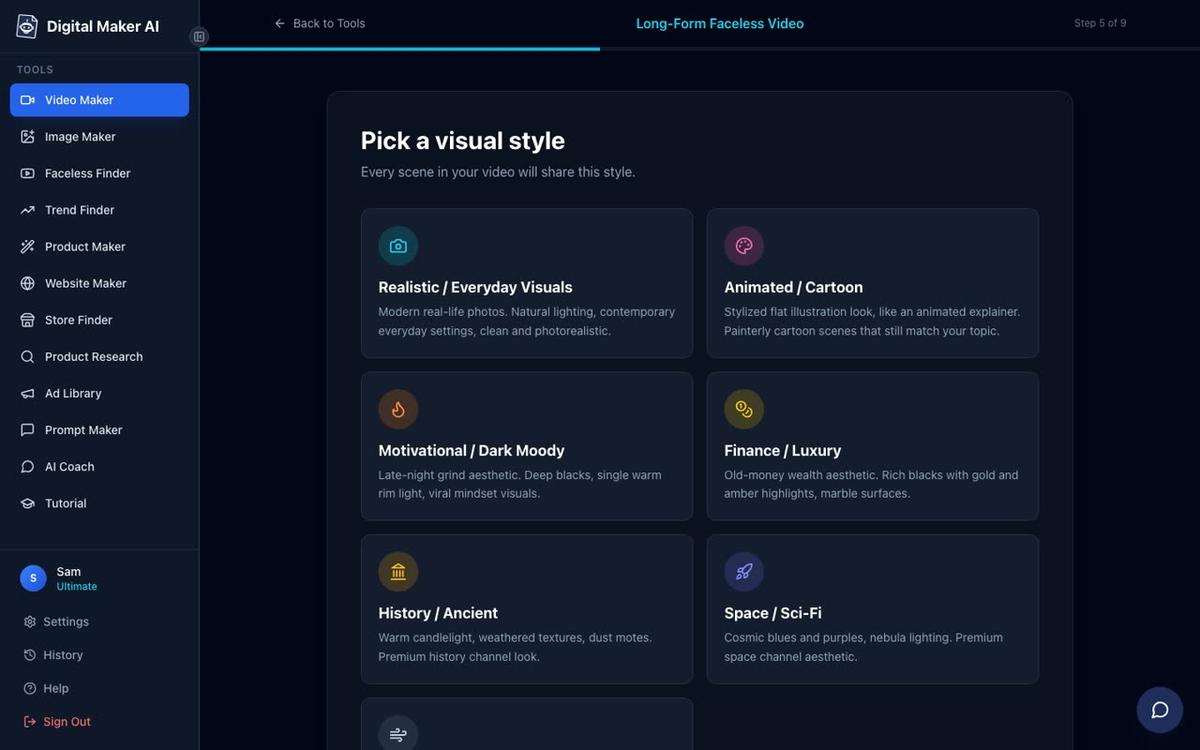
- Pick a visual style. For a finance channel, Finance or Luxury or Minimalist or Clean both work well. Seven styles are available in total.
- Choose the length. A five to eight minute video covers a topic in enough depth to be useful and to rank on YouTube search. Paid plan limits vary, so check digitalmaker.ai/pricing for the plan that fits your needs.
- Pick a voice. More than 100 built-in AI narration voices are available, with male and female options and US, UK and Australian accents.
- Generate. Press Generate Video. The script, scene images, voiceover and final MP4 are usually ready in three to six minutes.
Where to put the product link so it actually converts
Getting the placement right matters as much as making the video. Three locations drive the most clicks from a YouTube video to a product page.
- Video description, first two lines. YouTube shows only the first line or two before the "more" cut-off. Put the product link and a one-sentence description of what it does in the first 150 characters. Example: "Grab the free freelancer income tracker here: [link]".
- Pinned comment. After uploading, post a comment that expands on the product and pin it to the top. Viewers who scroll to comments see it immediately.
- End screen. YouTube's end screen tool lets you add a clickable card in the last 20 seconds of the video. Use it to link to your best-performing video, and mention the product link in the description in your narration just before the end screen appears.
Mention the product naturally inside the video too. A brief line like "I built a tracker that does all of this automatically. The link is in the description" takes five seconds and converts far better than leaving viewers to find the link themselves.
The 30-day plan: from zero to a live product channel
This plan is written for someone starting in late 2026 and launching in January 2027. Adjust the dates to fit when you start.
| Week | Task | Tool |
|---|---|---|
| Week 1 | Research the niche. List 10 video topics your buyer searches for. Build the digital product. | AI Coach (Product Research), AI Spreadsheet or Ebook Writer |
| Week 2 | List the product on Gumroad or Etsy. Create a product mockup. Set up the YouTube channel with a banner and description. | Image Maker (mockup and banner), Gumroad or Etsy |
| Week 3 | Make and upload videos 1 and 2. Add product links to description, pinned comment and end screen on both. | Long-Form Faceless Video maker |
| Week 4 | Make and upload videos 3 and 4. Review which video got the most views and make a fifth video on the same angle. | Long-Form Faceless Video maker, Faceless Finder (to check competitors) |
Four videos in 30 days is achievable with the AI doing the script and production work. Each video takes about 10 to 15 minutes of your time to set up and a few minutes to generate. Premium and Ultimate plan users can post finished videos straight to YouTube from the "Post to socials" button, which saves the upload step. See the publishing guide for how to connect your channel.
How to grow beyond the first month
Once the loop is running, growth comes from publishing consistently and expanding the product range. A few things that compound quickly:
- Use the Faceless Finder. Every signed-in account can search confirmed faceless channels by niche, see their upload frequency and estimated ad revenue, and spot what is working in a given topic area. Use it to find gaps your competitors are not covering.
- Add Shorts to the mix. A 30 to 60 second vertical Short made from the same topic as a long video drives new viewers to the long video and the product link. The Shorts maker in Digital Maker AI costs a flat one minute of your plan's pool per Short.
- Build a second product. Once one product is selling, the second is much faster to make. The Ebook Writer and AI Spreadsheet mean you can add a new product in an afternoon and immediately have a reason to make three more videos pointing to it.
- Consider an AI presenter. Premium and Ultimate users can add a photoreal AI presenter to their long form videos. The presenter can appear at the start, middle and end of each video, building a recognisable face for the channel without you ever being on camera.
For a deeper look at how a spreadsheet product channel works in practice, the post on how to sell a spreadsheet template with a faceless YouTube channel in 2027 walks through a complete example with video ideas and pricing strategy.

Common mistakes to avoid when selling digital products on YouTube
- Making the channel before the product. Without a product, early views earn nothing. Build the product first so every video from day one has a link to share.
- Hiding the product link. Burying the link in line five of the description costs sales. Put it in the first two lines, in a pinned comment and mention it in the video itself.
- Uploading one video and waiting. YouTube's algorithm rewards channels that publish regularly. Four videos in the first month gives the algorithm enough signal to start recommending your content.
- Picking too broad a niche. "Personal finance" is too broad. "Freelancer income tracking" is specific enough that every video you make is directly relevant to the buyer of your product.
- Ignoring the end screen. The end screen is the highest-converting placement on a YouTube video. Set it up on every upload, even if it just links to another video on the channel.
Frequently asked questions
Do you need a big YouTube channel to sell digital products?
No. A channel with a few hundred subscribers in a specific niche regularly outsells large general channels because the audience is already interested in exactly what the product solves. Relevance matters more than subscriber count when it comes to digital product sales.
What is the best type of digital product to sell on YouTube?
Products that solve a problem the viewer just watched a video about convert best. Spreadsheet trackers, printable planners, ebooks and templates all work well because they are low-priced, instant to deliver and directly related to the advice in the video that sent the buyer to the store.
Can I sell digital products on YouTube without showing my face?
Yes. A faceless YouTube channel uses AI visuals and a voiceover instead of a presenter on camera. Tools like Digital Maker AI generate the script, scene images, narration and captions automatically, so the channel runs entirely without you appearing on screen.
How many videos do I need before I start making sales?
There is no fixed number, but four to six focused videos that each answer a specific search query and link to the same product give the algorithm enough content to begin distributing your videos. Some channels make their first sale on the first video if the topic matches a high-intent search term.
Can I use Digital Maker AI for free to test this approach?
Yes. The Free plan includes five videos, one of each type, with no card needed. Free long form videos use a ready-made image library in topic areas including money and personal finance and business and side hustles, and carry a small watermark. Commercial usage rights are included on the Free plan. Visit digitalmaker.ai/pricing to compare plans.
What is the best way to sell digital products on YouTube if I already have a product?
Start with the videos. Pick the three most common questions your buyers ask, make a faceless video answering each one, and put the product link in the first line of every description. Pin a comment with a short pitch on each video. That setup alone will begin driving traffic to your store within the first few weeks.
The best way to sell digital products on YouTube in 2027 is to build the product, list it on a store, and let a library of faceless videos do the selling for you permanently. If you want to see how the video side works before you commit, the free course at digitalmaker.ai/free-course walks through the whole process step by step, from your first video to your first sale.
Alex Stevens: Alex Stevens writes for the Digital Maker AI team about faceless YouTube channels, AI presenters and AI video tools.