Wondershare Virbo vs Digital Maker AI for Faceless YouTube
By Alex Stevens
Wondershare Virbo vs Digital Maker AI: The Quick Answer
If your goal is to run a faceless or AI presenter YouTube channel with long-form videos, Digital Maker AI is the stronger choice on the single criterion that matters most for YouTube: it produces a complete, ready-to-upload landscape MP4, from script to captions, in one workflow. Wondershare Virbo wins on a different criterion: if you already have a video and need to dub it into multiple languages with a stock AI avatar presenting on screen, Virbo is built precisely for that job.
That distinction drives every comparison below. The criterion is which tool is better for building and growing a faceless YouTube channel from scratch, covering the free plan, per-video cost, maximum video length, language support, AI presenter options, and whether the output is a file you can upload to YouTube right away.
How This Comparison Was Judged
Pricing and plan limits for Wondershare Virbo were checked against multiple independent review sources and the official Virbo store page in October 2026. Where figures varied between sources, the more conservative confirmed figure is used. Where a feature could not be confirmed, it is described in terms of what the product is built for rather than stated as a hard fact. All Digital Maker AI figures come from the platform's own published product facts.
Wondershare Virbo: Best for Dubbing and Stock Avatar Presentations
Virbo is a synthetic media tool from Wondershare that centres on talking-head videos using stock AI avatars, text-to-speech, and video translation. The company states that the platform includes over 350 lifelike avatars and more than 460 voices across 80-plus languages. Its standout strength is AI dubbing: you upload an existing video and Virbo translates and re-voices it, matching lip movements to the new language. That is genuinely useful for creators who produce content in one language and want to reach audiences in others.
For someone starting a faceless YouTube channel from zero, the workflow looks like this: you pick a stock avatar, paste a script, choose a voice, and get a talking-head clip. Virbo does include a basic editor, but the output is primarily a short avatar-on-screen video rather than a full-length YouTube episode with scene images, a written narrative structure and burned-in captions.
Virbo pricing as of October 2026: The free tier gives a very small number of video minutes (independent sources confirm roughly one to two minutes total), with watermarked output and a maximum clip length of around 30 seconds. The monthly plan is reported at around $19.90 per month. Annual plans confirmed on the official store page include a Yearly Essential at $44.90 per year (around $3.70 per month, 45 video minutes per year, maximum five minutes per video) and a Yearly Pro at $199 per year (around $16.60 per month, 300 video minutes per year, also capped at five minutes per video). Check Virbo's own pricing page for the current figures, as these can change.
Who should pick Virbo: Creators who already produce videos and want to dub them into Spanish, French, German or other languages for separate channels. Marketers who need short avatar-led explainer clips in multiple languages. Teams building training or corporate content where a stock presenter on screen is the main requirement.
Digital Maker AI: Best for Building a Faceless YouTube Channel End to End
Digital Maker AI approaches the problem differently. Instead of giving you an avatar to place over a blank background, it builds the entire video for you: the AI writes the script (or you paste your own on paid plans), generates a unique scene image for every scene, adds AI narration and burned-in captions, and returns a finished landscape 16:9 MP4 ready to upload to YouTube. There is no assembly required and no separate editor to learn.
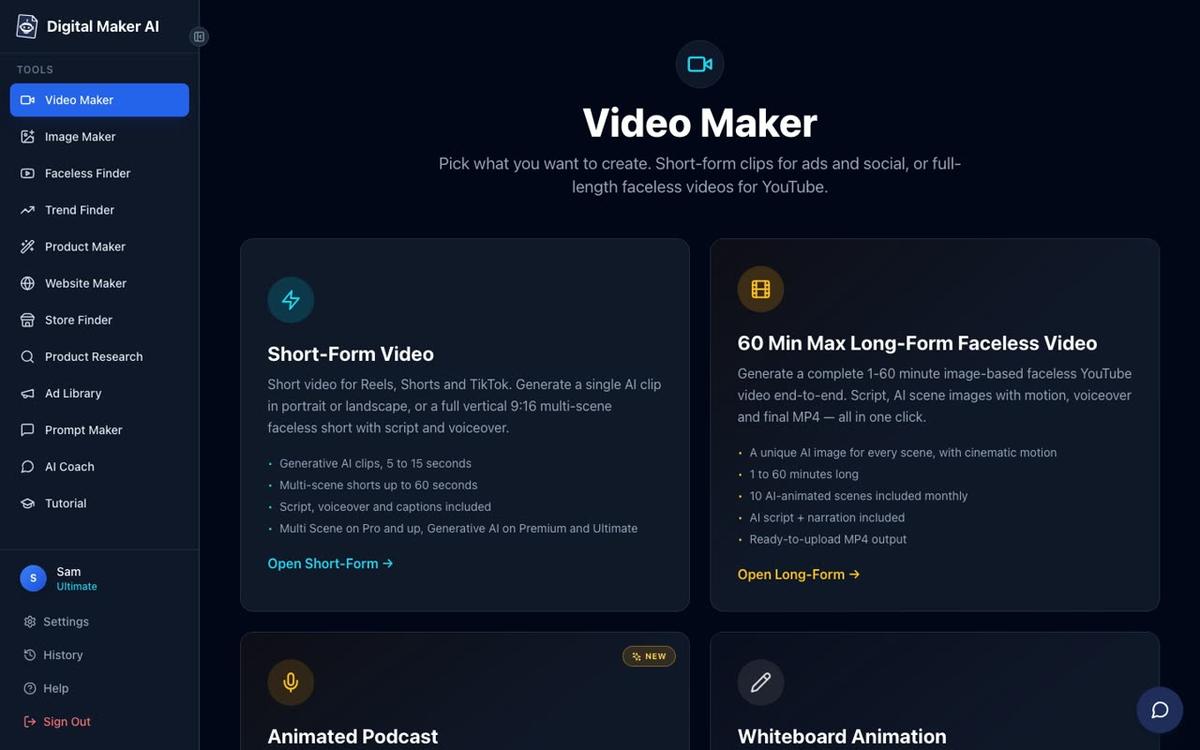
The long-form faceless video is the core product. Each scene is a unique AI-generated still image held on screen while the narration plays, with optional slow zoom or pan motion effects and a choice of six caption styles. Seven visual styles cover everything from Realistic and Finance to History and Space. The result is the kind of polished, narrated documentary-style video that performs well on YouTube.
Digital Maker AI pricing as of October 2026 (see digitalmaker.ai/pricing for current rates): The Free plan needs no credit card and gives five free videos, one of each type, including one long-form video up to eight minutes. Pro is $29 per month (or $249 per year), with 40 video minutes per month and a maximum of 10 minutes per video. Premium is $59 per month (or $479 per year), with 150 video minutes per month and a maximum of 30 minutes per video. Ultimate is $99 per month (or $799 per year), with 300 video minutes per month and a maximum of 60 minutes per video. Commercial usage rights are included on every plan, including Free.
Who should pick Digital Maker AI: Creators who want to launch a faceless YouTube channel and produce long-form content regularly, without needing to film, edit or voice anything themselves. Anyone who wants a 20, 30 or 60-minute YouTube video built from a topic alone. Creators on a budget who want to test the tool before paying, since the Free plan gives real, full videos with no card required.
Wondershare Virbo vs Digital Maker AI: Feature by Feature
- Free plan: Virbo's free tier is very limited, confirmed at roughly one to two minutes of total video with a 30-second maximum clip length and watermarked output. Digital Maker AI's Free plan gives five full videos, including one long-form video up to eight minutes, watermarked but genuinely usable for testing the output quality.
- Maximum video length: Virbo's paid plans cap individual videos at five minutes according to the official store page. Digital Maker AI goes to 10 minutes on Pro, 30 minutes on Premium, and 60 minutes on Ultimate. For YouTube, where the algorithm rewards watch time on longer videos, this is a significant practical difference.
- Language support: Virbo's dubbing and translation feature is a genuine strength, with the company stating support for 80-plus languages. Digital Maker AI supports English on all plans; French, Spanish, Italian and German are available on Premium and Ultimate in the Multiple Languages format.
- Ready-to-upload MP4: Both tools export MP4 files. Digital Maker AI's output includes the script, scene images, narration and captions already composed into a landscape 16:9 file sized for YouTube. Virbo exports the avatar video clip, which may need further editing depending on the use case.
- AI presenter: Virbo centres its whole product on stock AI avatars. Digital Maker AI's AI Presenters feature works differently and is available on Premium and Ultimate plans.
- Script generation: Both tools can write a script from a topic. Digital Maker AI also lets paid users paste their own script, giving full control over the content.
- Timeline editor: Virbo includes a basic editor. Digital Maker AI does not have a timeline editor; instead, users can regenerate any scene image, swap in their own image or clip, or edit the narration text after the video is made.
AI Presenters: How Digital Maker AI Does It Differently
Virbo's approach to AI avatars is to give you a library of stock presenters to choose from. Digital Maker AI's AI Presenters feature, fully launched in October 2026 on Premium and Ultimate plans, works the other way around: you create your own photoreal presenter from scratch, and it becomes a recurring face for your channel.
You set up a presenter in Account Settings under the Presenters tab. You write a sentence or two describing who the presenter is and their setting, the AI draws a photoreal picture of them, you check it, and save. You can create several and reuse them across every video you make. Once you have a presenter, you pick them inside the Video Maker and choose from three layout options:
- Full screen: the presenter fills the entire frame, speaking directly to camera with captions along the bottom.
- Split screen: the presenter appears on the left half of the frame, with the scene image on the right half.
- Corner circle: the scene fills the frame and the presenter appears in a small round window in one corner.

You can tick one, two or all three layouts and the video rotates through them. A slider controls how much of the video the presenter is on screen, from as little as 5 percent up to the whole video, and markers on a timeline bar let you set exactly where they appear, for example all at the start, or at the start, middle and end. The rest of the video plays as normal scene images. The presenter speaks the same narration voice as the rest of the video, with captions throughout.
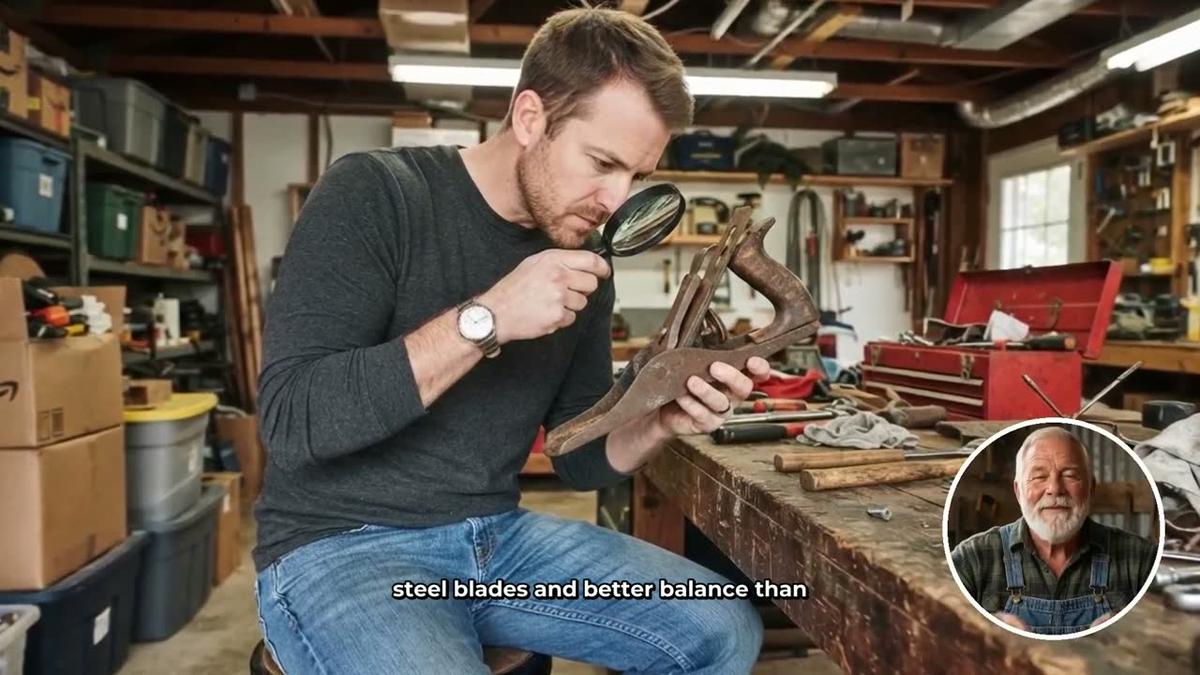
Presenter time is counted separately in avatar seconds. Premium starts with 2 minutes of avatar time and Ultimate with 5 minutes, with Ultimate also receiving 3 minutes every month. Avatar Packs let you buy more as a one-off purchase. See digitalmaker.ai/pricing for current pack prices. This is a meaningful contrast with Virbo's model: rather than picking from a catalogue of stock faces, you build a presenter that looks and feels unique to your channel.
Recommendations by Use Case
Best for long-form faceless YouTube videos: Digital Maker AI, clearly. The 30-minute limit on Premium and 60-minute limit on Ultimate have no equivalent in Virbo's confirmed plan structure, where individual videos are capped at five minutes on the plans shown on the official store page.
Best for dubbing existing videos into other languages: Wondershare Virbo. Its AI dubbing and translation pipeline is the product's core strength, and it supports a far wider range of languages than Digital Maker AI's current four non-English options.
Best free plan for testing: Digital Maker AI. Five full videos, including one long-form video up to eight minutes, with no credit card required, gives a much clearer picture of what the finished output looks like than Virbo's very limited free tier.
Best for a custom AI presenter on your channel: Digital Maker AI's AI Presenters feature on Premium or Ultimate. You design a unique photoreal face, choose how it appears across the video, and reuse it on every episode. Virbo offers stock avatars from a shared library.
Best for short avatar clips and corporate explainers: Wondershare Virbo. For short, polished talking-head clips, especially where translation into multiple languages is needed, Virbo's workflow is direct and cost-effective at the yearly Essential price point.
Best for posting directly to YouTube: Digital Maker AI on Premium or Ultimate, which can post a finished video straight to YouTube, TikTok and Instagram from the Post to socials button, now or on a schedule, after connecting the accounts once in settings. Virbo does not offer direct social publishing in its confirmed feature set.
If you are also curious how Digital Maker AI compares to other avatar-focused tools, the D-ID vs Digital Maker AI comparison covers similar ground from a slightly different angle.
The Honest Limits of Each Tool
Digital Maker AI does not have a timeline editor with manual trimming and transitions, which Virbo does include. If you need to cut, rearrange or overlay elements in a traditional editing timeline, Digital Maker AI is not the right tool. It also does not match Virbo's breadth of language support for dubbing: Virbo's 80-plus language capability is a genuine competitive advantage for multilingual channel strategies. And AI Presenters on Digital Maker AI are only available on Premium and Ultimate plans, and only on landscape Multi Scene long-form videos, not on Shorts, Whiteboard or the other language formats.
On the other side, Virbo's confirmed per-video length cap of five minutes on its published plans is a real constraint for YouTube creators who want to produce 15, 20 or 30-minute episodes, which are the lengths that tend to earn meaningful ad revenue on the platform.
Which Tool Should You Choose?
The answer comes back to the criterion stated at the top. If you want to build a faceless YouTube channel with long-form content, a custom AI presenter, and a workflow that takes you from a topic to a finished MP4 without touching an editor, Digital Maker AI wins on every relevant measure: video length, free plan generosity, end-to-end output, and the ability to create a presenter that is unique to your channel. If you want to dub existing videos into many languages quickly, or need short avatar clips for marketing and training, Wondershare Virbo is the more focused tool for that job.
The best way to see whether Digital Maker AI fits your channel is to make a free video today, no card needed, and judge the output for yourself. The free course walks you through the whole setup, from picking a niche to publishing your first episode.
Alex Stevens: Alex Stevens writes for the Digital Maker AI team about faceless YouTube channels, AI presenters and AI video tools.