How to Make AI Movies in 2027
By Alex Stevens
You can learn how to make AI movies in 2027 without a camera, a crew or any video editing experience. Tools like Digital Maker AI (digitalmaker.ai) let you go from a one-line idea to a finished film complete with narration, captions and moving scenes in a single session. This guide walks you through two routes: the built-in AI Movie path inside Digital Maker AI, and the Google Flow route using ready-made agent instructions.
Key takeaways
- Digital Maker AI's AI Movie path takes you from a one-line idea through an AI-written outline, a scene-by-scene review, and a finished 16:9 or 9:16 film with narration and captions.
- You can make Episode 1 of a series and return to make the next episodes, with the same settings saved each time.
- The Google Flow route uses ready-made agent instructions, a master prompt and a finished script from Digital Maker AI, then lets you drag and drop your own clips into a complete movie with voice and captions.
- 3D animated films on Digital Maker AI use 3D minutes (separate from video minutes) and are available on paid plans; see digitalmaker.ai/pricing for plan details.
- Every plan, including Free, includes commercial usage rights on finished videos.
What does "making an AI movie" actually mean in 2027?
An AI movie is a short film where artificial intelligence writes the script, generates every scene, adds a narration voice and burns in captions, all without you touching a camera or editing timeline. The result is a proper MP4 you can upload to YouTube, post as a Reel or share on TikTok. In 2027 the technology has moved far enough that you can choose between a landscape 16:9 cinematic film and a vertical 9:16 mini film built for Reels and TikTok, and the AI handles both formats from the same starting point: your idea.
Digital Maker AI (digitalmaker.ai) is an AI video platform for faceless YouTube videos, AI presenter videos, animated podcasts, 3D animated films and digital products. Its AI Movie feature sits inside the Video Maker and covers both the built-in path and the Google Flow route described below.
How to make AI movies with Digital Maker AI: the built-in path
This route handles everything inside your Digital Maker AI account. You bring the idea; the platform brings the outline, the scenes, the voice and the finished file.
- Create your account. Go to digitalmaker.ai/faceless and sign up. No payment card is needed for a free account. Free accounts get five free videos, one of each type, including one drag-and-drop movie from your own clips up to 8 minutes long. Paid plans unlock longer films and fresh AI-generated scenes on any topic.
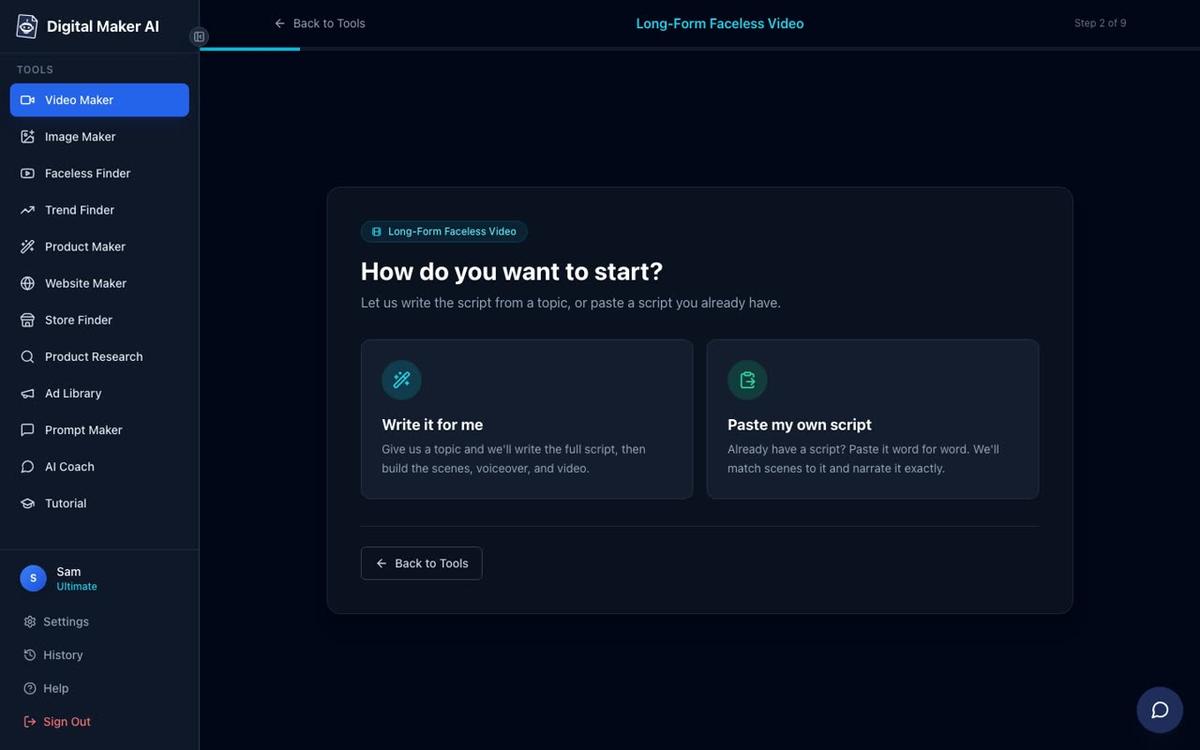
- Open the Video Maker. After signing in, press the Video Maker button in the left sidebar. This opens the free video screen where you pick your video type and press Next at the bottom.
- Pick your format. For an AI movie, choose the AI Movie or Long-Form path. You will see format cards including Multi Scene (a new AI-generated image for every scene), which is the foundation of every AI film on the platform. Pick 16:9 for a landscape cinematic look, or 9:16 for a vertical mini film suited to Reels and TikTok.
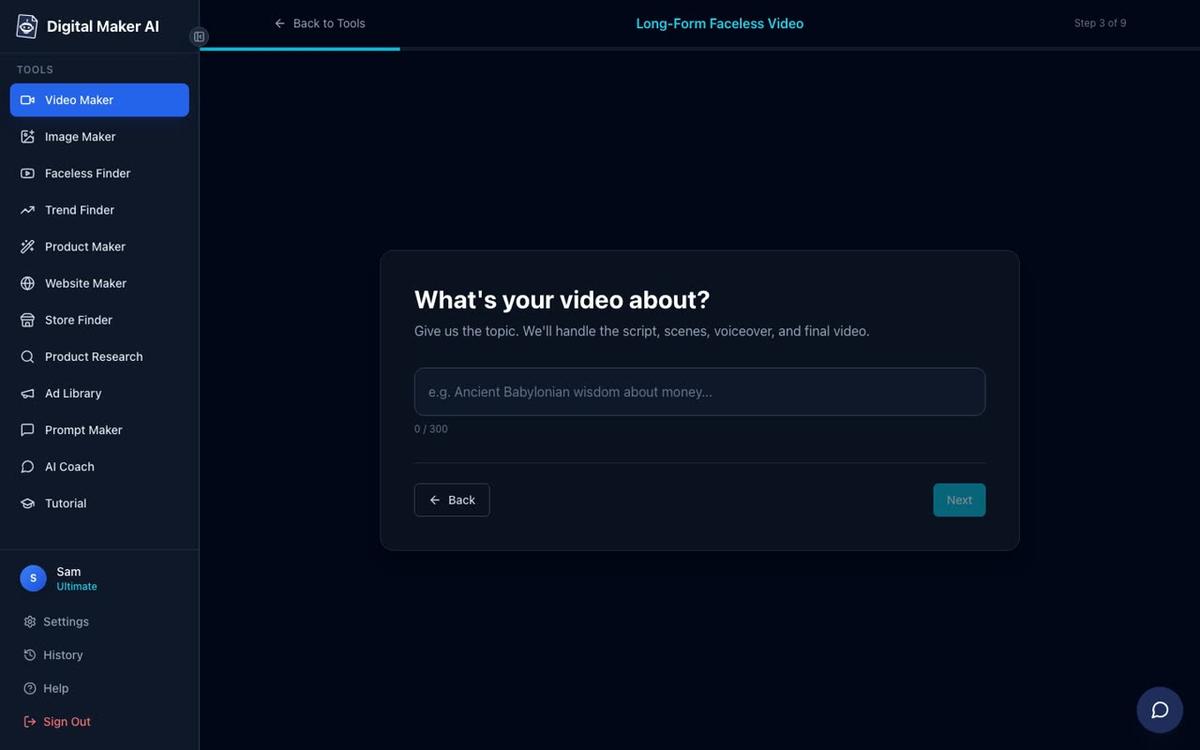
- Enter your one-line idea. Type your film concept in a single line, for example "A lone astronaut discovers a living ocean beneath Europa's ice." The AI writes the full outline and script for you. On paid plans you can also paste your own finished script if you prefer to write it by hand.
- Review the outline. Before any scenes are generated, the platform shows you the outline so you can check the story beats. This is your chance to adjust the direction before the AI commits to every scene image and line of narration.
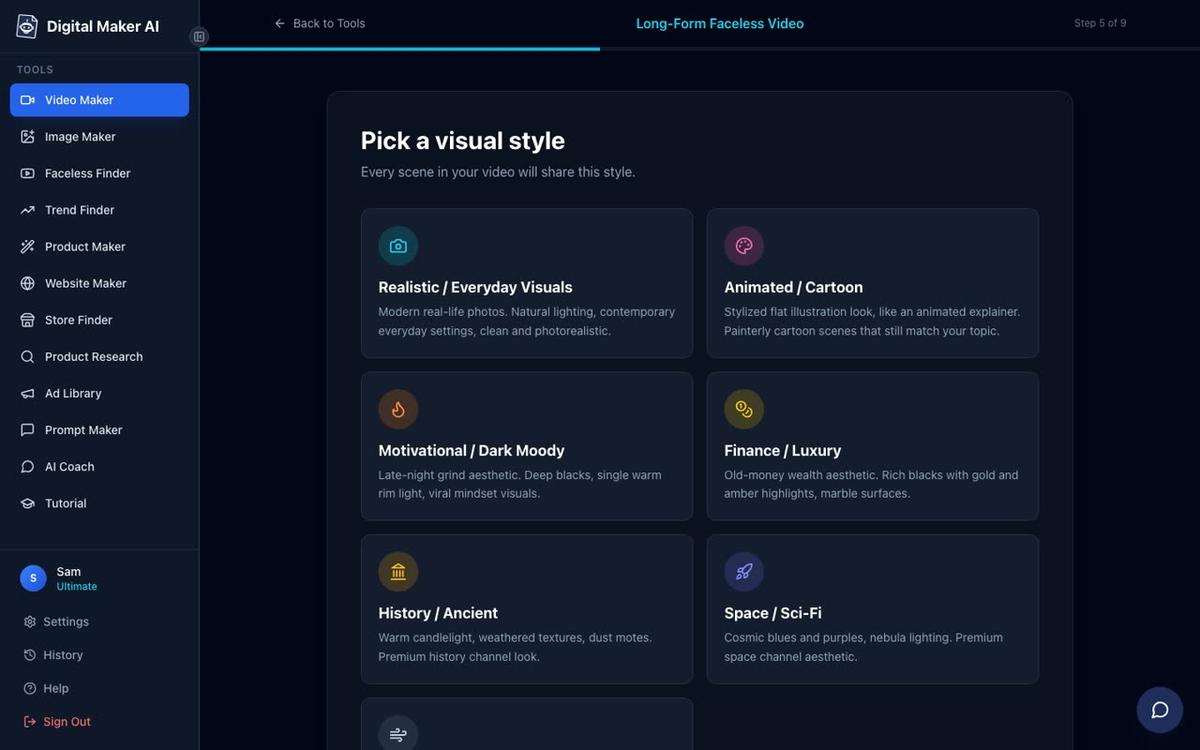
- Choose your visual style. Pick from seven styles: Realistic or Everyday Visuals, Animated or Cartoon, Motivational or Dark Moody, Finance or Luxury, History or Ancient, Space or Sci-Fi, and Minimalist or Clean. Every scene in the film shares the same style, giving it a consistent look.
- Pick a voice and set the length. Choose from more than 100 built-in narration voices (male and female, US, UK and Australian accents) and set how long the film should run. Premium and Ultimate plan holders can also design their own narrator voice from a written description.
- Generate and review. Press Generate. The AI writes the script (if you did not paste one), creates a unique scene image for every scene, records the narration and burns in captions. When it is ready you can regenerate any scene image (10 free regenerations per video), swap in your own image or a short clip, or edit the narration text.
- Decide: one-off film or Episode 1. You can download the finished film as an MP4 straight away, or save it as Episode 1 of a series. When you come back to make the next episode, the same settings (style, voice, captions, music) are waiting for you.
Tip: if you want real moving footage inside your film, use the Animate scenes option under your finished video. This turns chosen scenes into real moving AI clips. Premium plans include 5 animated scenes a month and Ultimate includes 10, with extra packs available. You can read more about this on the animated scenes page.
How to make AI movies with a 3D animated film
If you want a fully animated Pixar-style story film where every shot is a moving 3D clip, Digital Maker AI's 3D Animated Movie option is the route to take. This is a separate product from the long-form video maker and it is available on all paid plans.
You pick one of 233 public-domain library stories (fairy tales, fables, classic adventures, Bible stories, myths and legends, classic drama, nursery rhymes and bedtime tales) or write your own plot. You then see the cast, create each character as a 3D reference sheet (or turn your own photo into a 3D character), pick a look (Nursery, Kids adventure, Epic and faith, or Cinematic drama), choose a narrator from 30 Storyteller voices made for 3D films, and set captions and music. Nursery rhymes are made as sung films with a music style and a singer.
3D films are paid with 3D minutes, which are separate from your regular video minutes. Pro plans can make films up to 10 minutes long, and Premium and Ultimate plans can go up to 30 minutes. Ultimate also includes 2 free 3D minutes every month. Free accounts cannot make 3D films. After the film is ready you can fix any shot, redo the movement, change captions or update the music. For full details and 3D Pack pricing, see the 3D animated film page.
How to make AI movies using the Google Flow route
Google Flow is Google's AI video generation tool, designed for creating cinematic clips from text prompts and images. Digital Maker AI supports a dedicated Google Flow route for people who want to combine the two platforms: you get the master prompt, the agent instructions and the finished script from Digital Maker AI, then drag and drop clips into a finished movie with voice and captions inside Flow.
Here is how the two-platform route works:
- Get your agent instructions and master prompt. Inside Digital Maker AI, open the AI Movie path and choose the Google Flow route. The platform generates ready-made agent instructions and a master prompt tailored to your film idea. Copy these.
- Paste into Google Flow. Open Google Flow (flow.google.com) and paste the agent instructions as your starting prompt. Flow uses these to generate the individual video clips that will become your scenes.
- Get your finished script from Digital Maker AI. The platform also produces a complete scene-by-scene script with narration text for each clip. This is what you will use as the voiceover when you assemble the film.
- Drag and drop clips into a finished movie. Once Google Flow has generated your clips, bring them into Digital Maker AI's Drag and Drop Studio using the Clips to Movie option. Upload your clips, add the narration voice from the script, and the platform adds captions and cuts everything into one finished film.
- Download or post. Download the finished MP4, or if you are on Premium or Ultimate, post it straight to YouTube, TikTok or Instagram from the Post to socials button without leaving the platform.
The Google Flow route gives you real generated motion footage in every shot, which makes it a strong choice for cinematic AI movies where moving clips matter. The built-in Digital Maker AI path is faster and requires no second platform, so the right choice depends on how much time you want to spend and how important motion footage is to your film.
For a deeper look at how Google Flow fits into a faceless video workflow, see our guide on how to use Google Flow to make faceless videos in 2027.
What format should your AI movie be in 2027?
The format you pick affects where your film will perform best. Here is a quick comparison to help you decide:
| Format | Aspect ratio | Best for | Plan needed |
|---|---|---|---|
| Long-form AI movie | 16:9 landscape | YouTube, full story films | Free (up to 8 min, watermarked), paid for longer |
| Vertical mini film | 9:16 portrait | Reels, TikTok, YouTube Shorts | Pro, Premium, Ultimate |
| 3D animated film | 16:9 landscape | Story films, fairy tales, cinematic drama | Pro, Premium, Ultimate (3D minutes) |
| Google Flow clips to movie | 16:9 or 9:16 | Cinematic motion footage films | Any paid plan (Drag and Drop Studio) |
How to add an AI presenter to your movie
An AI presenter is a talking AI avatar who speaks your script on screen, inside your landscape Multi Scene film. This feature is available on Premium and Ultimate plans and has been fully live since October 2026.
You create a presenter in Account Settings under the Presenters tab. Describe who the presenter is and their setting in a sentence or two, and the AI creates a photoreal picture of them. Save the presenter and they are ready to use across all your videos. In the Video Maker you pick the presenter and choose one or more of three layouts: Full screen (the presenter fills the frame), Split screen (presenter on the left, the scene on the right), or Corner circle (the scene with the presenter in a small round window in the corner). A slider sets how much of the film the presenter appears on screen, and markers on a timeline bar let you place them at the start, middle, end or throughout.
Presenter time is counted in avatar seconds, separate from your video minutes. Premium starts with 2 minutes of avatar time and Ultimate with 5 minutes, plus 3 more every month. Avatar Packs add more as one-off purchases. For current pack pricing, see digitalmaker.ai/pricing. You can also browse real AI avatar channels in the Faceless Finder to see how other creators are using AI presenters in their films. Learn more on the AI presenter video page.
Common mistakes when making AI movies in 2027
- Skipping the outline review. The AI writes a full outline before generating any scenes. Read it. Adjusting the story at the outline stage costs nothing; changing scenes after generation uses regeneration credits.
- Mixing visual styles mentally. Every scene in a Digital Maker AI film shares the same visual style. Pick the style that fits your whole story, not just one scene you have in mind.
- Forgetting the format choice. A 16:9 film built for YouTube will look wrong posted as a Reel. Decide where the film will live before you start, and pick the matching aspect ratio.
- Expecting moving footage by default. The standard Multi Scene path uses a unique AI-generated still image for each scene, held on screen while the narration plays, with optional slow zoom or pan motion effects. Real moving footage comes from the Animate scenes add-on or the Google Flow route.
- Ignoring the episode system. If your film idea has a sequel, save it as Episode 1 rather than a one-off. The platform remembers your settings and makes the next episode much faster.
Frequently asked questions
Can I make an AI movie for free in 2027?
Yes. Free accounts on Digital Maker AI get one drag-and-drop movie from their own clips up to 8 minutes long, with no payment card needed. The free movie carries a small watermark, which is removed if you upgrade. Paid plans unlock AI-generated scenes on any topic and longer films.
How long does it take to make an AI movie?
A 5-minute AI movie on Digital Maker AI typically takes 3 to 6 minutes to generate once you have filled in the steps. Longer films take proportionally more time. A 3D animated film of 10 minutes can take longer as every shot is a moving 3D clip rather than a still image.
Do I need to write a script to make an AI movie?
No. Digital Maker AI writes the full script from your one-line idea. On paid plans you can also paste your own finished script if you prefer to write it yourself. Either way, the AI generates every scene image and narration from the script automatically.
Can I make a movie series with AI in 2027?
Yes. After finishing your first film you can save it as Episode 1 of a series. When you return to make the next episode, your style, voice, captions and music settings are already saved, so each new episode starts from where the last one left off rather than from scratch.
What is the difference between an AI movie and a 3D animated film on Digital Maker AI?
An AI movie (Multi Scene path) uses a unique AI-generated still image for each scene with optional zoom or pan motion and narration. A 3D animated film uses real moving 3D clips for every shot, in a Pixar-style look. The 3D film is paid with separate 3D minutes and is available on paid plans only.
Can I post my AI movie straight to YouTube or TikTok?
Premium and Ultimate plan holders can post a finished video directly to YouTube, TikTok and Instagram from the Post to socials button inside Digital Maker AI, either immediately or on a schedule. Free and Pro plan holders download the MP4 and upload it themselves. Nothing posts automatically; you always press Post first.
Ready to make your first AI movie? Start with the free course at digitalmaker.ai/free-course, which walks you through your first video step by step and shows you how to build a channel around your films from day one.
Alex Stevens: Alex Stevens writes for the Digital Maker AI team about faceless YouTube channels, AI presenters and AI video tools.