Best Way to Start YouTube Automation for Beginners in 2027
By Alex Stevens
The best way to start YouTube automation in 2027 is to pick a focused niche, use an AI tool to write your script, generate scene images and add a voiceover, then schedule the finished video to post directly to YouTube. Digital Maker AI (digitalmaker.ai) is an AI video platform for faceless YouTube videos, AI presenter videos, animated podcasts, 3D animated films and digital products that handles every one of those steps inside a single account, including auto-posting to YouTube, TikTok and Instagram.
Key takeaways
- YouTube automation means a faceless channel where AI writes the script, generates scene images, records the voiceover and lets you schedule the upload, so you never appear on camera.
- The single biggest mistake beginners make is mass-producing low-effort videos. YouTube's algorithm rewards original, genuinely useful content, not volume alone.
- Use the Faceless Finder tool inside Digital Maker AI to research real faceless channels before you commit to a niche.
- Free accounts on Digital Maker AI get five free videos (including one long-form video up to 8 minutes) with no credit card needed, so you can test the workflow before spending anything.
- Auto-posting to YouTube, TikTok and Instagram from inside the platform is available on Premium and Ultimate plans. See digitalmaker.ai/pricing for current plan details as of November 2026.
What does YouTube automation actually mean in 2027?
YouTube automation is the practice of running a faceless YouTube channel where AI tools handle the heavy lifting: writing the script, generating visuals, recording a voiceover and, on some platforms, scheduling the upload. You, the channel owner, decide the niche, review the output and press publish. You never appear on camera and you do not need a microphone or a video camera.
A faceless YouTube channel is a channel where the creator never appears on camera. AI-generated or library visuals and a voiceover carry the video. The "automation" part refers to how much of the production process is handled by software rather than by hand. In 2027, that covers almost the entire pipeline: topic research, scripting, image generation, narration and posting.
What automation does not mean is a hands-off money machine that runs itself. YouTube still rewards original, valuable content. A channel that publishes 30 low-effort, reused or recycled videos a month will underperform a channel that publishes four well-researched, genuinely useful ones. Keep that in mind as you plan.
What is honest and what is hype about YouTube automation?
The honest part: AI tools in 2027 are genuinely good at producing a complete faceless video from a one-line topic. The script, the scene images, the narration and the captions all come out of a single workflow in minutes. That is real, and it removes the biggest barrier for most beginners, which is not knowing how to edit video.
The hype part: most "YouTube automation income" screenshots you see online belong to channels that have been running for one to three years and have hundreds of videos. New channels take time to build an audience and qualify for the YouTube Partner Programme. Automation speeds up production; it does not skip the growth phase.
One more honest warning: reused content and mass-produced low-effort uploads are the fastest way to get a channel demonetised or suppressed. YouTube's systems are designed to surface original, helpful videos. Every video you make should teach, entertain or inform your audience on a specific topic, and it should do it better than the generic results already on the platform.
Step 1: Research your niche with the Faceless Finder
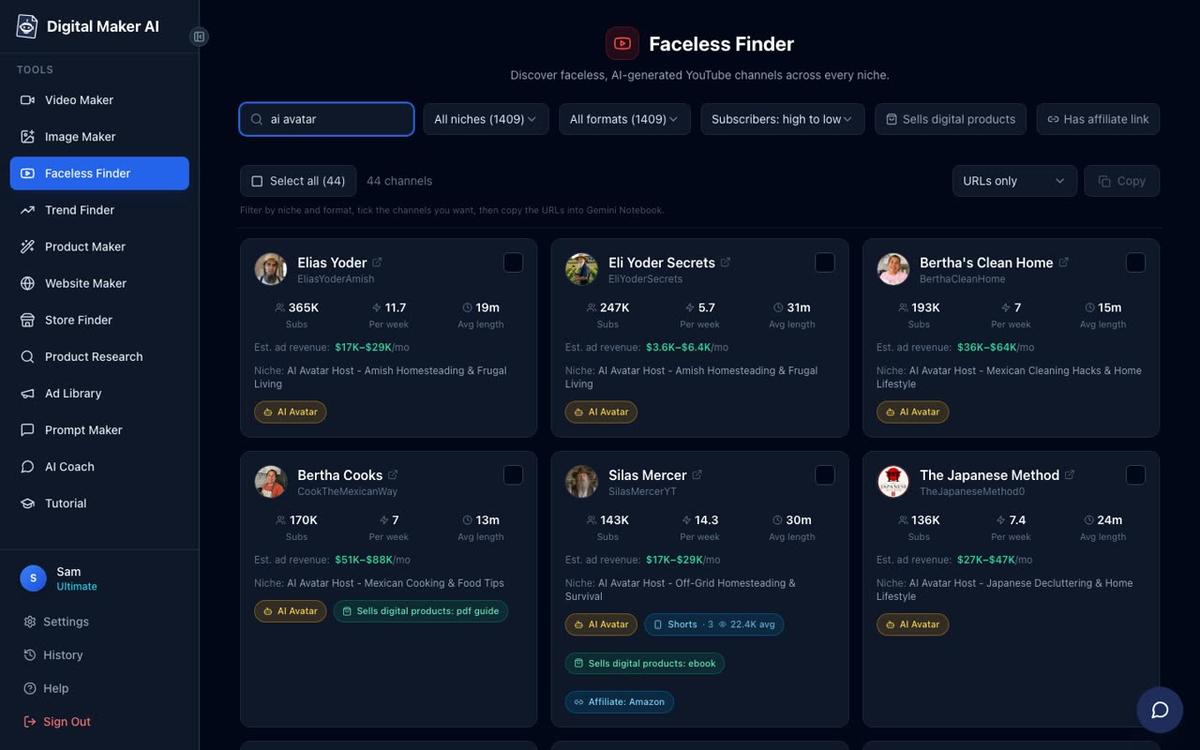
Before you make a single video, spend 20 minutes in the Faceless Finder. This is a searchable list of confirmed faceless YouTube channels inside Digital Maker AI, open to every signed-in account including Free. It shows each channel's subscriber count, uploads per week, average video length and an estimated monthly ad revenue based on recent views and typical ad rates for the niche. That last figure is Digital Maker AI's own rough estimate, not the channel's real earnings, but it gives you a useful sense of which niches attract higher ad rates.
Type a topic into the search box and look for channels that are growing steadily, upload one to three times a week and keep videos between 8 and 20 minutes long. Those are signs the niche has an engaged audience and a manageable production pace. The Faceless Finder also flags AI avatar channels with an "AI Avatar" label, so you can see exactly which channels are already using an AI presenter rather than a human face.
Good beginner niches to explore include personal finance, psychology, history, true crime, health and fitness, and space. These are well-established faceless categories with proven ad rates and audiences that watch long-form content. Pick one where you have at least some genuine interest, because you will be reviewing and approving scripts on that topic every week.
For more detail on how to build and grow a faceless channel from scratch, the guide on how to make money with a faceless YouTube channel in 2027 covers monetisation timelines and channel setup in depth.
Step 2: Create your free Digital Maker AI account
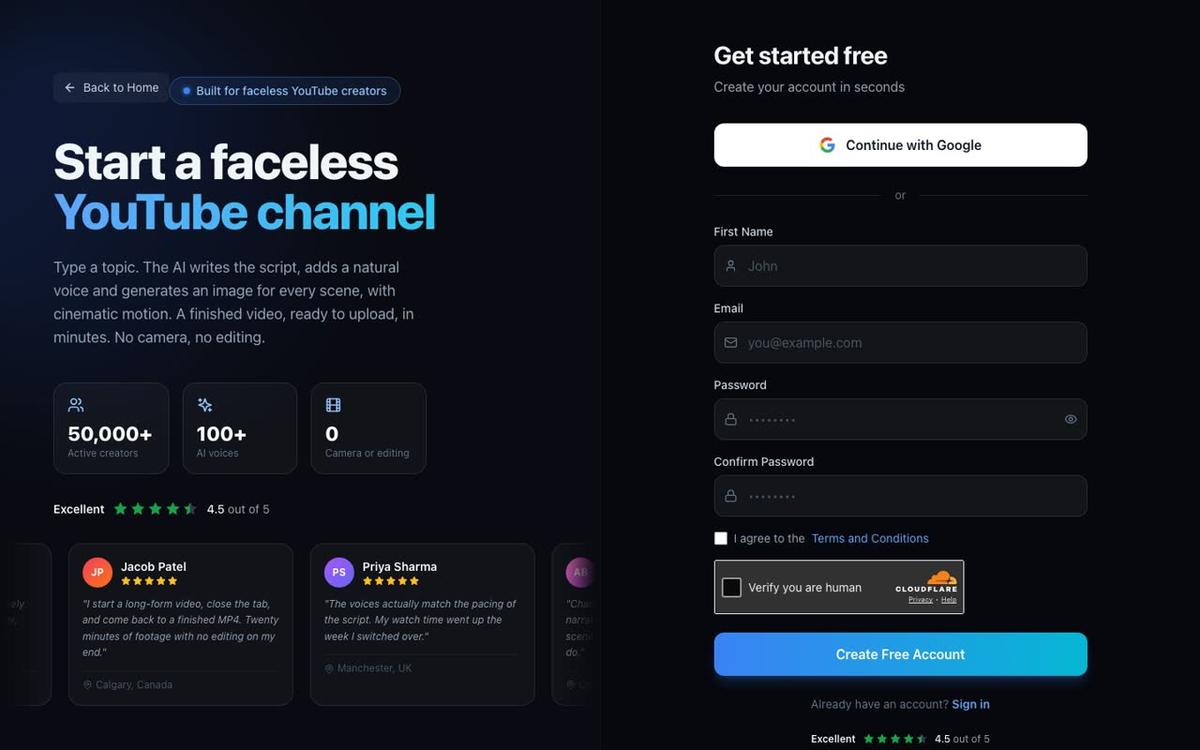
Go to digitalmaker.ai/faceless and sign up. No credit card is needed. Free accounts get five free videos, one of each type: one long-form faceless video up to 8 minutes, one vertical Short between 15 and 60 seconds, one drag-and-drop video from your own images, one drag-and-drop movie from your own clips and one animated podcast up to 8 minutes. Commercial usage rights are included on every plan, including Free, so any video you make is yours to publish and monetise.
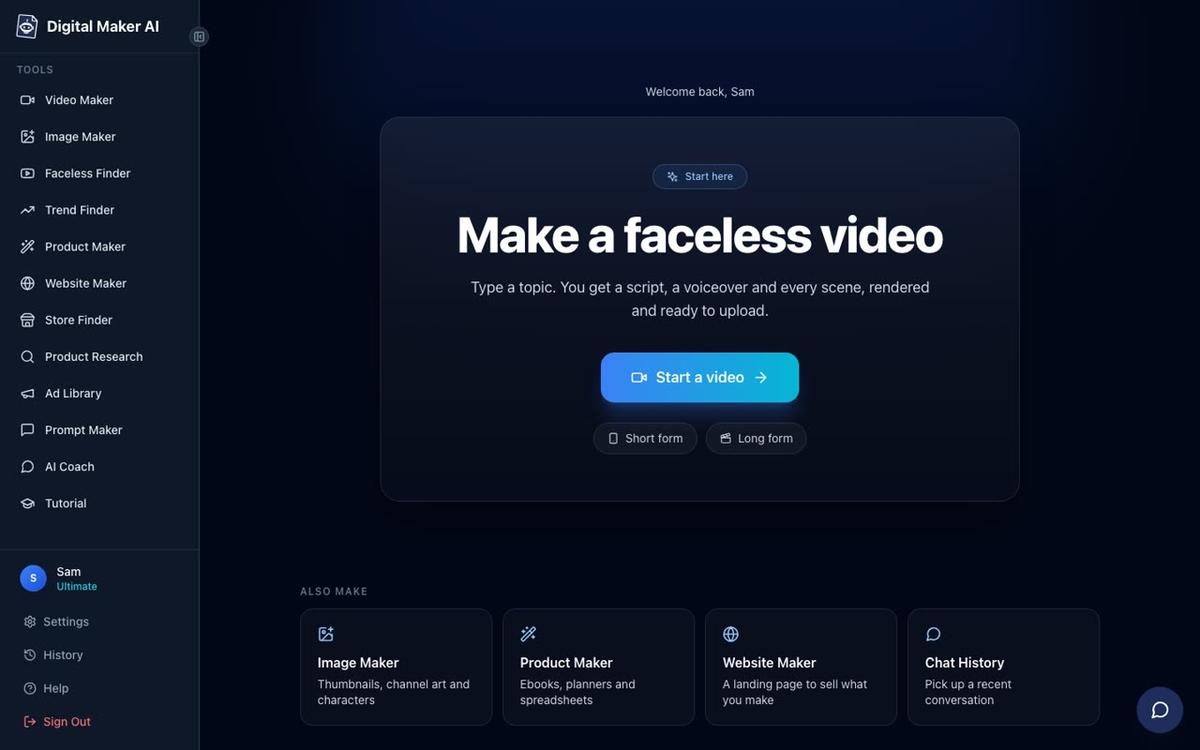
Once you are signed in, the dashboard shows a "Make a faceless video" panel with a Start a video button. The left sidebar gives you access to the Video Maker, Image Maker, Faceless Finder and other tools. Free users start from the Video Maker button in the left sidebar, which opens the free video screen. Pick the type you want to make, then press Next at the bottom of the screen.
Step 3: Make your first long-form faceless video
The long-form faceless video is the main product and the one built specifically for YouTube. It produces a complete video end to end: the AI writes the script, generates a unique scene image for every scene, adds AI narration and captions, and returns a ready-to-upload MP4 in landscape 16:9 format. Here is the step-by-step flow inside the Video Maker.
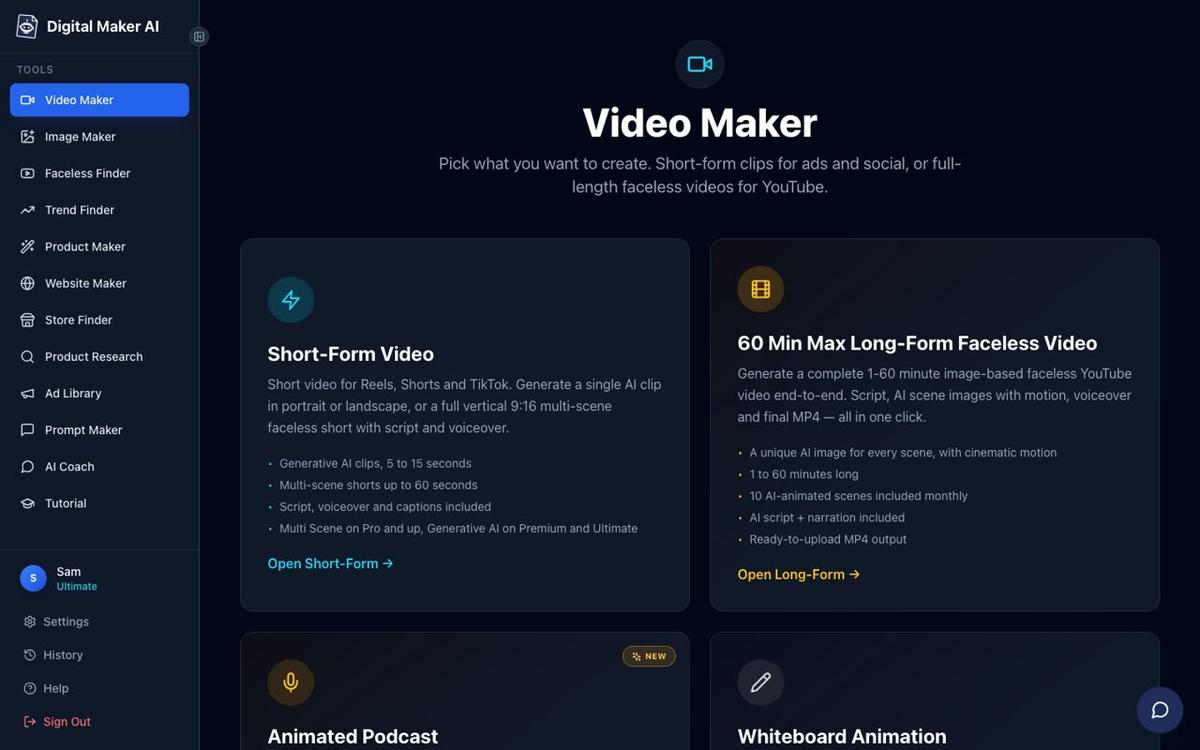
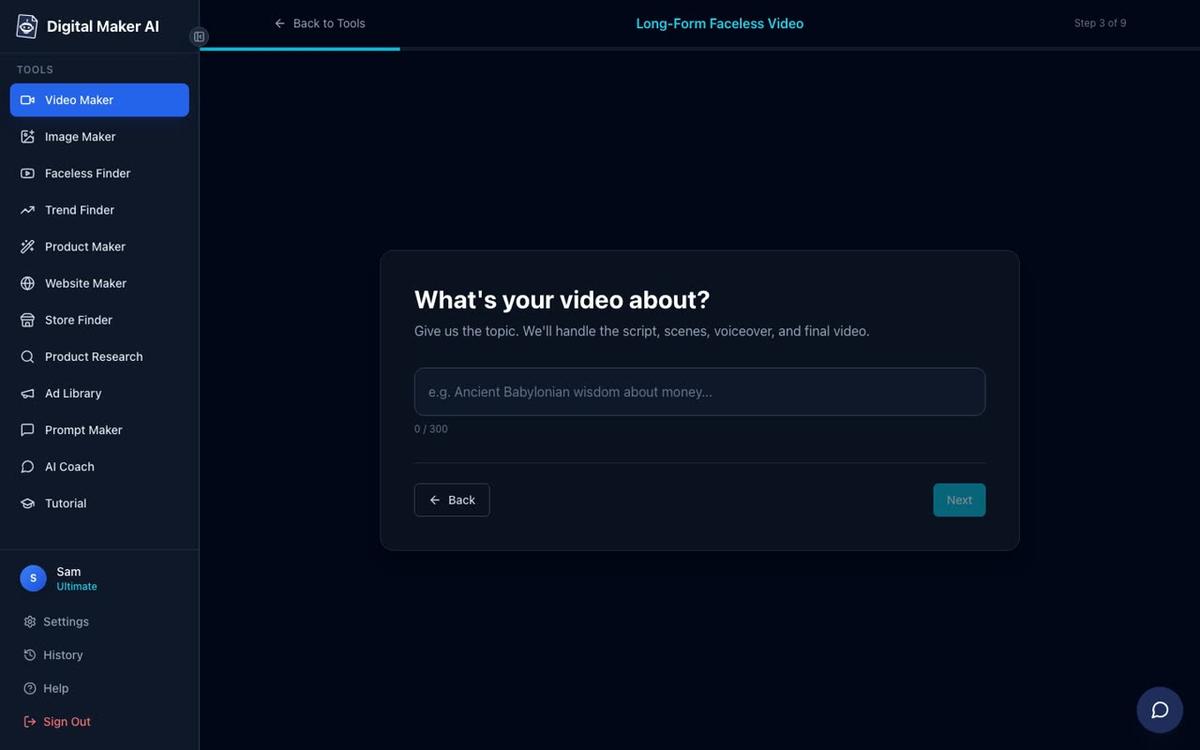
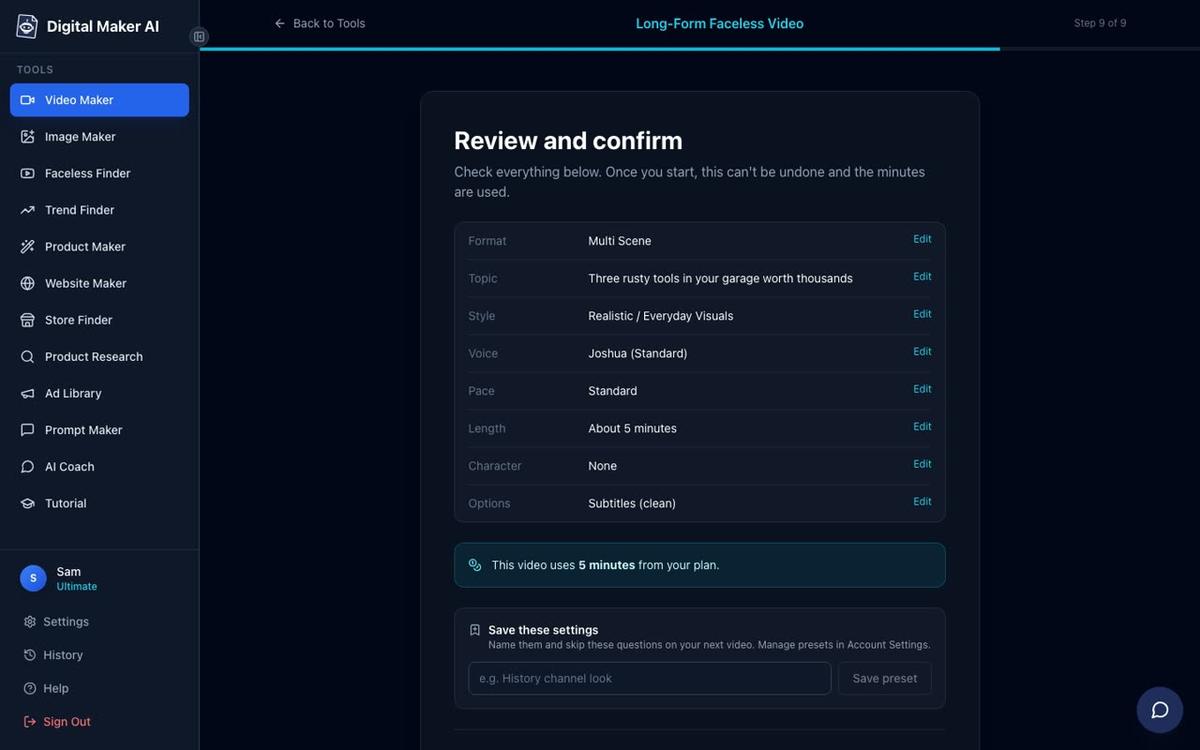
- Choose your format. Select Multi Scene Video. This gives every scene in the video its own AI-generated image, which is the standard format for faceless YouTube content. Single Scene and Whiteboard Animation formats are available on Premium and Ultimate.
- Choose how to start the script. On the Free plan, the AI writes the script for you from a topic. On paid plans you can also paste your own script. For your first video, let the AI write it.
- Type your topic. Keep it specific. Instead of "history", try "The fall of the Roman Empire explained in 5 minutes" or "What ancient Babylonian merchants knew about money". A tight topic produces a tighter script and better scene images.
- Pick a visual style. There are seven options: Realistic or Everyday Visuals, Animated or Cartoon, Motivational or Dark Moody, Finance or Luxury, History or Ancient, Space or Sci-Fi, and Minimalist or Clean. Free accounts can choose Realistic or Animated or Cartoon. Note that Animated or Cartoon means illustrated, cartoon-looking still scenes, not moving cartoon animation.
- Set the length. Free long-form videos can be up to 8 minutes. Aim for 5 to 8 minutes for your first video. Each scene is held on screen for roughly ten seconds while the narration plays.
- Pick a narration voice. There are more than 100 built-in voices covering male and female options and US, UK and Australian accents. Free accounts use standard voices. Listen to a few and pick one that fits your niche.
- Choose pacing. Calm, Standard or Energetic. Standard works for most niches. Calm suits meditation or history content. Energetic suits finance or motivation.
- Review and generate. Check the summary, confirm the settings, and press Generate Video. The script, scene images, voiceover and final MP4 typically take 3 to 6 minutes to produce.
After the video is ready, you can regenerate any scene image you are not happy with (10 free regenerations per video), swap in your own image or a short clip, or edit the narration text. There is no timeline editor, so editing is done scene by scene rather than on a track. Free videos carry a small Digital Maker AI watermark; upgrading removes it from that video.
For the full guide to making long-form faceless videos up to 60 minutes, including plan limits and format options, visit the long-form video page.
What formats and plans does Digital Maker AI offer for YouTube automation?
| Plan | Monthly video minutes | Max video length | Auto-post to YouTube, TikTok, Instagram | Paste your own script |
|---|---|---|---|---|
| Free | 5 free videos (one of each type, once) | 8 minutes | No (download MP4) | No |
| Pro | 40 minutes a month | 10 minutes | No (download MP4) | Yes |
| Premium | 150 minutes a month | 30 minutes | Yes | Yes |
| Ultimate | 300 minutes a month | 60 minutes | Yes | Yes |
See digitalmaker.ai/pricing for current pricing as of November 2026.
Step 4: Schedule your video to post directly to YouTube
On Premium and Ultimate plans, once a video is finished you will see a "Post to socials" button. Connect your YouTube, TikTok and Instagram accounts once in Account Settings, and from then on you can post any finished video immediately or schedule it for a specific date and time. Posts are labelled as AI-generated. Nothing posts automatically without you pressing Post, so you stay in control of every upload.
This is one of the biggest practical advantages of the platform for YouTube automation. Instead of downloading an MP4, opening YouTube Studio, filling in the title and description and setting a schedule, you do it all from inside Digital Maker AI in one step. For the full details on posting AI videos to YouTube, TikTok and Instagram, including how to connect your accounts, visit the publishing page.
Free and Pro accounts download the MP4 and upload it themselves through YouTube Studio. That is still a fast process, and it is a perfectly workable way to run a channel while you are testing the niche.
Step 5: Build a consistent posting schedule
Consistency matters more than volume. A channel that posts one well-researched, genuinely useful video every week will outperform a channel that posts five thin videos and then goes quiet. Here is a realistic first-week plan for a beginner.
- Day 1: Research. Spend 30 minutes in the Faceless Finder. Write down five specific video topics in your chosen niche. Each topic should answer a real question your target viewer is searching for.
- Day 2: Make your first video. Use the Video Maker to produce a 5 to 8 minute video on your strongest topic. Review every scene and regenerate any image that looks off.
- Day 3: Review and refine. Watch the finished video all the way through. Edit any narration lines that sound unnatural. Check that the captions are readable.
- Day 4: Create a thumbnail. Use the Image Maker inside Digital Maker AI to generate a YouTube thumbnail. A clear face (even an AI-generated one), bold text and a strong colour contrast all help click-through rate.
- Day 5: Upload and optimise. Post the video with a keyword-rich title, a detailed description and five to eight relevant tags. If you are on Premium or Ultimate, use the Post to socials button to schedule it.
- Days 6 and 7: Plan the next video. Use the AI Coach inside Digital Maker AI to generate video ideas, YouTube titles and descriptions for the following week. The AI Coach is available from the left sidebar after signing in.
Common mistakes to avoid when starting YouTube automation in 2027
These are the errors that hold most beginners back, and none of them require an expensive lesson to learn.
- Choosing a niche that is too broad. "Health" is not a niche. "Evidence-based sleep habits for shift workers" is. The narrower your topic, the easier it is to rank for specific searches and build a loyal audience.
- Publishing reused or recycled content. Rephrasing another channel's script and swapping the images is not automation; it is plagiarism, and YouTube's systems are very good at detecting it. Every video should add something new: a fresh angle, a more detailed explanation or a better example.
- Ignoring the first 30 seconds. The hook is the most important part of any faceless video. If the opening does not give the viewer a clear reason to keep watching, they leave. Use the AI Coach to generate strong hooks before you make the video, then review the AI's opening lines and sharpen them yourself.
- Posting without checking the output. AI tools are fast but not perfect. Always watch your finished video before publishing. Look for scene images that do not match the narration, mispronounced words in the voiceover, or caption timing that feels off.
- Expecting results in week one. New channels typically take three to six months to see meaningful organic traffic. The YouTube Partner Programme requires 1,000 subscribers and 4,000 watch hours (or 10 million Shorts views). Plan for the long game.
What else can you do with Digital Maker AI for your channel?
Beyond long-form videos, Digital Maker AI includes several tools that are directly useful for a YouTube automation workflow. The Short-form video maker produces vertical 9:16 Shorts between 15 and 60 seconds, which are useful for growing your channel between long-form uploads. The Animated Podcast lets you create a two-host AI podcast episode on any topic, with two different voices, captions and animated sound bars, saved as a landscape video ready for YouTube.
On Premium and Ultimate, you can also add an AI presenter to your long-form videos. You describe who the presenter is in a sentence or two, the platform generates a photoreal picture of them, and they appear on screen speaking the narration in full screen, split screen or corner circle layouts. This is a fully launched feature, live since October 2026, and it is a practical way to give your channel a recognisable face without appearing on camera yourself.

Frequently asked questions
Is YouTube automation legal?
Yes. Running a faceless channel and using AI tools to produce your videos is entirely legal. YouTube's terms of service require that content is original and does not violate copyright. Using AI to write a script and generate images is fine; copying another creator's content is not, regardless of whether a human or an AI does it.
How long does it take to make a faceless YouTube video with AI?
Inside Digital Maker AI, a 5-minute long-form video typically takes 3 to 6 minutes to generate once you have filled in the topic, style, voice and length. Reviewing the output and making any edits adds another 10 to 15 minutes. Total time from idea to ready-to-upload MP4 is around 20 to 30 minutes for most videos.
Do I need to show my face for YouTube automation to work?
No. The entire point of a faceless channel is that you never appear on camera. AI-generated scene images, a voiceover and captions carry the video. If you want a human-looking presenter without using your own face, the AI presenter feature on Premium and Ultimate plans creates a photoreal on-screen host from a written description.
Can I start YouTube automation for free?
Yes. Digital Maker AI's Free plan requires no credit card and includes five free videos, one of each type. The free long-form video can be up to 8 minutes. Free videos carry a small watermark and are limited to English, standard voices and two visual styles, but they are fully usable for testing your niche before committing to a paid plan.
How many videos should I post per week to grow a faceless YouTube channel?
One to two well-researched videos per week is a sustainable and effective pace for most beginners. Posting more than that is only worthwhile if the quality stays high. Channels that post four or five thin videos a week typically see lower average view durations, which hurts their ranking in YouTube's algorithm over time.
What is the best niche for YouTube automation in 2027?
The best niche is one with a proven faceless channel audience, a reasonable ad rate and topics you can research accurately. Personal finance, psychology, history, true crime and space consistently perform well for faceless channels. Use the Faceless Finder inside Digital Maker AI to check real channels in any niche before you commit.
The best way to start YouTube automation is to do the research first, make one good video, watch it all the way through, publish it, and repeat. AI tools remove the production barrier; your job is to keep the quality bar high. Start with the free Digital Maker AI course for a full walkthrough of setting up your first faceless channel from scratch, including channel art, your first video and your posting schedule.
Alex Stevens: Alex Stevens writes for the Digital Maker AI team about faceless YouTube channels, AI presenters and AI video tools.