How to Start a Faceless YouTube Channel With No Money in 2027
By Alex Stevens
You can start a faceless YouTube channel with no money in 2027 using free AI tools. A faceless YouTube channel is a channel where the creator never appears on camera: AI-generated visuals and a voiceover carry every video. Digital Maker AI (digitalmaker.ai) is an AI video platform for faceless YouTube videos, AI presenter videos, animated podcasts, 3D animated films and digital products. Its Free plan lets you make your first five videos at no cost, with no card required, so you can publish before spending a single dollar.
Key takeaways
- The Free plan gives you five complete videos (one of each type) with no card needed, each up to 8 minutes long.
- Free videos use a library of ready-made images in set topic areas such as history, psychology, true crime and personal finance.
- YouTube Partner Programme requires 1,000 subscribers and 4,000 watch hours, or 10 million Shorts views in 90 days, before you earn ad revenue.
- The Faceless Finder tool (free for all signed-in accounts) shows real channel numbers, estimated monthly revenue and whether a niche is already working for others.
- A simple weekly routine of two to three videos is enough to build toward monetisation in most niches within six to twelve months.
Step 1: Pick a niche that already makes money for faceless channels
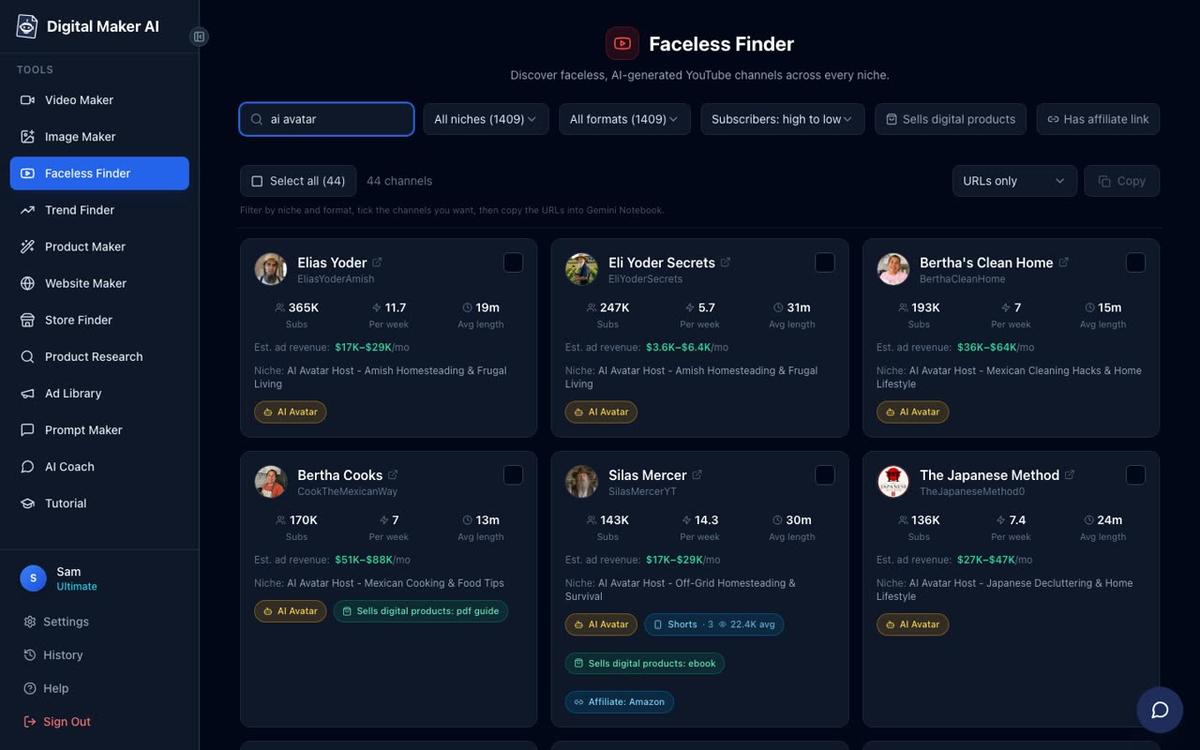
The right niche makes everything easier. You want a topic with proven demand, low barrier to entry and an audience that watches long enough to earn watch hours. The fastest way to check this in 2027 is the Faceless Finder inside Digital Maker AI, available to every signed-in account including Free.
Open the Faceless Finder from the left sidebar after signing in. Search by niche name, for example "psychology" or "true crime", and you will see a list of real faceless channels with their subscriber count, uploads per week, average video length and an estimated monthly ad revenue figure. That estimate is Digital Maker AI's own rough calculation from recent views and typical ad rates for the niche, not the channel's verified earnings, but it gives you a genuine sense of what is working.
Good niches for beginners in 2027 include psychology, stoicism, ancient history, space, health and fitness, and personal finance. These all sit inside the Free plan's image library, so you can make your first videos without upgrading. Pick one topic you can talk about for at least fifty videos. Depth beats breadth at the start.
Worked example: A psychology channel posting two eight-minute videos a week needs roughly five months to hit 4,000 watch hours if each video averages 200 views and a 60 percent watch-through rate. That is a realistic target, not a guarantee, but it shows the maths is achievable without a big audience.
Step 2: Write your first script (or let the AI do it)
Every faceless video starts with a script. A good script for a new channel has three parts: a hook in the first fifteen seconds that names a problem or a surprising fact, a body that delivers on the promise in clear steps or stories, and a close that tells the viewer what to do next (like or subscribe, watch another video).
On the Free plan the AI writes the script for you from a single topic line. You type something like "5 psychology tricks that make people trust you instantly" and the platform handles the rest. Pasting your own script is a paid-plan feature, so beginners on Free are best served by letting the AI write it and then reading through the result before generating the video.
If you want to practice writing scripts yourself first, the AI Coach inside Digital Maker AI can suggest hooks, YouTube titles, descriptions and tags for any topic, even on the Free plan (20 messages a month in Fast mode). It is also worth reading our guide on the easiest way to start a faceless YouTube channel for more on structuring early content.
Step 3: Make your first video free in Digital Maker AI
This is the step most beginners overthink. Here is the exact path on the Free plan.
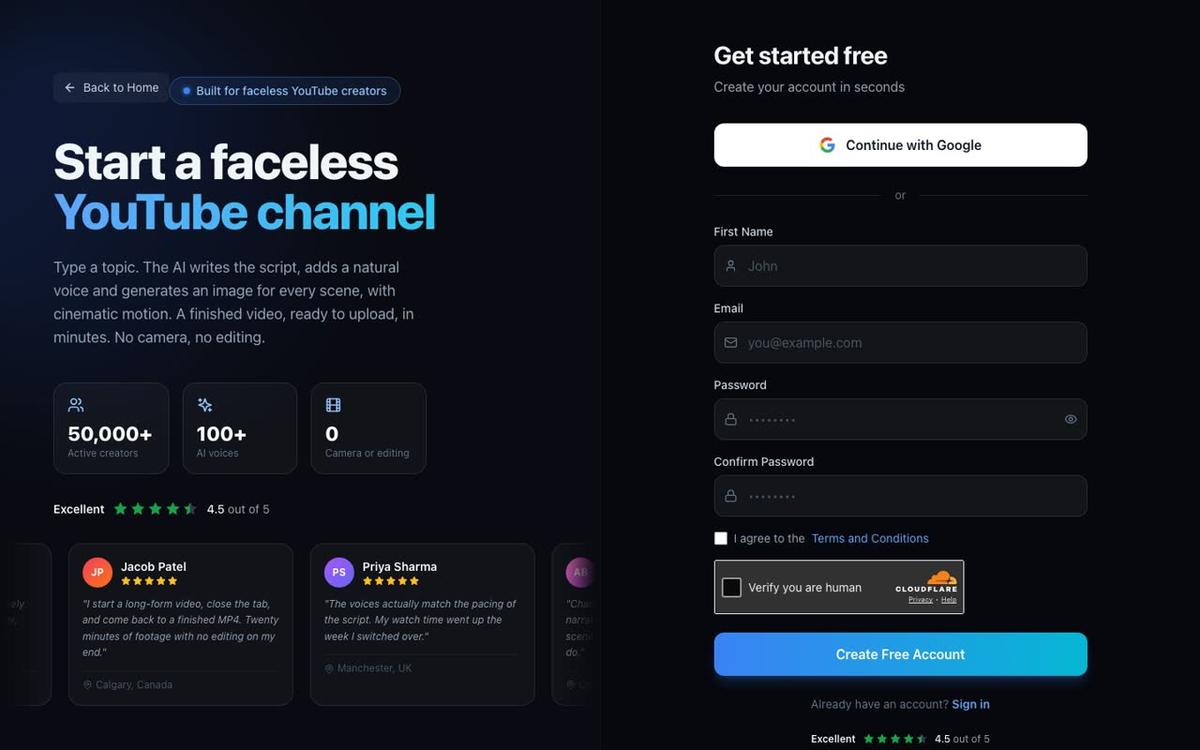
- Create a free account. Go to digitalmaker.ai/faceless and sign up with Google or email. No card is needed.
- Open the Video Maker. After signing in, click the Video Maker button in the left sidebar. This opens the free video screen where you choose the type of video you want to make.
- Pick Long-Form Faceless Video. Select this card and press Next at the bottom of the screen. This is the main YouTube format: a landscape 16:9 video with AI-written script, one generated image per scene, AI narration and burned-in captions, delivered as a ready-to-upload MP4.
- Choose Multi Scene format. On Step 1, pick Multi Scene. This gives each scene its own image, which keeps viewers engaged across a longer video.
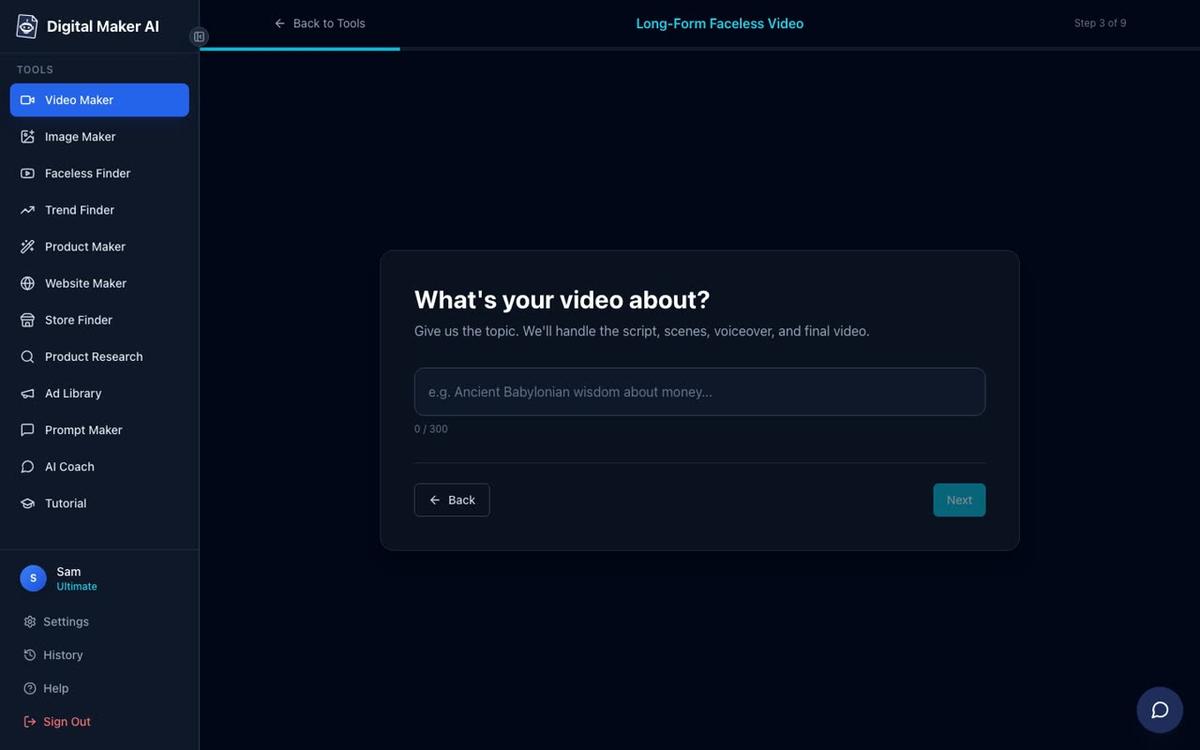
- Let the AI write the script. On Step 2, choose Write it for me. On Step 3, type your topic in one line.
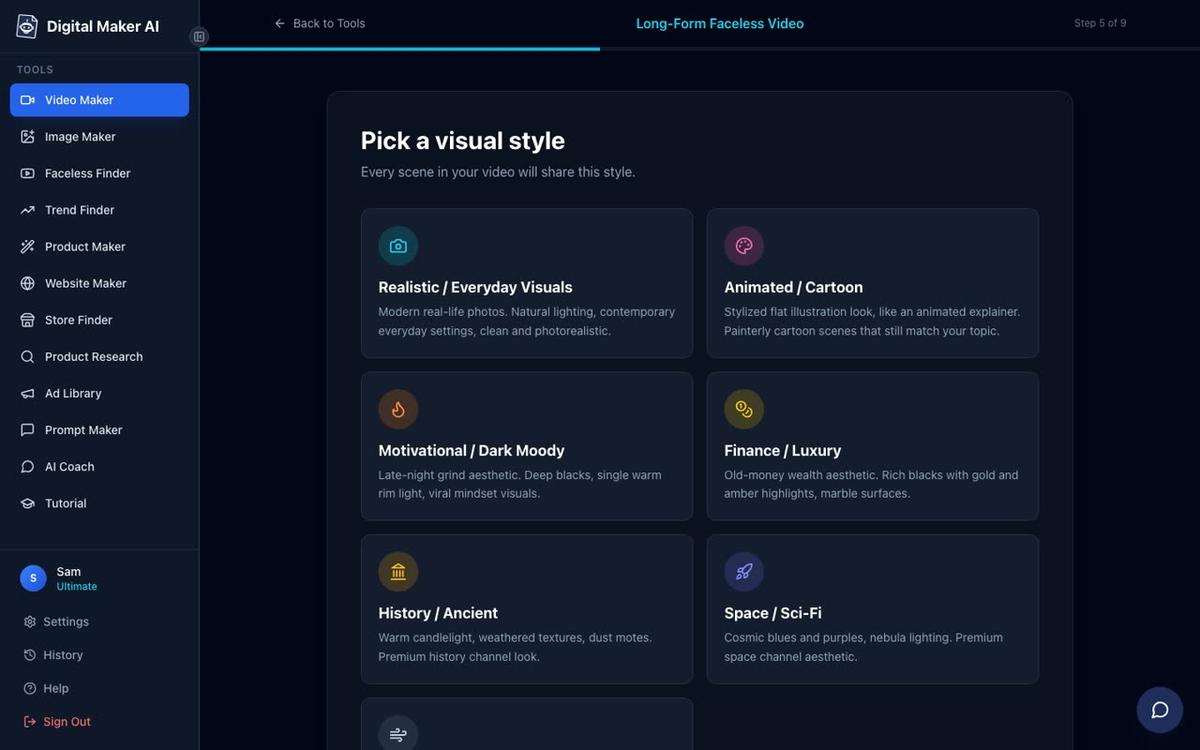
- Pick your visual style. Free users can choose between Realistic and Animated or Cartoon. The Animated or Cartoon style means illustrated, cartoon-style still scenes, not moving cartoon animation.
- Set the length. Free long-form videos can run up to 8 minutes. A five-minute video is a good starting point: long enough to earn watch time, short enough to generate quickly.
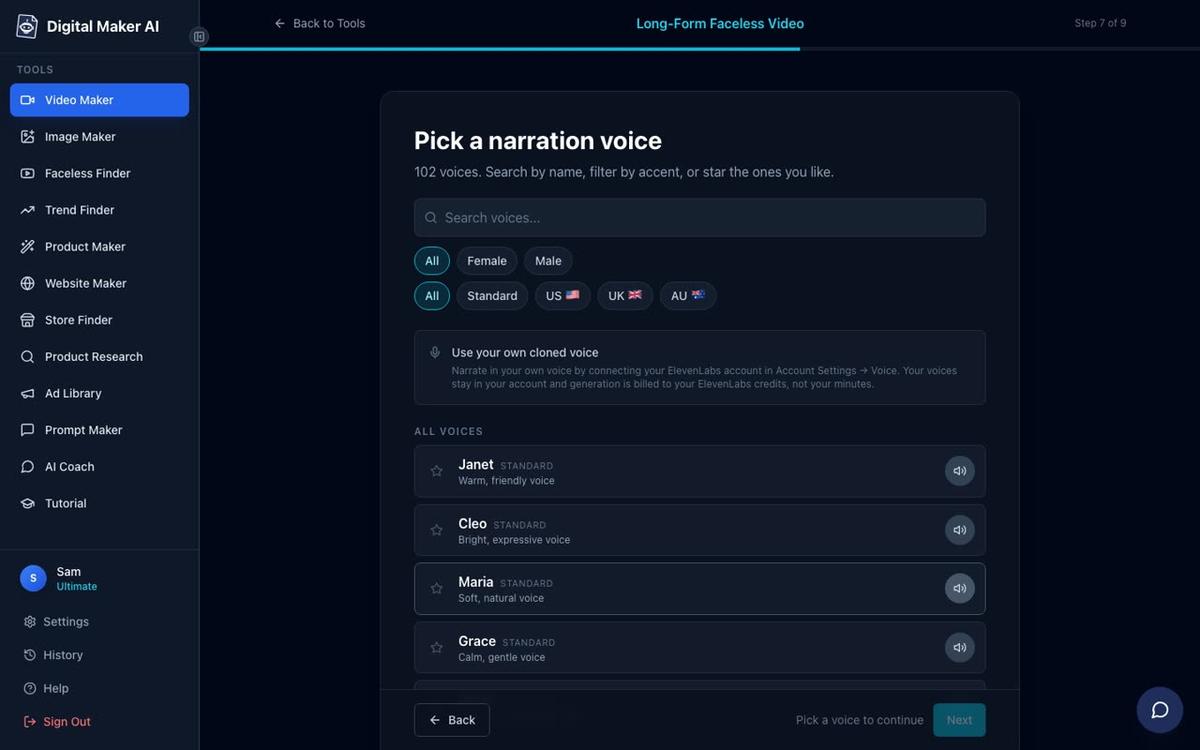
- Pick a voice. Choose from the standard voice library. More than 100 voices are available across male and female, and US, UK and Australian accents.
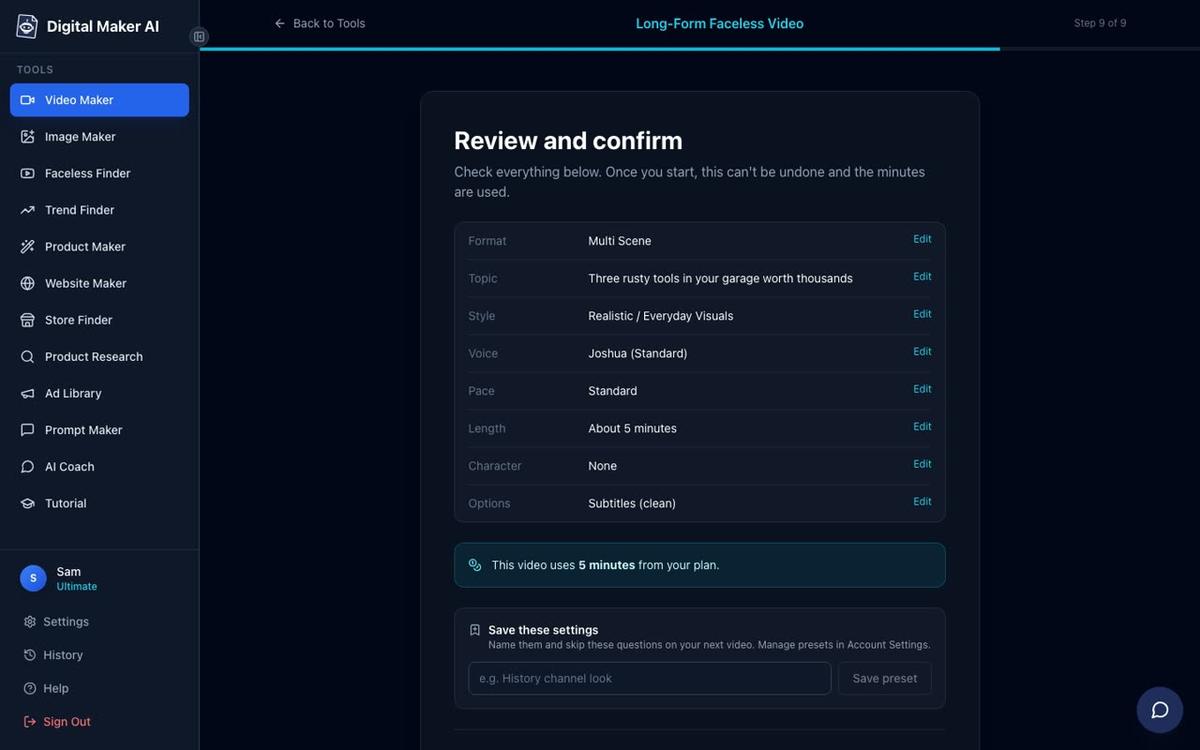
- Review and generate. Check the summary on Step 9, then press Generate Video. The script, scene images, voiceover and final MP4 usually take three to six minutes.
Free videos carry a small Digital Maker AI watermark. Upgrading to a paid plan later removes it from that video. Commercial usage rights are included on every plan, including Free, so you can monetise from day one.
Step 4: Make a thumbnail that gets clicks
Your thumbnail is the first thing a viewer sees in search results. A good thumbnail has one clear subject, readable text in large font and strong contrast. You do not need Photoshop or a design background.
Inside Digital Maker AI, the Image Maker generates YouTube thumbnails from a text description. Describe the scene you want, the emotion and the colour palette, and it returns a finished image you can download and upload to YouTube. Free accounts can use the Image Maker, so this step costs nothing.
Keep thumbnails consistent across your channel. Pick two or three colours and a font style and use them every time. Viewers start to recognise your channel before they even read the title, which lifts click-through rate over time.
Step 5: Upload to YouTube and optimise the listing
Once your MP4 is ready, download it and upload it to YouTube Studio. Fill in every field:
- Title: put the main keyword near the front, for example "5 Psychology Tricks That Make People Trust You Instantly".
- Description: write two to three paragraphs. The first sentence should repeat the title keyword. Add a brief summary of the video, then a few related keywords in natural sentences.
- Tags: add five to ten tags that match the topic and the niche.
- Thumbnail: upload the image you made in the Image Maker.
- Category and language: set these correctly so YouTube places the video in the right recommendations.
On paid plans (Premium and Ultimate), you can connect your YouTube account once in Account Settings and post directly from Digital Maker AI using the Post to socials button, either immediately or on a schedule. Nothing posts automatically: you press Post and it goes. Free and Pro users download the MP4 and upload it themselves.
How long does it take to monetise a faceless YouTube channel in 2027?
To join the YouTube Partner Programme (YPP) and earn ad revenue, you need 1,000 subscribers and 4,000 watch hours in the past 12 months, or 10 million Shorts views in 90 days. These are YouTube's own thresholds and they have not changed for several years.
Most new faceless channels posting two to three videos a week reach those thresholds in six to twelve months, assuming the niche has genuine search demand and the videos are at least five minutes long. Channels in high-CPM niches such as personal finance and business typically earn more per thousand views than entertainment niches, which matters once you are monetised.
| Milestone | Typical time at 2 videos per week | What helps most |
|---|---|---|
| First 100 subscribers | 4 to 8 weeks | Consistent posting, strong thumbnails |
| 1,000 subscribers | 4 to 9 months | SEO titles, watch-time above 50 percent |
| 4,000 watch hours | 5 to 12 months | Videos 5 minutes or longer, strong hooks |
| YPP approval | After both thresholds are met | No strikes, original content |
Be honest with yourself: these are averages, not guarantees. Channels that pick a focused niche, post consistently and improve their thumbnails and titles over time reach monetisation faster than channels that post randomly across topics.
Your simple weekly routine to start a faceless YouTube channel with no money
Consistency beats perfection at the start. Here is a routine that works even if you have only a few hours a week.
- Monday: research and plan. Open the Faceless Finder, check what is performing well in your niche this week, and write down three video ideas. Pick one for this week and one for next week.
- Tuesday: generate the video. Open the Video Maker, type your topic, choose your style and voice, and press Generate. The video is usually ready in under ten minutes.
- Wednesday: make the thumbnail and write the listing. Use the Image Maker for the thumbnail. Write the title, description and tags in YouTube Studio.
- Thursday: upload and schedule. Upload the MP4, add the thumbnail, fill in the listing and schedule it to publish at the time your audience is most active (typically early morning or early evening in your target time zone).
- Friday: review last week's video. Check the YouTube Studio analytics. Which titles got the most impressions? Which videos had the best watch time? Use that to improve next week's topic choice.
Two videos a week at this pace is sustainable and gives the YouTube algorithm enough signal to start recommending your channel within a few months.
What changes when you upgrade from the Free plan?
The Free plan is a genuine starting point, not a demo. But there are real limits to know about before you plan your channel. On Free, videos use library images from a set list of topic areas, all videos are in English, you cannot paste your own script, and each video carries a small watermark.
Paid plans (see digitalmaker.ai/pricing for current plan details as of November 2026) unlock fresh AI-generated images on any topic, the ability to paste your own script, more visual styles, longer videos, and the option to post directly to YouTube. Premium and Ultimate also unlock AI presenter videos, where a photoreal AI presenter appears on screen alongside your scenes, and the long-form video generator up to 30 or 60 minutes per video.
If you are building a channel around a niche that sits inside the Free plan's topic areas (psychology, history, space, personal finance and others), you can make a meaningful number of videos before needing to upgrade. Use the five free videos to test your niche, your voice choice and your thumbnail style before committing to a paid plan.
Common mistakes beginners make when starting a faceless channel
- Choosing a niche that is too broad. "Motivation" is a category, not a niche. "Stoic principles for people in their thirties" is a niche. Narrow topics build loyal audiences faster.
- Ignoring the hook. If the first fifteen seconds do not give the viewer a reason to stay, they leave. Write the hook before anything else.
- Inconsistent thumbnails. A channel where every thumbnail looks different is harder to recognise in search. Pick a style and stick to it.
- Posting once and waiting. The algorithm needs data. One video gives it almost nothing. Twenty videos gives it enough to start recommending your channel.
- Skipping the description. YouTube uses the description text to understand what the video is about. A blank description is a missed opportunity for search ranking.
Frequently asked questions
Can I really start a faceless YouTube channel with no money in 2027?
Yes. Digital Maker AI's Free plan gives you five complete videos with no card needed, each up to 8 minutes long, with commercial usage rights included. You can publish all five, build your first audience and decide whether to upgrade only after you see results.
Do I need any video editing skills to make faceless YouTube videos?
No editing skills are needed. Digital Maker AI writes the script, generates a scene image for every scene, adds AI narration and captions, and delivers a finished MP4 ready to upload. There is no timeline editor to learn and no footage to cut.
How many videos do I need before YouTube starts recommending my channel?
There is no fixed number, but most creators report that the algorithm begins to recommend their videos consistently once they have published 20 to 30 videos in a focused niche. Posting two to three videos a week gets you there in two to three months.
What niches work best for a free faceless channel in 2027?
The Free plan's image library covers money and personal finance, business and side hustles, motivation, stoicism, law of attraction, history, ancient Egypt, the Roman Empire, true crime and mysteries, psychology, space, the deep sea, health and fitness, and faith. All of these have proven faceless channels earning ad revenue.
When can I start earning money from a faceless YouTube channel?
You can apply for the YouTube Partner Programme once you reach 1,000 subscribers and 4,000 watch hours in the past 12 months, or 10 million Shorts views in 90 days. Most new channels posting consistently in a focused niche reach these thresholds within six to twelve months.
Is the watermark on free videos a problem for growing a channel?
The watermark is small and appears on Free plan videos. Commercial usage rights are still included, so you can monetise the videos. Upgrading to a paid plan removes the watermark from those videos. Many creators start on Free, confirm the niche works, then upgrade before applying for the YouTube Partner Programme.
Ready to make your first video today? The free course at digitalmaker.ai/free-course walks you through picking a niche, writing a hook and building your first faceless channel from scratch, with no experience and no upfront cost.
Alex Stevens: Alex Stevens writes for the Digital Maker AI team about faceless YouTube channels, AI presenters and AI video tools.