NexLev vs Digital Maker AI for Faceless YouTube Channels
By Alex Stevens
NexLev vs Digital Maker AI: the verdict up front
If you are comparing NexLev vs Digital Maker AI for a faceless YouTube channel, the single most important thing to know is this: they are not the same type of tool. NexLev is a research and niche-finding platform; Digital Maker AI is a full video production pipeline. The right question is not which one is better, but which part of the job you need help with right now.
This comparison is judged on one criterion: how much of the faceless YouTube workflow does each tool actually complete? We looked at what each product does from the moment you have an idea to the moment a video is uploaded to YouTube. NexLev wins on depth of niche intelligence. Digital Maker AI wins on everything that comes after you have chosen a niche, and it also includes its own built-in channel research tool so you can do both in one place.
What NexLev does (and where it stops)
NexLev is built for one job: helping faceless YouTube creators find profitable niches before the competition does. Its flagship feature is the Niche Finder, which scans YouTube channels continuously to surface niches where demand is high and competition is still manageable. You can filter by estimated revenue, growth trajectory, engagement metrics and more, and the tool hands you a shortlist of opportunities rather than making you dig through YouTube manually.
Alongside the Niche Finder, NexLev offers a Chrome extension with more than 40 features that sit directly on top of YouTube. From any channel page you can check analytics, see monetization status, discover similar channels, preview thumbnail performance, track real-time 48-hour view counts and run a swipe file. The company states that the extension turns your YouTube browser tab into a research lab without needing to open a separate dashboard.
NexLev also bundles a Discord community and sells a YouTube Faceless Course as a separate one-time purchase. More recently the company added an MCP server so the tool can be queried from AI assistants.
Where NexLev stops: NexLev does not write scripts, generate images, record narration, add captions or export a video file. Once you have validated a niche, you leave NexLev and open a separate tool to make the actual content. That gap is exactly where Digital Maker AI begins.
NexLev pricing (as of November 2026, per the company's own site): a free tier with three basic features; Lite at $13 per month (around $9 to $10 per month billed annually); Pro at around $42 to $46 per month (around $39 to $43 per month billed annually), which is the tier that includes the Niche Finder alongside the Chrome extension. The YouTube course is sold separately. A short free trial is available. Always check nexlev.io/pricing for the current figures before subscribing.
What Digital Maker AI does end to end
Digital Maker AI is a complete faceless video production platform. You start with a topic, and the tool handles every step from there: it writes the script (or accepts your own on paid plans), generates a unique AI scene image for every scene, records AI narration in one of more than 100 built-in voices, burns in captions and returns a ready-to-upload MP4. There is no timeline editor to wrestle with and no separate tools to stitch together.
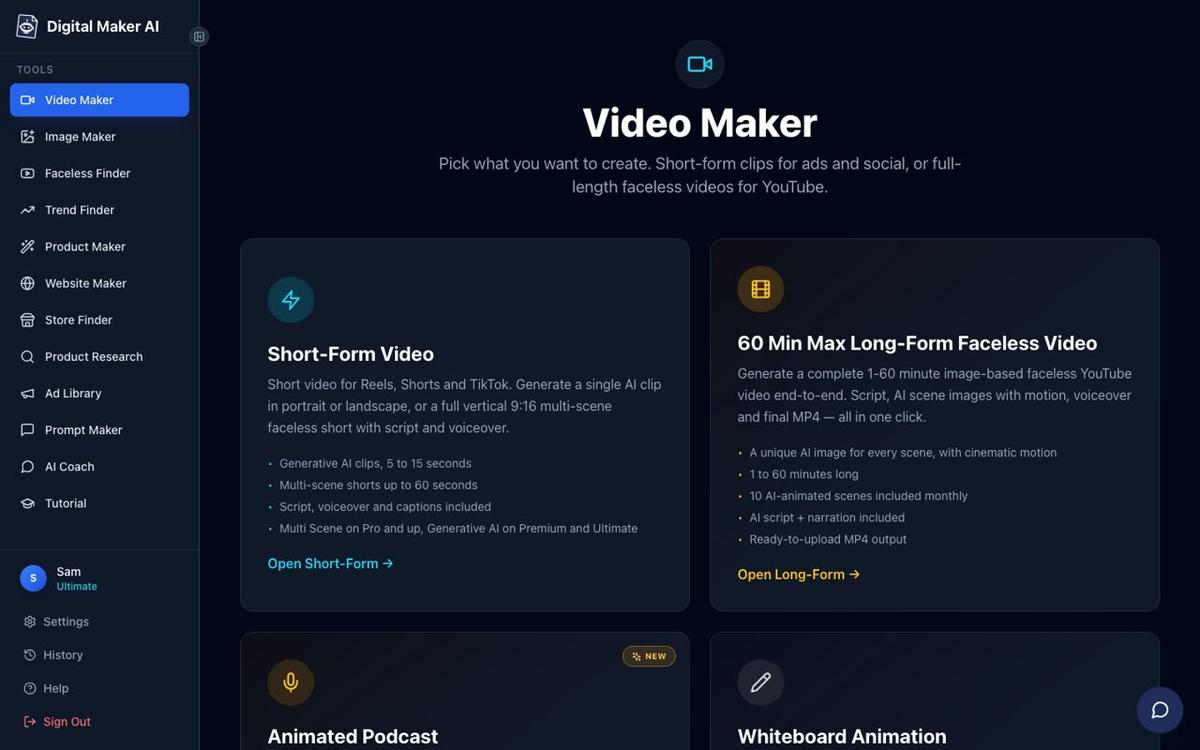
The long-form Video Maker produces landscape 16:9 videos built for YouTube. You pick a visual style (seven options including Realistic, Animated or Cartoon, History or Ancient, Finance or Luxury and Space or Sci-Fi), a caption look, a voice and optional background music. Each scene is a freshly generated still image held on screen while the narration plays, with optional slow zoom or pan motion effects. You can regenerate any scene image, swap in your own image or a short clip, or edit the narration text after the video is made.
Premium and Ultimate plans also unlock AI presenter videos, where a photoreal AI presenter speaks the script on screen. You can choose Full screen (the presenter fills the frame), Split screen (presenter on the left, scene on the right) or Corner circle (the scene with the presenter in a small round window). A slider controls how much of the video the presenter appears in.

One thing Digital Maker AI does not do is provide a stock footage library or a timeline editor with manual trimming and transitions. The tool is designed to produce a finished video from a topic in one flow, not to replace a traditional video editor. If your workflow requires cutting your own clips together, you would need a separate editing tool for that part.
The Faceless Finder: built-in channel research at no extra cost
Digital Maker AI includes its own channel research feature called the Faceless Finder, and it is open to every signed-in account including the Free plan. It is a searchable list of confirmed faceless YouTube channels showing subscribers, uploads per week, average video length and an estimated monthly ad revenue. You can search by niche or by channel name.
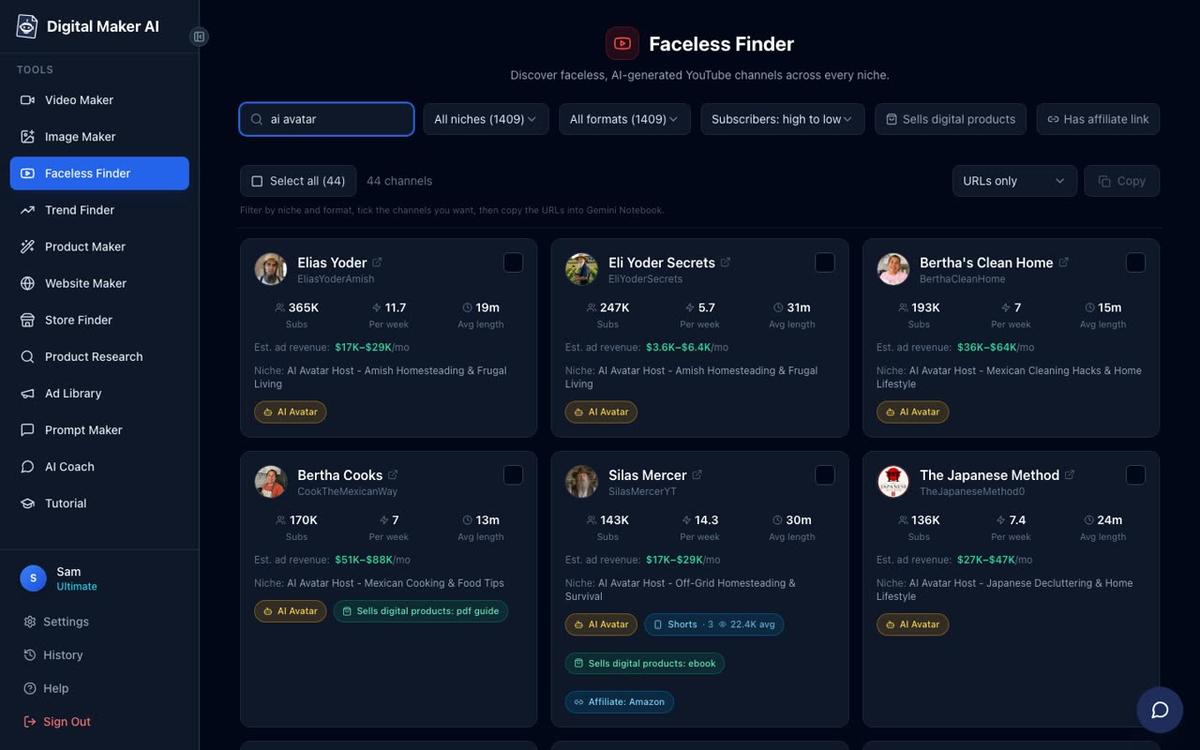
The Finder also labels AI avatar channels (channels fronted by an AI-generated presenter) with an amber badge, so you can type "AI avatar" in the search box and see only those channels. The revenue figures are Digital Maker AI's own rough estimates based on recent views and typical ad rates for the niche, not the channel's actual earnings, so treat them as directional rather than precise. The Faceless Finder is not as deep as NexLev's niche scoring system, but it gives you enough to spot a promising niche and move straight into production without switching tools.
Plans and pricing for Digital Maker AI
Digital Maker AI offers four plans (as of November 2026, see digitalmaker.ai/pricing for current details). The Free plan requires no credit card and gives you five one-off free videos (one of each type: a long-form faceless video up to 8 minutes, a vertical Short, a drag-and-drop video from your own images, a drag-and-drop movie from your own clips and an animated podcast). Free videos carry a small watermark and are limited to English, two visual styles and standard voices. Commercial usage rights are included on every plan including Free.
The Pro plan costs $29 per month ($249 per year) and includes 40 video minutes a month with a maximum of 10 minutes per long-form video. The Premium plan costs $59 per month ($479 per year) and includes 150 video minutes a month with a maximum of 30 minutes per video, plus AI presenters, long-form videos up to 30 minutes, Single Scene and Whiteboard Animation formats, and direct posting to YouTube, TikTok and Instagram. The Ultimate plan costs $99 per month ($799 per year) and includes 300 video minutes a month with a maximum of 60 minutes per video, plus 5 free animated scenes a month and 3 minutes of avatar time every month.
NexLev vs Digital Maker AI by use case
- Best for deep niche validation: NexLev Pro wins here. Its Niche Finder scans YouTube continuously, surfaces breakout niches with growth data and lets you filter by dozens of criteria. If you are deciding between five possible channel topics and want hard data before you commit, NexLev gives you more to work with than the Faceless Finder alone.
- Best for making and publishing the video: Digital Maker AI wins outright. NexLev does not make videos at all. Digital Maker AI takes you from topic to finished MP4 in one session, and Premium and Ultimate users can post directly to YouTube from inside the platform without downloading and re-uploading.
- Best for long-form faceless YouTube videos: Digital Maker AI. Scripts, scene images, narration, captions and export in one tool. Premium supports videos up to 30 minutes; Ultimate goes up to 60 minutes. NexLev has no video creation capability.
- Best for Shorts: Digital Maker AI's Short-Form Video maker produces vertical 9:16 Shorts at 15, 30, 45 or 60 seconds with narration and bold captions, costing a flat one minute of the pool. NexLev's Chrome extension can analyse Shorts performance but cannot make them.
- Best on a budget: Digital Maker AI's Free plan. You get five complete videos at no cost, access to the Faceless Finder for channel research and commercial usage rights. If you are just starting out and want to test the full workflow before spending anything, the Free plan covers both the research and the production side. NexLev's free tier is limited to three minor browser utilities and does not include the Niche Finder.
- Best for an established creator who already makes videos: NexLev Lite or Pro as a research layer on top of your existing production workflow. If you are already happy with how you make videos and just want sharper niche intelligence, NexLev's Chrome extension and Niche Finder add genuine value without replacing your current setup.

The honest verdict on NexLev vs Digital Maker AI
These two tools solve different problems. NexLev is a research tool that tells you where to go; Digital Maker AI is the vehicle that gets you there. Used together, NexLev validates the niche and Digital Maker AI produces every video in that niche. If your budget is tight, Digital Maker AI alone covers the essentials: the Faceless Finder gives you enough channel data to pick a direction, and the Video Maker handles everything from script to export. You can compare a similar research-versus-production dynamic in the ShortGPT vs Digital Maker AI comparison, which looks at another tool that focuses on a narrow part of the workflow.
Ready to see how far you can get without spending anything? Start with the free faceless YouTube course from Digital Maker AI, which walks you through picking a niche, setting up a channel and making your first video, all in one place.
Alex Stevens: Alex Stevens writes for the Digital Maker AI team about faceless YouTube channels, AI presenters and AI video tools.