How to Make a Faceless YouTube Channel About a Single Topic
By Alex Stevens
By the end of this guide you will know exactly how to start a single topic faceless YouTube channel, have at least 20 video ideas written down, and have made your very first video. Most beginners pick a topic that is far too broad and then wonder why their channel never gains traction. This guide fixes that from the start.
Step 1: Understand Why Single-Topic Channels Grow Faster
YouTube's recommendation algorithm looks for signals that tell it what a channel is about. When every video on your channel covers the same tight subject, those signals are strong and consistent. The algorithm learns who to show your videos to, and it keeps showing them. A channel that uploads about "history" one week, "motivation" the next and "personal finance" the week after sends mixed signals. A channel that uploads nothing but short Stoic quotes, or nothing but facts about ancient Rome, or nothing but personal finance tips for people in their twenties, gives the algorithm a clear pattern to work with.
Viewers behave the same way. When someone watches one of your Stoic quotes videos and enjoys it, they click on your channel. If they see ten more Stoic quotes videos waiting for them, they subscribe. If they see a random mix of topics, they leave. A tight topic builds an audience that actually wants more of what you make.
The other benefit is speed. When you know your subject inside out, you never sit staring at a blank screen wondering what to make next. Your content series plans itself.
Step 2: How to Start a Single Topic Faceless YouTube Channel by Choosing the Right Subject
A good single topic passes three tests. First, you can name at least 20 different video ideas on it right now. Second, it has an audience that already watches YouTube. Third, it is specific enough that a viewer can describe your channel in one sentence.
Here are some examples of topics that are too broad, and the tighter version that works:
- Too broad: History. Tight: Daily life in ancient Rome.
- Too broad: Philosophy. Tight: Stoic quotes and what they mean today.
- Too broad: Money. Tight: Personal finance tips for people paying off student debt.
- Too broad: Health. Tight: Cold water therapy and its science.
- Too broad: Space. Tight: Strange facts about black holes.
Notice that each tight version still has room for dozens of videos. "Daily life in ancient Rome" could cover food, clothing, housing, work, children, slaves, soldiers, religion and dozens more. That is your content series.
Step 3: Use the Faceless Finder to Spot Real Channels and Check What Works
Before you commit to a topic, spend ten minutes in the Faceless Finder inside Digital Maker AI. It is a searchable list of confirmed faceless YouTube channels, open to every signed-in account including the free one. Each channel card shows subscribers, uploads per week, average video length and an estimated monthly ad revenue. That last number is Digital Maker AI's own rough figure based on recent views and typical ad rates for the niche, not the channel's real earnings. But it is useful for comparing niches side by side.
Type your topic idea into the search box. If you see several channels with consistent upload schedules and growing subscriber counts, that is a healthy sign. Look at how often they upload. A channel posting two or three times a week on the same tight subject is a model you can follow. If you see channels with very few uploads and low estimated revenue, the niche may be too small or too competitive at the top.
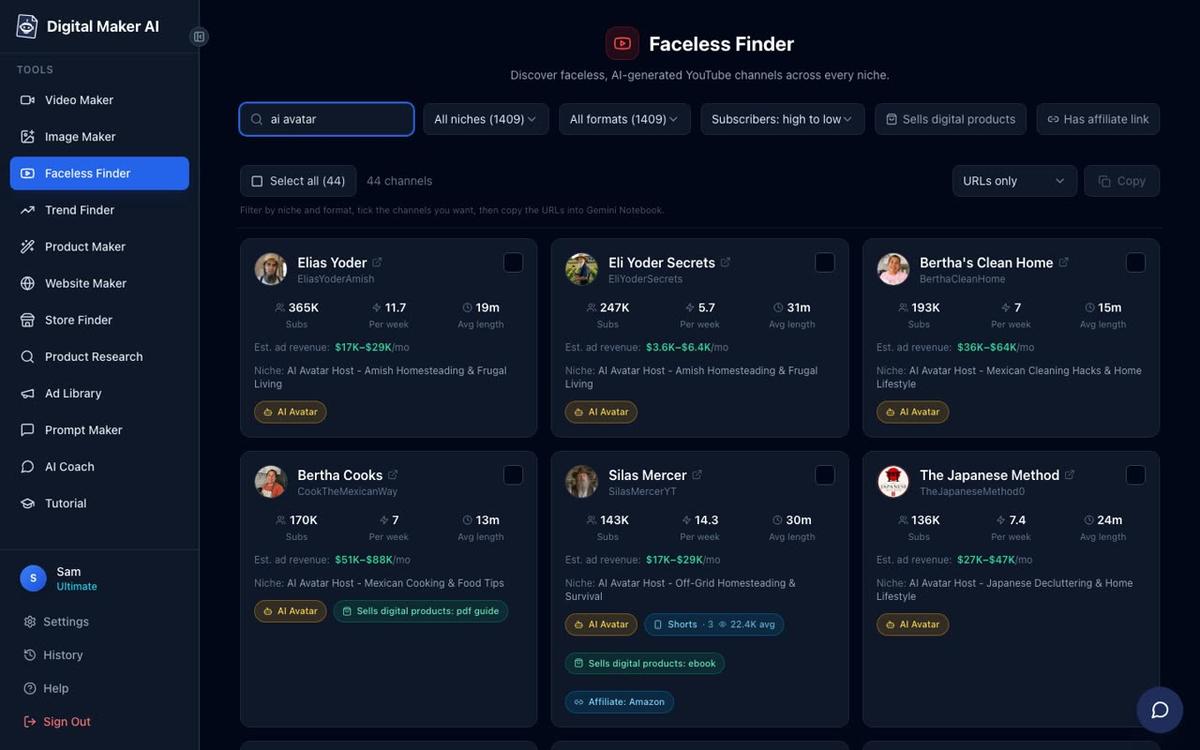
You can also type "AI avatar" into the search box to see only channels fronted by an AI-generated presenter, each marked with an amber AI Avatar label. These are useful benchmarks if you plan to add a presenter to your videos later.
Write down the names of three channels in your chosen niche. Note how many videos they have, how often they post and what their most-viewed videos are about. Those popular titles are clues about what your audience wants most.
Step 4: Plan a Content Series of at Least 20 Video Ideas
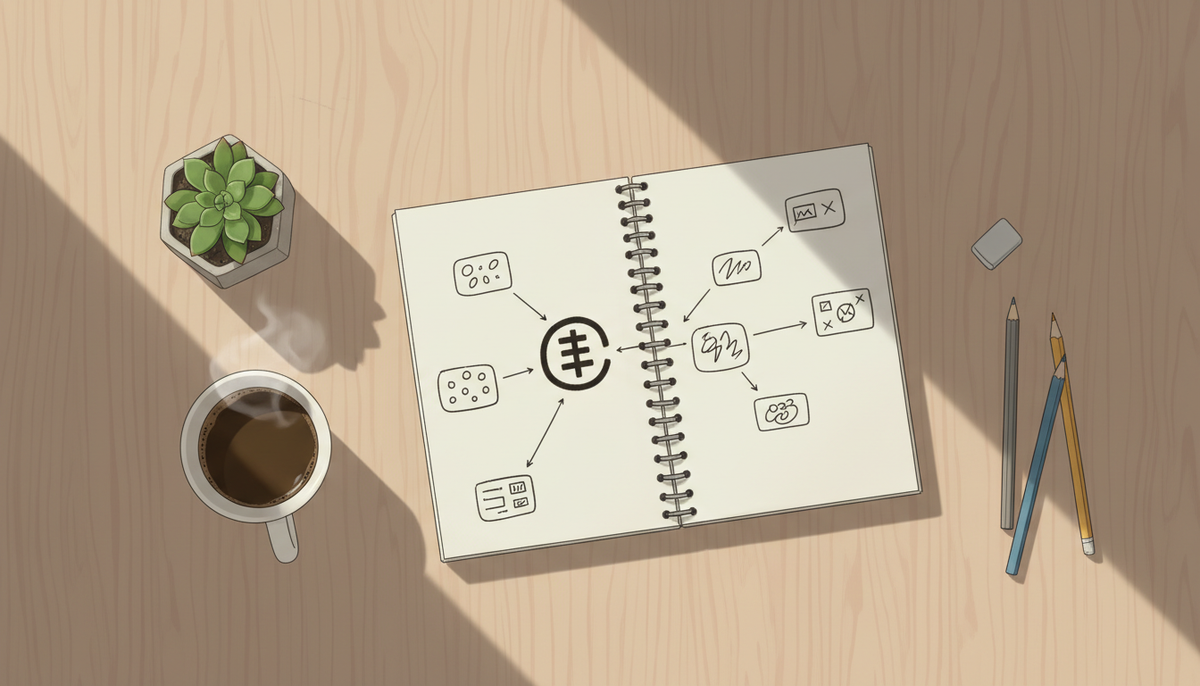
Twenty ideas sounds like a lot. It is not. Once you have a tight topic, the ideas come quickly. Use this method: write your topic in the centre of a blank page, then draw five branches. Each branch is a sub-angle. Under each sub-angle, write four specific video titles. That gives you twenty titles in about fifteen minutes.
For a channel about daily life in ancient Rome, the five branches might be: food and drink, home and family, work and trade, entertainment, and religion and superstition. Under "food and drink" you might write: What did a Roman soldier eat on a march? The strange foods Romans ate that we would never touch today. How Roman bread was made and why it was so hard. What a Roman dinner party actually looked like. That is four titles from one branch, and you have four more branches to go.
Keep this list somewhere you can add to it. Every time you read something interesting about your topic, it becomes a future video. Your list will grow faster than you can make videos, which is exactly where you want to be.
If you get stuck, the AI Coach inside Digital Maker AI can suggest video ideas, hooks and titles for your niche. Pro plan users and above can also run live Faceless Finder lookups inside the chat to see what topics are growing right now.
Step 5: Enter Your Tight Topic in the Video Maker
Now it is time to make your first video. Sign in at digitalmaker.ai/faceless and press the Video Maker button in the left sidebar. Choose Long-Form Faceless Video. At step 2, choose "Write it for me" and the AI will write the script from your topic. On a paid plan you can also paste your own script.
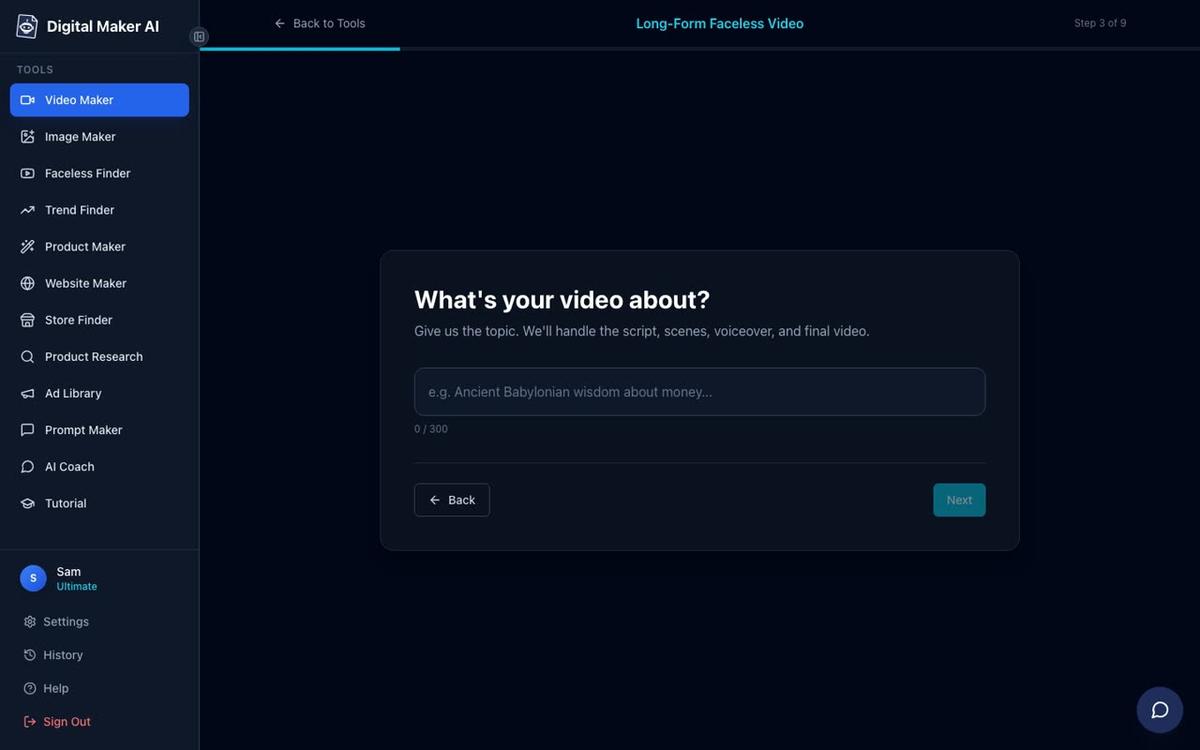
At step 3 you will see a single topic box. This is the most important step for a single-topic channel. Type your video subject in one clear sentence. Be specific. Instead of "ancient Rome", write "What did a Roman soldier eat on a long military march?" The more specific your topic line, the more focused and watchable the script will be.
Step 6: Pick the Visual Style That Matches Your Niche
At step 5 you choose a visual style. This is where your channel gets its look. Every scene in every video you make will share this style, so your channel feels consistent from the very first upload.
Match the style to your niche. A channel about ancient Rome or Egyptian history fits the History or Ancient style perfectly. A personal finance channel looks sharp and credible with the Finance or Luxury style. A Stoic philosophy channel suits the Motivational or Dark Moody style. A science or space channel belongs in Space or Sci-Fi. A channel aimed at families or younger viewers can use the Animated or Cartoon style, which produces illustrated, cartoon-looking still scenes.
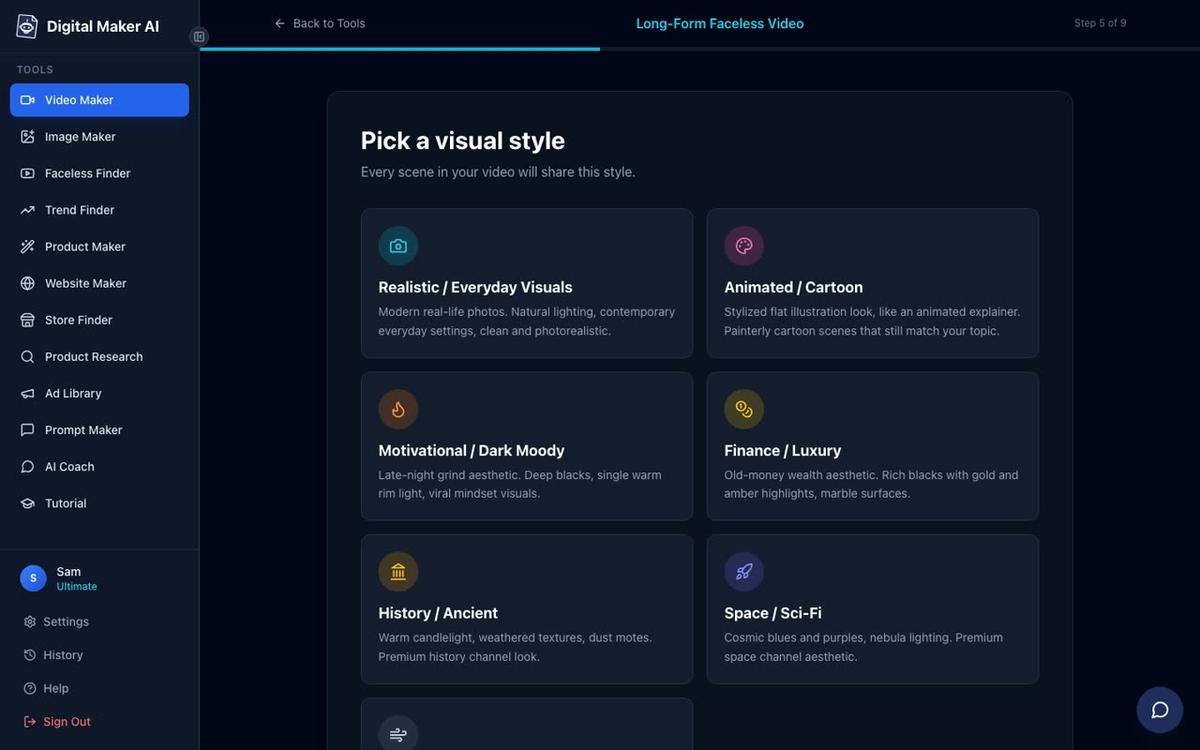
Pick one style and stick with it across your whole content series. Viewers will start to recognise your channel's look before they even read the title.
On the Free plan, you have two style choices: Realistic and Animated or Cartoon. The full set of seven styles is available on paid plans, which also generate every scene image fresh for any topic rather than drawing from a set library. You can check all plan options at digitalmaker.ai/pricing.
Step 7: Set the Length, Voice and Pacing
For a first video, five to eight minutes is a good target. It is long enough for YouTube to serve ads, short enough to finish quickly and upload the same day. At step 6 use the length slider to set this. At step 7 pick a narration voice. There are more than 100 built-in voices with male and female options and US, UK and Australian accents. Pick one that fits your channel's tone and use the same voice on every video. Consistency in voice is as important as consistency in visuals.
At step 8 choose your pacing. Calm works well for history and philosophy. Standard suits most niches. Energetic fits motivational and finance content where you want to keep things moving.
At step 9 you will see a summary of everything you have chosen, including how many minutes the video will use from your plan. Press Generate Video and the platform writes the full script, generates a unique AI image for every scene, adds your chosen narration and captions, and returns a finished MP4 ready to upload to YouTube. The whole process usually takes three to six minutes.
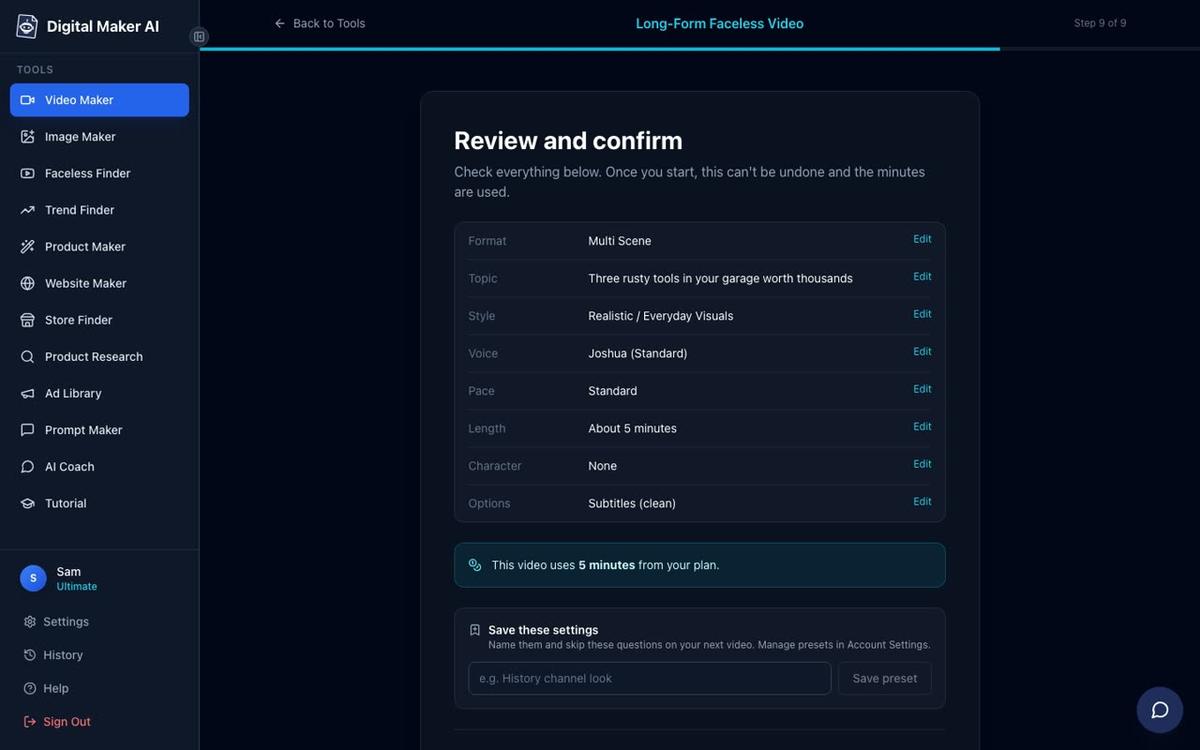
After the video is made you can regenerate any scene image you are not happy with (ten free regenerations per video), swap in your own image, or edit the narration text. There is no timeline editor to learn.
For ideas on how to build a longer video series around a single subject, the guide on making a faceless video for a local business shows how to structure repeatable content around one theme.
Step 8: Keep Your Channel Consistent from Video Two Onwards
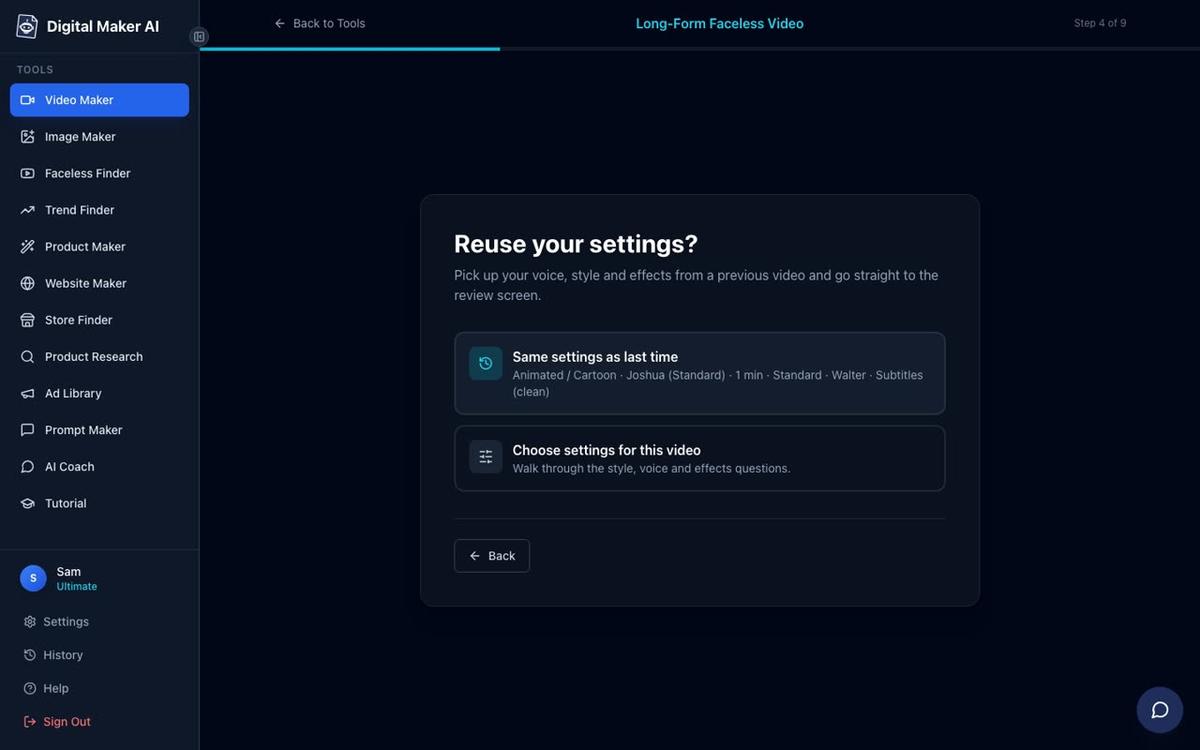
The biggest advantage of a single-topic channel is that every decision you make once applies to every future video. Same visual style, same voice, same pacing, same caption look. Digital Maker AI remembers your last settings at step 4 of the video maker, so you can reuse them with one click rather than choosing everything again.
On Premium and Ultimate plans you can also save a recurring character, a drawn figure who appears in every scene of every video. This is a powerful way to give your channel a face without ever appearing on camera yourself. You can read more about this in the guide to consistent AI character videos.
Premium and Ultimate users can also post finished videos directly to YouTube from inside the platform, now or on a schedule, after connecting their account once in settings. Nothing posts automatically. You press Post when you are ready.
Common Mistakes to Avoid
- Picking a topic that is too broad. If you cannot name 20 video ideas in ten minutes, narrow the topic further.
- Changing the visual style halfway through. Pick one style before your first video and keep it. Viewers notice when a channel changes its look.
- Uploading once and waiting. The algorithm rewards channels that upload regularly. Aim for at least one video a week. With 20 ideas already planned, that is five months of content.
- Ignoring the Faceless Finder. Checking what real channels in your niche are doing before you start saves weeks of guessing. The estimated revenue figures show which niches attract advertisers, which matters a lot for long-term earnings.
- Making every video a different length. Pick a target length and stick close to it. Consistent length trains your audience to know what to expect.
What to Do Next
Open the Faceless Finder at digitalmaker.ai, search for your niche and spend fifteen minutes studying the channels that are already working. Write down your 20 video ideas. Then come back to the Video Maker and make your first video today. The whole process from sign-up to a finished MP4 takes under an hour.
If you want a complete walkthrough of growing a faceless channel from scratch, including choosing a channel name, designing a banner and planning your first month of uploads, the free faceless YouTube channel course covers every step in detail.
Alex Stevens: Alex Stevens writes for the Digital Maker AI team about faceless YouTube channels, AI presenters and AI video tools.