Murf AI vs Digital Maker AI: Voiceover Tool or Full Video?
By Alex Stevens
Murf AI vs Digital Maker AI: The Short Answer
If your single criterion is getting a finished, ready-to-upload YouTube video with the least editing work, Digital Maker AI wins for solo creators who have no footage and no editing skills. Murf AI wins for video editors who already have footage and need a studio-quality voice to lay over it. That is the core difference, and everything else in this comparison flows from it. The keyword murf ai vs digital maker ai comes up constantly in creator forums, and for good reason: the two tools solve adjacent problems in very different ways.
To judge them fairly, one criterion was applied throughout: how much work does a solo creator still have to do after pressing the generate button? Pricing figures are taken from each product's official site as of October 2026 and are confirmed below. Where a figure could not be confirmed from a live source, that is noted.
Murf AI: Best-in-Class Voiceover, Nothing More
Murf AI is a dedicated text-to-speech and audio production platform. The company states that it offers more than 200 AI voices across 35-plus languages, with word-level controls for pitch, speed, emphasis and pauses. Its browser-based Murf Studio lets you paste a script, pick a voice, and fine-tune every syllable before exporting. The output is a high-quality audio file, not a video.
Beyond the core voice generator, Murf has expanded into three connected products. Murf Studio handles voiceover creation. Murf Dub is an AI dubbing platform that takes an existing video and re-voices it in 40-plus languages while preserving the original timing, background music and sound effects. Murf Falcon is a low-latency API for developers building conversational agents. Voice cloning is available on higher tiers, letting you create a custom voice from a short recording and then adjust its pitch, intonation and pace to suit your needs.
The controls are genuinely fine-grained. The company states that you can adjust pitch contours, rhythm and intonation at the sentence level, or go word by word to add emphasis or a pause. For e-learning producers, corporate narrators and video editors who know exactly what footage they are working with, that level of control is hard to match.
Murf AI pricing (as of October 2026, check murf.ai/pricing for current rates):
- Free: $0, limited voice access, no commercial rights, suitable for testing only.
- Creator: $19 per month billed annually (or $29 per month on monthly billing), 24 hours of voice generation per year, one seat, commercial rights included.
- Business: $66 per month billed annually (or $99 per month on monthly billing), 96 hours of voice generation per year on annual billing, advanced voice controls, team collaboration and priority support.
- Enterprise: Custom pricing for large organisations needing voice cloning, SSO and compliance features.
Who should pick Murf AI: A video editor, e-learning developer or marketing team that already has footage, slide decks or animations and simply needs a high-quality narration track. Murf gives you the voice; you still need to import it into your editing software, sync it to your visuals, add captions, export and compress. If that workflow already exists for you, Murf is excellent at its job.
Where Murf AI falls short for YouTube creators: Murf does not write your script, generate scene images, add captions or produce an MP4. After Murf, you are holding a WAV or MP3 file and a blank timeline. For a solo creator with no editing background, that gap is significant.
Digital Maker AI: End-to-End Faceless Video
Digital Maker AI approaches the problem from the opposite direction. Rather than producing a voice and handing it back to you, it produces a complete video. You type a topic (or paste your own script on paid plans), choose a visual style, pick a voice and captions look, and the platform writes the script, generates a unique AI image for every scene, records the narration, burns in captions and returns a ready-to-upload MP4. There is no timeline editor, no manual trimming and no need to own any other software.
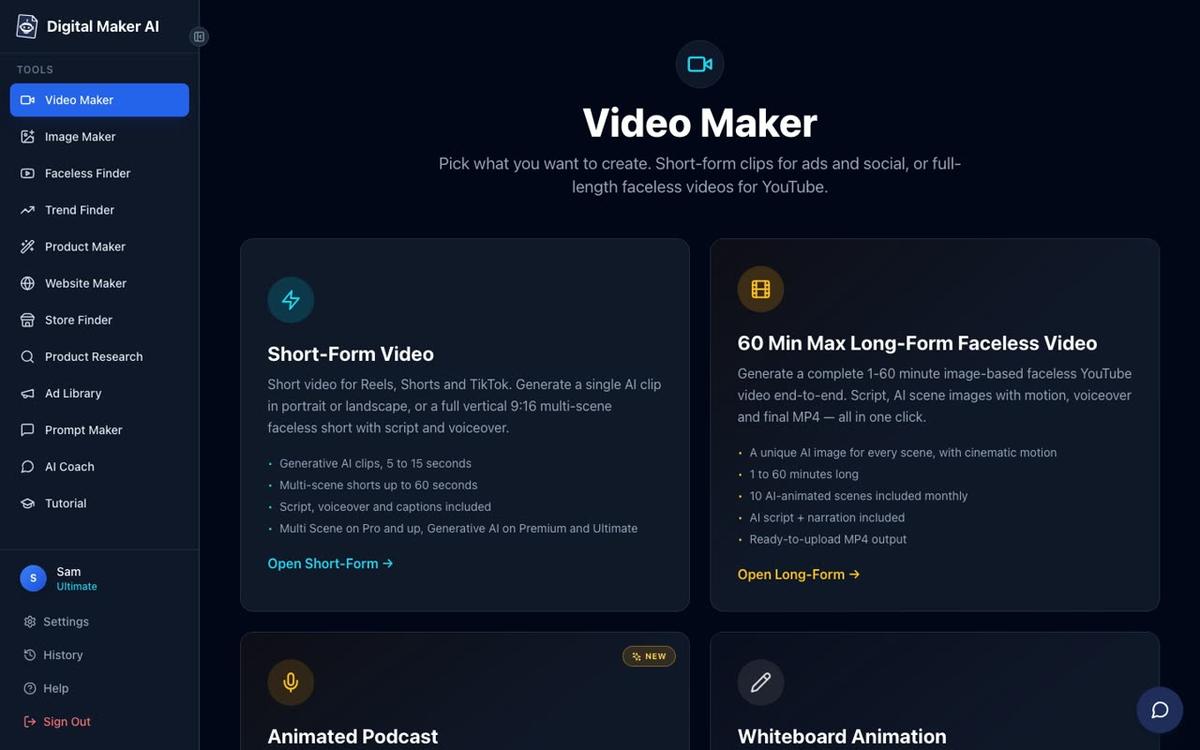
On the voice side, Digital Maker AI includes more than 100 built-in AI narration voices covering male and female options, US, UK and Australian accents, and adjustable pace. Premium and Ultimate subscribers can go further with Voice Design, which lets you describe the voice you want in writing and the platform builds it for you, with no ElevenLabs account needed. Alternatively, if you already use ElevenLabs and have a cloned voice there, you can add your own ElevenLabs API key in Account Settings and the narration will use your cloned voice and your ElevenLabs credits. That is the only route to a cloned voice inside Digital Maker AI, and it is a deliberate one: you retain full control of your voice data through your own account.
Seven visual styles are available: Realistic, Animated or Cartoon, Motivational or Dark Moody, Finance or Luxury, History or Ancient, Space or Sci Fi, and Minimalist or Clean. Six caption looks let you match the style of the biggest YouTube channels. After a video is generated, you can regenerate any scene image (ten free regenerations per video), swap in your own image or a short clip, or edit the narration text without rebuilding the whole video.
Digital Maker AI pricing (as of October 2026, see digitalmaker.ai/pricing for current rates):
- Free: No card needed. Five one-time free videos (one of each type), English only, standard voices, watermarked. Commercial rights included.
- Pro: $29 per month ($249 per year), 40 video minutes per month, videos up to 10 minutes long.
- Premium: $59 per month ($479 per year), 150 video minutes per month, videos up to 30 minutes long. Unlocks Voice Design, AI Presenters, recurring characters, animated scenes, social posting and more.
- Ultimate: $99 per month ($799 per year), 300 video minutes per month, videos up to 60 minutes long, 3 minutes of avatar time per month, and up to 3 designed voices.
Where Digital Maker AI is honest about its limits: It does not offer a timeline editor for manual trimming and transitions. It does not have a stock footage library or b-roll. Its voice controls are less granular than Murf's word-level pitch and pace editing. If you need to dub an existing video into 40 languages, Murf Dub is built for that and Digital Maker AI is not. For creators who want deep audio engineering, Murf remains the stronger dedicated tool.
The AI Presenter Feature: Where the Gap Widens
The clearest illustration of the murf ai vs digital maker ai difference is the AI Presenter feature, which is available on Premium and Ultimate plans and fully launched as of October 2026. You describe who your presenter is and their setting in a sentence or two, the platform draws a photoreal picture of them, and you save them for reuse across every future video. In the Video Maker you pick one, three or all of the available layouts: Full screen (the presenter fills the frame), Split screen (presenter on the left, scene on the right) or Corner circle (the scene with a round presenter window in the corner). A slider sets how much of the video the presenter appears, and markers on a timeline bar let you place them at the start, the middle, the end, or throughout.

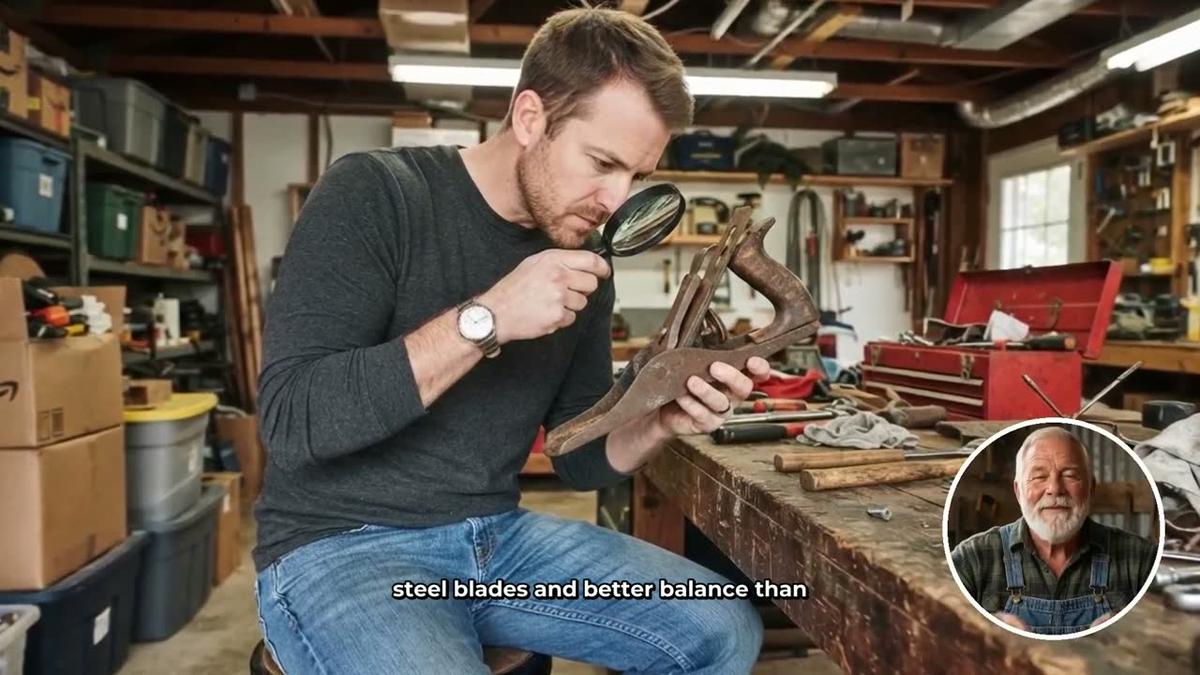
The presenter speaks the same narration voice as the rest of the video, with captions. Presenter time runs on a separate avatar time pool: Premium starts with 2 minutes and Ultimate with 5 minutes, with 3 more minutes added to Ultimate each month. Additional avatar time is available as one-off Avatar Packs (3 minutes for $15, 10 minutes for $45, 30 minutes for $119, as of October 2026). See digitalmaker.ai/pricing for current pack prices. You can learn more about what this looks like in finished videos on the AI avatar video generator page.
Murf has no equivalent. It produces an audio file. Turning that audio into a video with a talking presenter requires a separate avatar tool, a video editor, and the time to stitch them together. Digital Maker AI handles all of that inside a single workflow.
Murf AI vs Digital Maker AI: Recommendations by Use Case
Use this as a quick guide to which tool fits your situation.
Best for a solo YouTube creator with no editing experience
Digital Maker AI. You type a topic, choose your settings and get a finished MP4. No audio editor, no video editor, no timeline. The Free plan gives you one long-form video (up to 8 minutes) and one Short with no card required, so you can test the full pipeline before spending anything.
Best for a video editor who already has footage
Murf AI. If you have a finished cut sitting in Premiere Pro or DaVinci Resolve and you need a voice to lay over it, Murf's word-level controls and 200-plus voices are hard to beat. The Creator plan at $19 per month (annual billing, as of October 2026) gives you 24 hours of voice generation per year, which is substantial for most individual creators.
Best for multilingual dubbing of existing videos
Murf AI. Murf Dub supports dubbing in 40-plus languages and preserves the original video timing and background audio. Digital Maker AI supports French, Spanish, Italian and German on Premium and Ultimate, but only for new videos, not for dubbing existing footage.
Best for a faceless channel with a recurring on-screen host
Digital Maker AI. The AI Presenter feature lets you build a consistent photoreal host who appears across every video in your channel. You can also save a recurring character and have the same illustrated figure drawn into every scene. Neither of these features exists in Murf, which is an audio-only tool.
Best for e-learning and corporate narration teams
Murf AI. The Business plan's team collaboration features, priority support and deep pitch and pace controls are built for professional narration workflows. Digital Maker AI is optimised for YouTube-style content rather than SCORM packages or slide-synced e-learning.
Best value for a creator who wants both voice quality and a finished video
Digital Maker AI Premium. At $59 per month (as of October 2026, see digitalmaker.ai/pricing), you get 150 video minutes, Voice Design, AI Presenters, recurring characters, animated scenes and direct social posting to YouTube, TikTok and Instagram. That is a complete production stack for a solo creator, at a price comparable to Murf's Business plan which covers audio only.
For creators who want to explore the long-form faceless video format specifically, Digital Maker AI's pipeline from topic to MP4 is the most direct route available without hiring an editor or learning a timeline tool.
The Bottom Line
Murf AI and Digital Maker AI are not really competing for the same customer. Murf is the right choice when you have footage and need a voice. Digital Maker AI is the right choice when you have a topic and need a video. The murf ai vs digital maker ai decision comes down to where you are starting from: an empty timeline or an empty idea. If it is the latter, Digital Maker AI's free plan is a no-risk way to see a finished video in under ten minutes. Start with the free creator course to learn how to build a faceless channel from scratch, pick your niche and get your first video published.
Alex Stevens: Alex Stevens writes for the Digital Maker AI team about faceless YouTube channels, AI presenters and AI video tools.