How to Make a Faceless Video About a Book or Course You Sell
By Alex Stevens

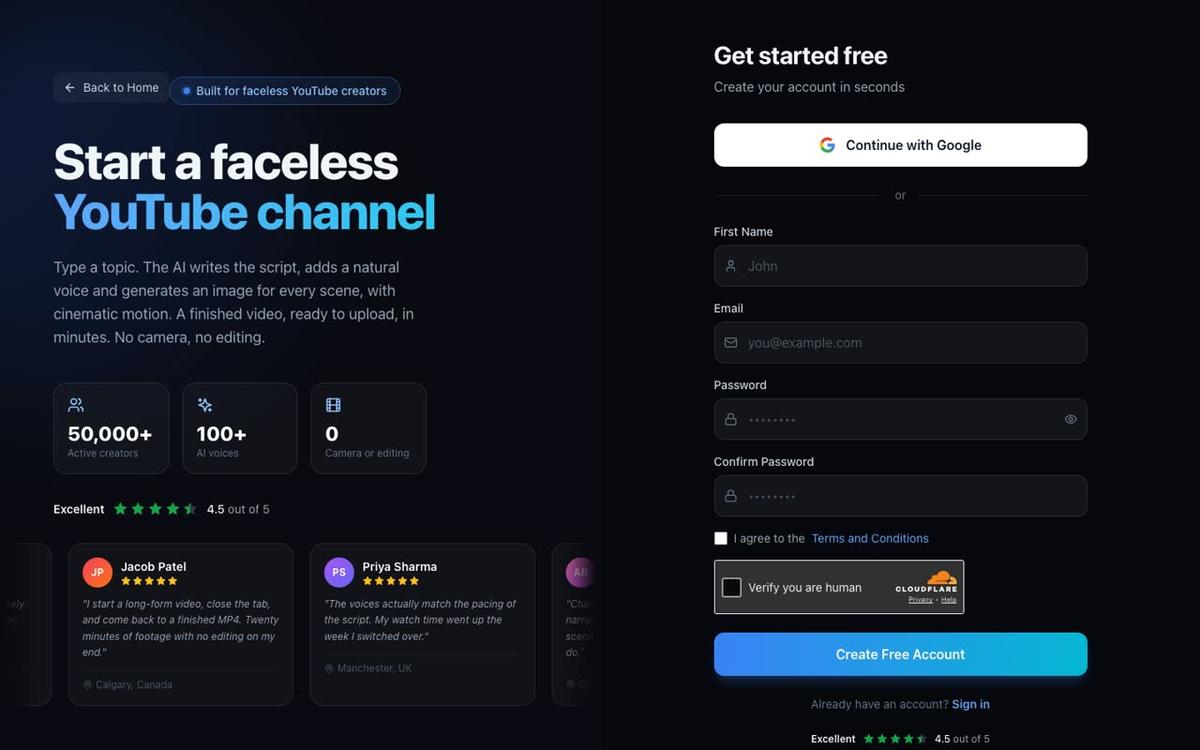
By the end of this guide you will have a complete, ready-to-upload faceless YouTube video that drives free traffic to your ebook, course or printable planner. You will know how to pick a topic angle that teaches something real, write a script that ends with a soft call to action, and build the whole video inside the Digital Maker AI Long-Form Faceless Video maker without recording your voice or showing your face. This is the full workflow for anyone who wants to know how to make a faceless YouTube video to sell a product, from blank page to published video.
Step 1: Pick a Topic Angle That Serves Your Product Without Being an Ad
The biggest mistake product creators make on YouTube is treating every video as a sales pitch. Viewers click away the moment they feel sold to. The goal is to teach something genuinely useful, something that your product takes further. Think of the video as a free sample of the thinking inside your product.
If you sell a budgeting course, a video titled Why Most People Overspend in the First Week of the Month teaches a real insight. It is not an ad. But by the end, the viewer naturally wants to know more, and that is where your soft call to action lives. If you sell a meal-planning printable, a video on How to Plan a Week of Dinners in Under 20 Minutes demonstrates exactly the problem your product solves.
A good rule: the video should be worth watching even if the viewer never buys. That trust is what converts them later.
Practical tips for choosing your angle:
- Write down the three biggest frustrations your product solves. Each one is a potential video topic.
- Search YouTube for your niche and look at the titles of videos with high views. What question are they answering?
- Avoid titles that sound like ads. Why This Planner Changed My Morning Routine feels promotional. 5 Morning Habits That Actually Stick feels useful.
- Keep one topic per video. Trying to cover everything dilutes both the teaching and the call to action.
Step 2: Write a Script That Educates and Ends With a Soft Call to Action
A faceless YouTube video that ranks and converts follows a simple structure: hook, problem, teaching, resolution, call to action. The hook is the first 30 seconds. It tells the viewer exactly what they will learn and why it matters to them right now. The problem section builds empathy. The teaching section delivers real value. The resolution wraps it up. The call to action is the last 30 to 60 seconds.
The soft call to action does not say "buy my course." It says something like: "If you want the full system I use for this, I put it all into a step-by-step guide you can grab in the description." That one sentence is enough. It respects the viewer and it converts better than a hard sell.
Script length and video length: Videos between 8 and 15 minutes tend to rank well on YouTube. They are long enough to cover a topic properly, which signals quality to the algorithm, but short enough that viewers watch to the end. Aim for a script of around 1,200 to 2,000 words for a 10 to 15 minute video, depending on your narrator's pace.
On paid plans you can paste your finished script directly into the video maker. On the free plan, the AI writes the script from a topic line you provide, which is a fast way to get started and see how the process works.
Step 3: Sign Up and Open the Long-Form Video Maker
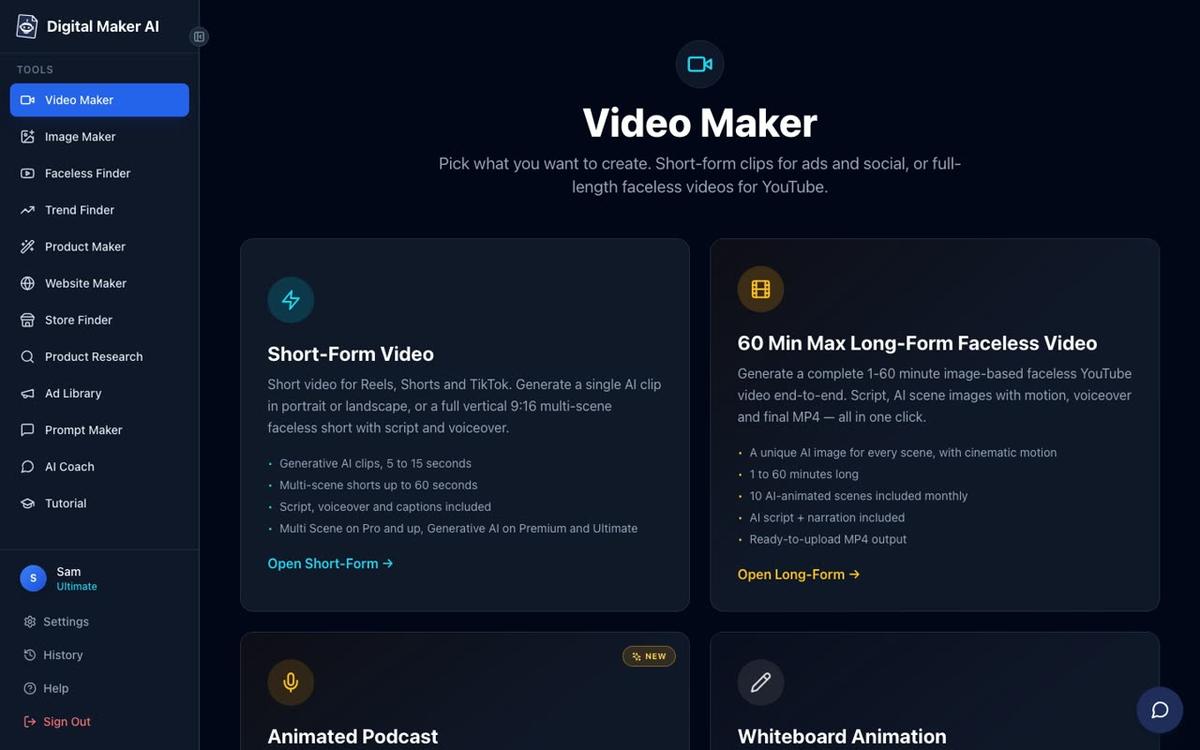
Go to digitalmaker.ai/faceless and create a free account. No card is needed. Once you are signed in, click the Video Maker button in the left sidebar. You will see cards for Short-Form Video, Long-Form Faceless Video, Animated Podcast and Drag and Drop Studio. Click the Long-Form Faceless Video card to begin.
The maker walks you through nine steps. Each step is one decision: format, script source, topic, settings, visual style, length, voice, pacing and a final review. You cannot get lost.
Step 4: Choose Multi Scene Format and Enter Your Topic (Steps 1 to 3)
At step 1, choose Multi Scene. This gives every scene in your video its own AI-generated image, which keeps the visuals fresh and holds attention across a 10 to 15 minute video. At step 2, choose whether you want the AI to write the script for you, or whether you want to paste your own. Paid plan users can paste a finished script; free plan users let the AI write from a topic line.
At step 3, you type your topic into a single box. Be specific. Instead of "budgeting tips," write something like: "Why most people overspend in the first week of the month and how to fix it." The more specific your topic line, the more focused the script the AI produces.
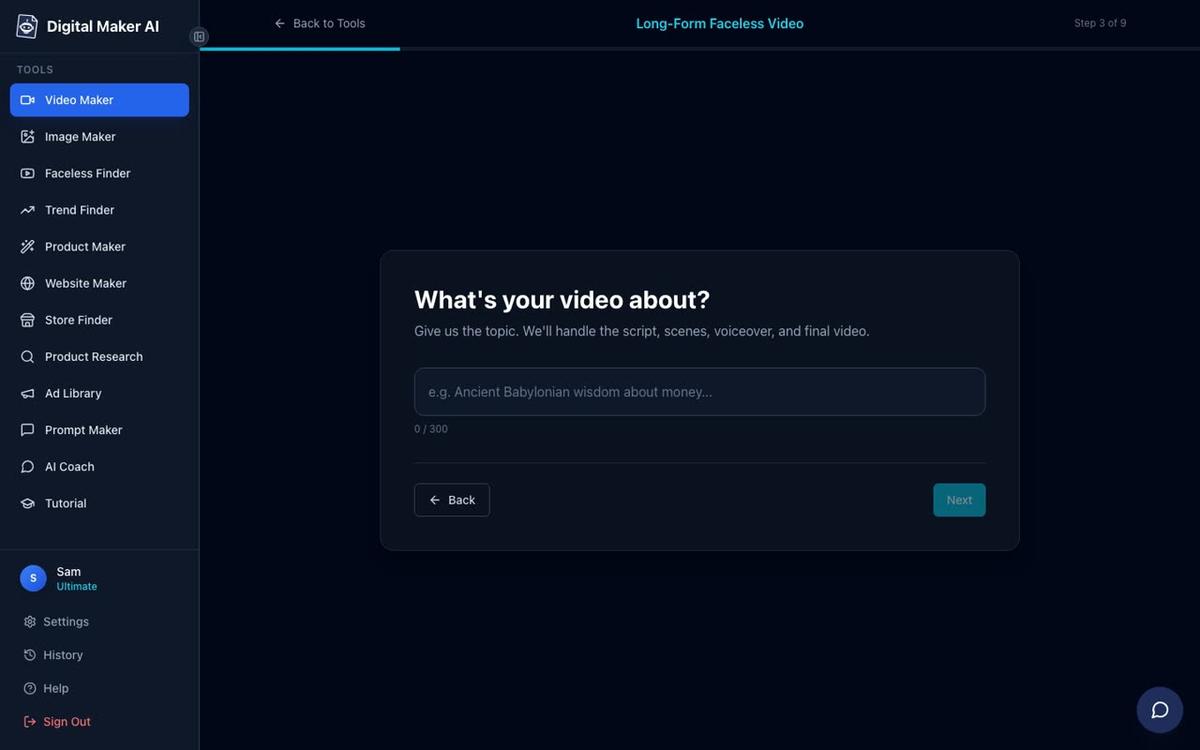
Tip: If your product is a finance course, include a phrase from your product's core promise in the topic line. The AI will reflect that framing in the script, making the call to action feel natural rather than bolted on.
Step 5: Pick a Visual Style That Matches Your Product's Tone
This is one of the most important decisions you will make, because the visual style sets the emotional tone of the whole video. There are seven styles to choose from: Realistic or Everyday Visuals, Animated or Cartoon, Motivational or Dark Moody, Finance or Luxury, History or Ancient, Space or Sci-Fi, and Minimalist or Clean.
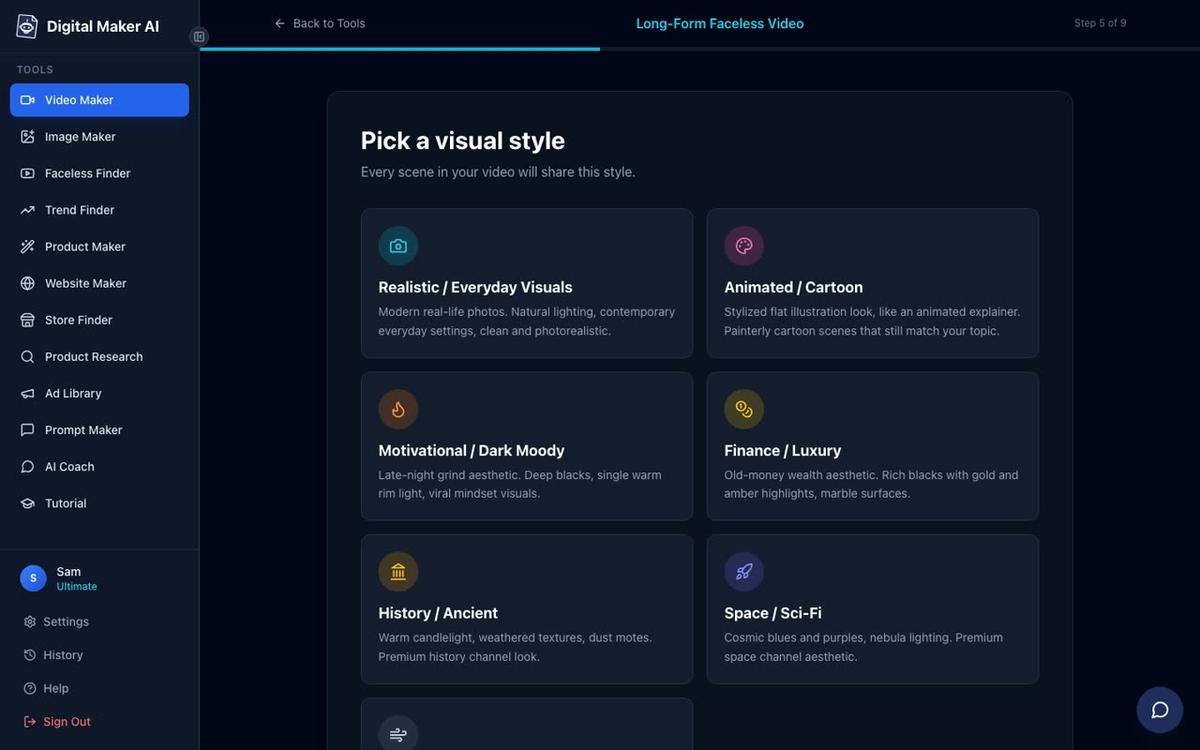
Match the style to what your product buyer expects to see:
- Finance or Luxury works well for money courses, investing guides and premium planners. It signals credibility.
- Minimalist or Clean suits productivity tools, templates and workbooks. It feels calm and organised.
- Animated or Cartoon works for beginner-friendly courses and children's educational products. Note that this style produces illustrated, cartoon-style still images, not moving animation.
- Motivational or Dark Moody suits self-development courses, journaling guides and mindset products.
- Realistic or Everyday Visuals is a safe, versatile choice for almost any niche, from health and fitness to cooking to parenting.
On the free plan you have two style options: Realistic and Animated or Cartoon. Paid plans unlock all seven and generate every scene image fresh from your specific topic, rather than drawing from a set library.
Step 6: Set the Right Video Length
At step 6 you set the length with a slider. For a product-selling video, aim for 8 to 15 minutes. This range gives you enough time to teach something substantial, which keeps viewers watching and tells the YouTube algorithm the video is worth recommending. Shorter videos often rank for less competitive searches but have less room to build trust before the call to action.
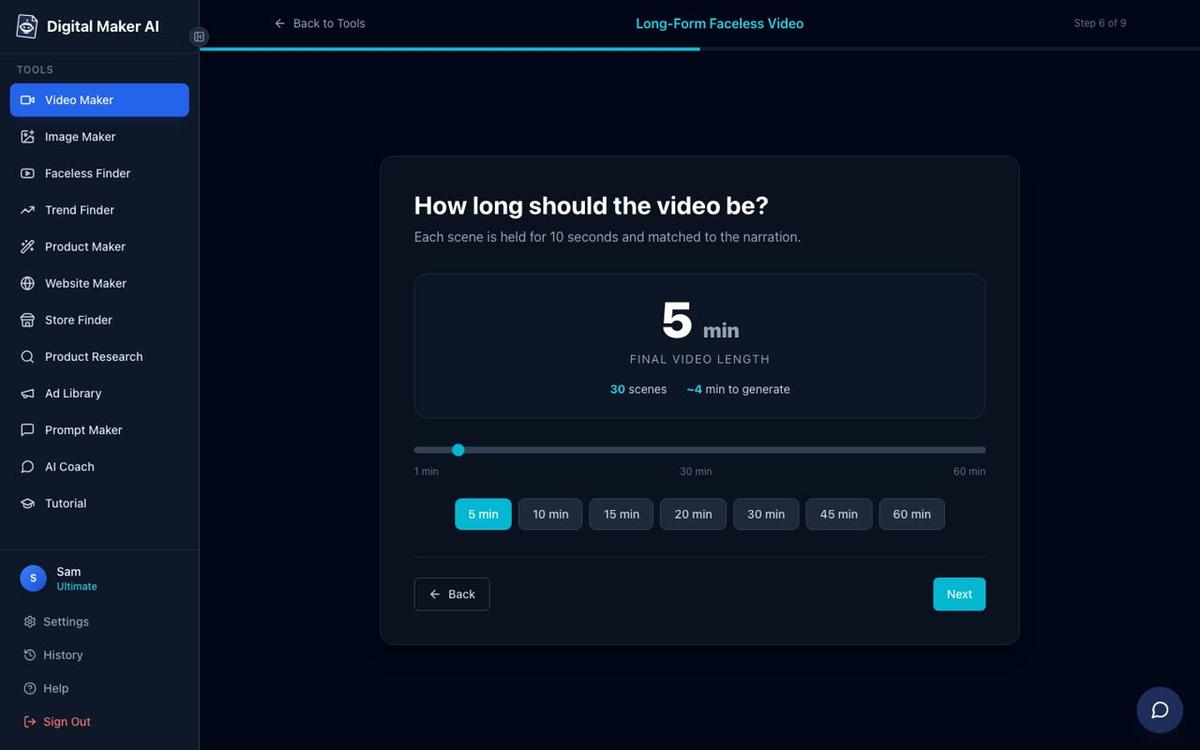
The free plan supports long-form videos up to 8 minutes, which is enough to test the workflow and see a finished result. Pro plan goes up to 10 minutes, Premium up to 30, and Ultimate up to 60. For a first product-selling video, 8 to 10 minutes is a perfectly good starting point.
Step 7: Choose a Voice That Fits Your Brand
The narration voice is the personality of your video. There are over 100 built-in voices to choose from, with male and female options and US, UK and Australian accents. You can filter by gender and accent and preview any voice before committing.
Think about who your product buyer is and what kind of voice they would trust. A calm, measured US female voice works well for wellness and productivity content. A confident, clear UK male voice suits finance and business topics. An energetic, warm voice works for motivation and self-development.
Premium and Ultimate plan users can also design a custom voice from a written description, or connect their own cloned ElevenLabs voice for a completely unique sound across every video.
Step 8: Review and Confirm Before Generating
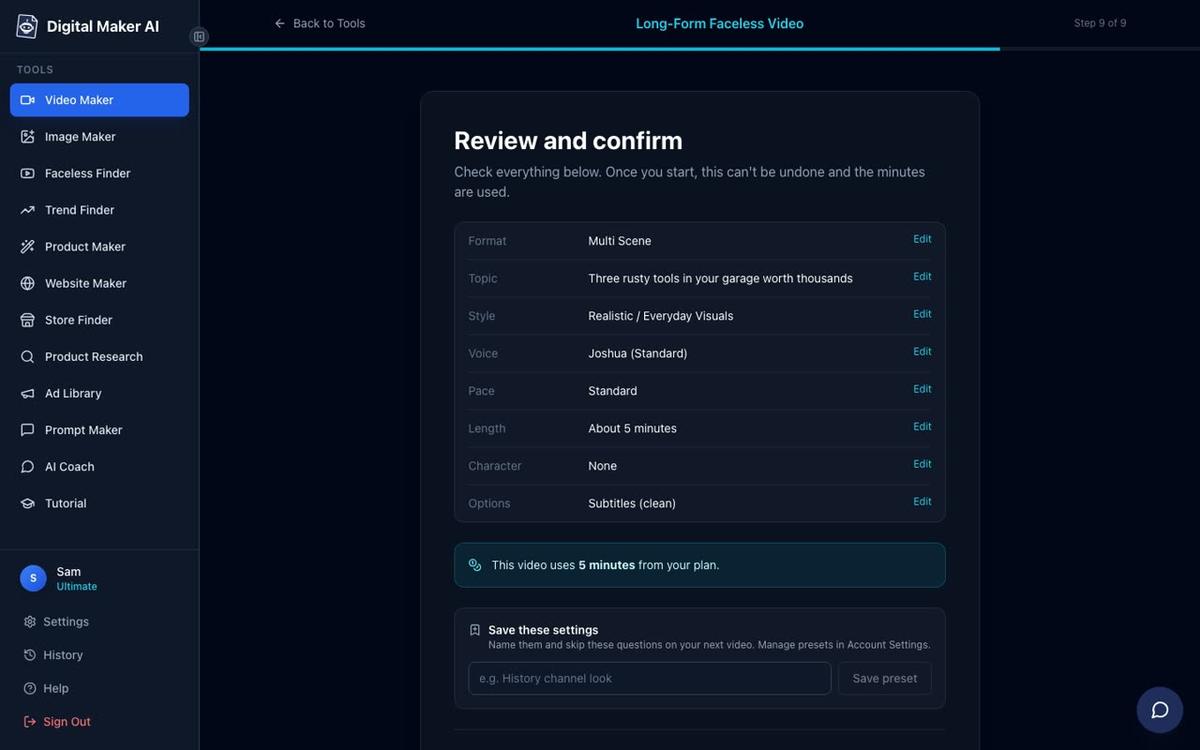
Step 9 shows you a full summary before anything is generated. You can see the format, topic, visual style, voice, pace, length and how many minutes the video will use from your plan. Check everything here. Once you press Generate Video, the AI writes the script, creates a unique image for every scene, records the narration and assembles the MP4. This usually takes 3 to 6 minutes.
After the video is ready you can regenerate any scene image you are not happy with (each video gets 10 free regenerations), swap in your own image or a short clip, and edit the narration text for any scene. This is where you would refine the call to action at the end, making sure it mentions your product and points viewers to the link in the description.
How to Make a Faceless YouTube Video to Sell a Product: Getting It to YouTube
Once you are happy with the finished video, it is time to publish. Premium and Ultimate plan users can post straight to YouTube from the Post to socials button inside the video, after connecting their YouTube account once in Account Settings. You can post immediately or schedule it for a specific time. Every post is labelled as AI generated. If you want to learn more about the auto-publishing workflow, the AI video auto-publishing feature page covers how it works in detail.
Free and Pro plan users download the MP4 and upload it to YouTube manually, which takes under two minutes.
Before you publish, complete your YouTube video description:
- Put the link to your product or sales page in the first two lines, before the "show more" cut-off.
- Write a short paragraph summarising what the video covers, using the same words your buyer would search for.
- Add three to five relevant hashtags at the bottom.
- Create a custom thumbnail. The Image Maker inside Digital Maker AI can generate YouTube thumbnails to match your video's visual style.
Building a Series: One Product, Multiple Videos
A single video can drive traffic, but a series of five to ten videos on related topics builds a channel that compounds over time. Each video teaches one thing, and each one ends with a soft call to action pointing to the same product. Over a few months, the channel becomes a free, always-on traffic source that you own.
Plan your series around the main objections and questions your buyers have before they purchase. If you sell a freelancing course, your series might cover: how to find your first client, how to price your services, what to include in a proposal, how to handle a difficult client, and how to raise your rates. Each video is useful on its own. Together they build the case for your course without ever feeling like an ad.
For a consistent look across your series, use the same visual style, the same narration voice and the same caption style in every video. Premium and Ultimate plan users can also save a recurring character who appears in every video, giving the channel a recognisable face without you ever appearing on screen.
Common Mistakes to Avoid
- Pitching too early. If you mention your product in the first two minutes, viewers feel sold to and leave. Save the call to action for the final minute.
- Choosing a topic that is too broad. "How to save money" will not rank. "Why most people fail at saving in January" has a specific angle that a specific viewer will search for.
- Mismatching the visual style and the product. A dark, moody visual style for a cheerful children's activity planner sends a confusing signal. Take five minutes to match the style to your buyer's expectations.
- Forgetting the description link. The video can do everything right and still fail to convert if the product link is buried or missing from the description.
- Making only one video. One video is a test. A series is a strategy. Plan at least five topics before you start so you have momentum.
- Ignoring the thumbnail. On YouTube, the thumbnail and the title do the job of getting the click. A generic thumbnail costs you views even when the video is excellent.
What to Do Next
The free plan on Digital Maker AI lets you build one long-form faceless video of up to 8 minutes at no cost, with no card required. That is enough to go through the full workflow, see a finished MP4, and decide whether this is the right approach for your product before committing to a paid plan. The free video carries a small watermark, and upgrading later removes it from that video. For more details on what each plan includes, visit the pricing page.
If you want to see how other creators are using faceless videos to sell products, the Digital Maker AI faceless channel hub is a good place to explore real channel examples and niche ideas. And if you want to go deeper on the video-making process, the free course at digitalmaker.ai/free-course walks you through building your first faceless YouTube channel from scratch, including how to structure videos that sell without feeling like ads.
Alex Stevens: Alex Stevens writes for the Digital Maker AI team about faceless YouTube channels, AI presenters and AI video tools.