How to Get Your First 1,000 YouTube Subscribers With AI Videos
By Alex Stevens

By the end of this guide you will know exactly how to get your first 1,000 YouTube subscribers using AI-generated faceless videos, even if you have never recorded yourself, never edited a clip and have zero budget to start. You will have a niche picked, a publishing rhythm set and a clear picture of the tools that do the heavy lifting for you. Most consistent creators who follow this approach hit 1,000 subscribers in three to six months.
Step 1: Understand What YouTube Actually Checks Before It Pays You
Before you think about how to get your first 1,000 YouTube subscribers, it helps to know why that number matters. YouTube requires two things before it lets you into the YouTube Partner Programme and turns on ad revenue: 1,000 subscribers and either 4,000 watch hours in the past 12 months or 10 million Shorts views in the past 90 days. Hitting subscribers without watch hours does nothing, and hitting watch hours without subscribers does nothing either. You need both, and you need them together.
The good news is that a weekly rhythm of AI-generated videos attacks both targets at the same time. Each long-form video adds to your watch hours. Each Short you post from the same content drives new viewers back to those longer videos. One upload a week, done consistently, is enough to get there.
Step 2: Pick a Tight Niche Using the Faceless Finder
The biggest mistake beginners make is choosing a topic that is too broad. "History" is not a niche. "Forgotten Roman emperors" is a niche. A tight niche means every video you make is relevant to every subscriber you already have, so your watch time climbs faster.
Digital Maker AI includes a tool called the Faceless Finder, available to every signed-in account including the free tier. It shows you real faceless YouTube channels, their subscriber counts, how many videos they upload per week, their average video length and an estimated monthly ad revenue based on recent views and typical ad rates for that niche. The estimate is Digital Maker AI's own rough figure, not the channel's real earnings, but it is useful for comparing niches side by side.
Type a topic into the search box and you will see which channels are already working in that space and how active they are. If you see several channels with tens of thousands of subscribers uploading once or twice a week, that is a healthy sign. It means the niche has an audience and the pace is achievable.
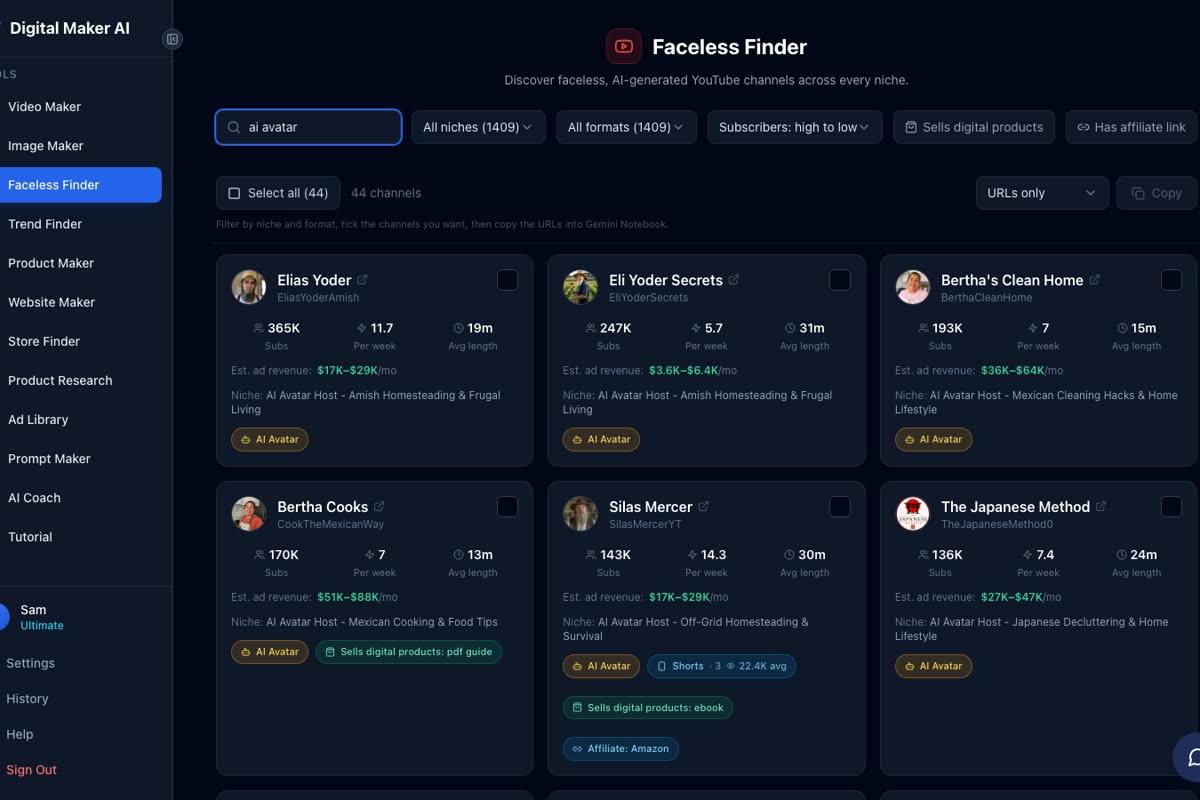
The Faceless Finder also marks channels fronted by an AI presenter with an "AI Avatar" label. Typing "AI avatar" in the search box filters to only those channels, so you can see exactly how other creators are using AI presenters to build audiences in niches like stoicism, home cleaning, cooking and gardening. For a deeper look at how those channels are built, read how to create an AI avatar for YouTube videos.
The free topic areas available in the image library cover money and personal finance, business and side hustles, motivation, stoicism, law of attraction, history, ancient Egypt, the Roman Empire, true crime and mysteries, psychology, space, the deep sea, health and fitness, and faith. Pick a niche from this list to start for free, then broaden to any topic once you upgrade.
Step 3: Write a Hook-First Script
The first 30 seconds of a YouTube video decide whether a viewer stays or leaves. YouTube measures this as "audience retention" and rewards videos that hold people with more recommendations. So every script you write needs to open with a hook: a question, a surprising fact or a bold claim that makes the viewer need to know what comes next.
A simple hook formula that works: state a problem or mystery in one sentence, hint at the answer in the next sentence, then tell the viewer they will get the full answer by the end of the video. For example: "Most people have no idea that ancient Rome had a form of fast food. The story behind it changes how you think about modern cities entirely. Stay with me."
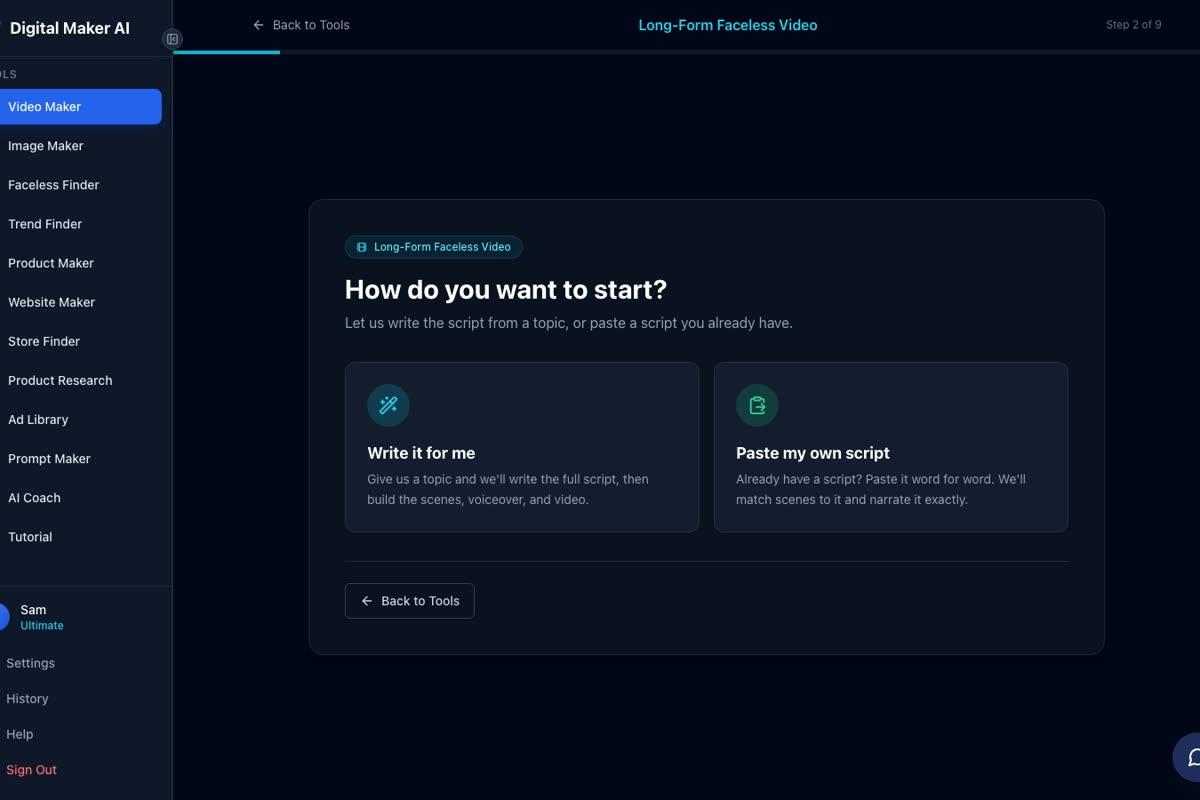
You do not need to write the full script yourself. The Long-Form Video Maker in Digital Maker AI has an AI script writer built in. At step 2 of the video maker you choose "Write it for me," type your topic in one line at step 3, and the AI writes a complete hook-first script with narration for every scene. On paid plans you can also paste your own script if you prefer.
Step 4: Build Your First Video With the Long-Form Video Maker
The Long-Form Video Maker is where a topic becomes a finished, ready-to-upload MP4. Here is exactly what happens, step by step, so you know what to expect the first time you use it.
Start by signing in at digitalmaker.ai/faceless. No card is needed for the free account. Once you are inside, click the Video Maker button in the left sidebar. This opens the free video screen. Pick Long-Form Video, then press Next at the bottom of the screen.
The maker walks you through nine steps. At step 2 you choose how to start the script. At step 3 you type the topic in one line. The AI uses that line to write the full script, generate a unique still image for every scene, record the narration and burn in captions, then return a finished MP4. You do not touch a timeline. You do not record anything. The whole process usually takes three to six minutes.
At step 5 you pick a visual style. Seven options are available: Realistic or Everyday Visuals, Animated or Cartoon, Motivational or Dark Moody, Finance or Luxury, History or Ancient, Space or Sci-Fi, and Minimalist or Clean. Every scene in the video shares that style, so the channel looks consistent from day one. Free accounts can choose from Realistic and Animated or Cartoon.
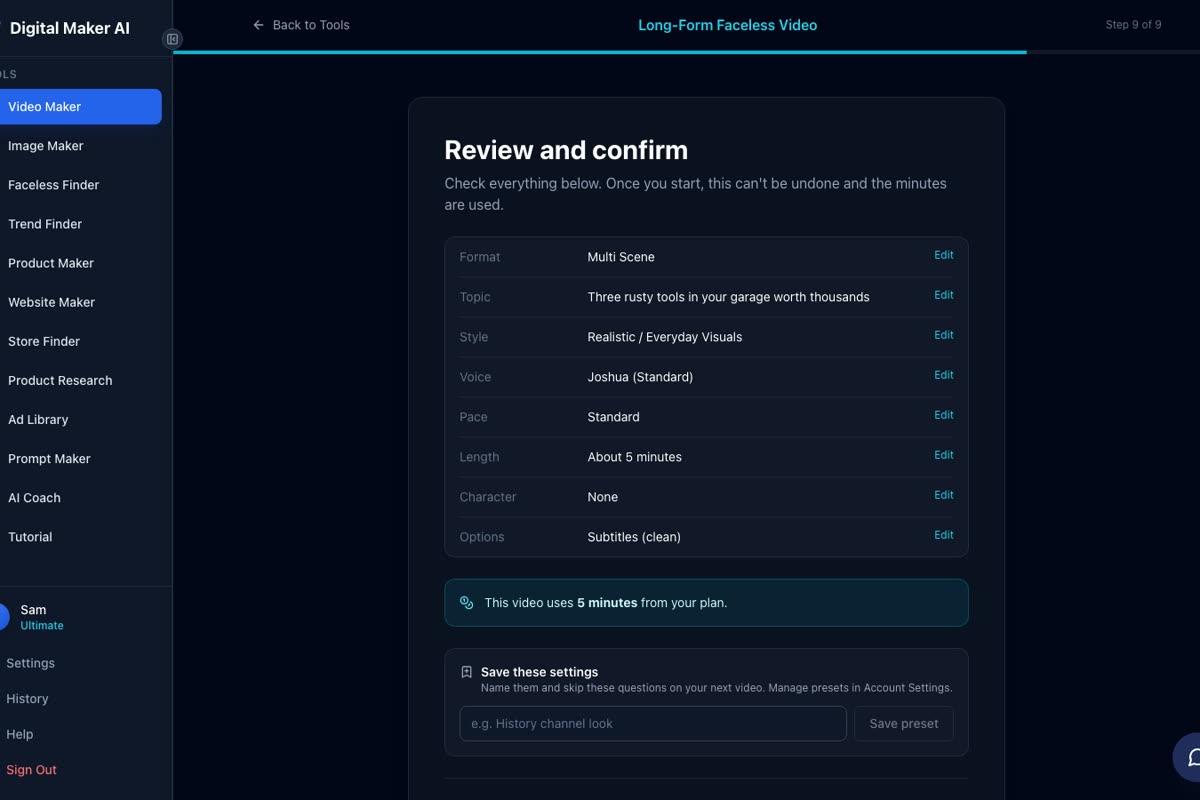
At step 9 you see a full summary before anything is generated. It lists your format, topic, style, voice, pace, length and how many minutes the video will use from your plan. Check everything here, then press Generate Video.
Free accounts get one long-form video up to 8 minutes, built from the ready-made image library in the set topic areas listed above. The video carries a small Digital Maker AI watermark. Upgrading later removes it from that video. Commercial usage rights are included on every plan, including Free, so you can monetise from the start.
Once the video is ready you can regenerate any scene image (10 free regenerations per video), swap in your own image, edit the narration text or change the voice. After that, download the MP4 and upload it to YouTube.
Step 5: Publish Consistently, Once a Week
Consistency is the single most important factor in reaching 1,000 subscribers. YouTube's recommendation algorithm rewards channels that upload regularly because it can predict when new content will arrive and plan when to show it. One video a week is the minimum cadence that keeps a channel active in YouTube's eyes.
The reason AI videos make this realistic is speed. A traditional YouTube video might take a full weekend to script, film, edit and export. An AI faceless video takes under ten minutes of your time: type a topic, pick your settings, wait a few minutes for the video to generate, then upload. That is a pace almost anyone can keep up with week after week.
Plan your first four videos before you publish the first one. Write four topics in your niche, all connected by a thread. For example, if your niche is ancient Rome: "The Roman fast food street that archaeologists just found," "Why Roman soldiers ate better than most modern armies," "The Roman emperor who was also a stand-up comedian" and "How Rome's sewer system shaped every city that came after it." Four connected videos give a new subscriber a reason to keep watching straight away, which builds watch hours fast.
Step 6: Turn Every Long-Form Video Into a YouTube Short
YouTube Shorts are a free traffic engine for your main channel. Every Short you post has a chance to appear in the Shorts feed to people who have never heard of you. When they tap through to your channel and subscribe, that subscriber also counts toward your 1,000. And if your Shorts rack up 10 million views in 90 days, that alone qualifies you for the Partner Programme.
The Short does not need to be a different idea. Take the hook from your long-form video, the first 30 to 60 seconds, and turn it into a vertical Short. The Video Maker includes a Short-Form Video option that produces a vertical 9:16 video between 15 and 60 seconds, with a new image every few seconds, narration and bold captions. It costs a flat one minute of your plan's video pool and is available on paid plans.

Post the Short on the same day as your long-form video, or one or two days later to spread out your uploads across the week. In the description of the Short, link to the full video. This turns Shorts viewers into long-form watch hours, attacking both monetisation targets at once. For a full walkthrough of making Shorts with AI, see how to make a YouTube Short with AI in under 10 minutes.
Step 7: Optimise the Title, Thumbnail and Description
A good video with a weak title gets ignored. YouTube uses the title and thumbnail together to decide whether to recommend a video. Keep these principles in mind for every upload.
- Title: Put the most interesting part of the video in the first five words. Use a number or a question when it fits naturally. "5 Things Rome Got Right That We Forgot" works better than "Interesting Facts About Ancient Rome."
- Thumbnail: One bold image, one short text phrase, high contrast. The Image Maker inside Digital Maker AI generates YouTube thumbnails from a text prompt, so you can match the visual style of your video.
- Description: Write two or three sentences that expand on the title, then add a few relevant keywords in natural sentences. YouTube reads descriptions to understand what a video is about.
- Tags: Add five to ten tags that match what someone would type to find the video. Include both specific phrases and broader category terms.
Common Mistakes That Slow You Down
These are the patterns that keep beginners stuck below 1,000 subscribers for much longer than they need to be.
- Switching niches after three videos. YouTube needs time to understand your channel and show it to the right audience. Give any niche at least ten videos before you judge whether it is working.
- Uploading without a hook. If the first 30 seconds of your video do not give the viewer a reason to stay, your audience retention will be low and YouTube will stop recommending it. Always write the hook first.
- Ignoring Shorts entirely. Long-form videos alone build watch hours slowly. Shorts are the fastest way to get your channel in front of new people at no extra cost.
- Waiting for a perfect video. A consistent imperfect video beats an occasional perfect one every time. Publish on schedule and improve as you go.
- Not checking analytics. YouTube Studio shows you which videos people watched all the way through and which ones they left early. After your first ten videos, look at the retention graphs and make more videos that look like your best performers.
The Free Plan and When to Upgrade
The Free plan is the right place to start. No card is needed. You get one long-form video up to 8 minutes, one vertical Short, one drag-and-drop video from your own images, one drag-and-drop movie from your own clips and one animated podcast, each made once. That is enough to test the tool, find your niche and publish your first piece of content.
Once your channel gains traction and you want to publish every week without a watermark, with longer videos and on any topic, upgrading to a paid plan makes sense. See the full breakdown of what each plan includes at digitalmaker.ai/pricing. Paid plans generate every scene image fresh on any topic, remove the watermark and unlock longer video lengths. The upgrade does not change how the tool works: the same nine-step process, just with more options and more minutes each month.
Your Realistic Timeline to 1,000 Subscribers
Here is what a typical growth curve looks like for a creator who follows this guide consistently.
- Month 1: Publish four long-form videos and four matching Shorts. Focus entirely on the niche and the hook. Expect low numbers. This is normal.
- Month 2: One or two videos start to get recommended by YouTube. Subscribers begin to arrive in small batches. Watch hours start to accumulate.
- Month 3: If one video breaks through and gets recommended widely, subscriber growth can spike. Keep uploading on schedule regardless.
- Months 4 to 6: Compounding kicks in. Each new video is shown to a growing subscriber base, which means faster watch hours on every upload. Most consistent creators hit 1,000 subscribers somewhere in this window.
The key word is consistent. Three to six months of one video a week is 12 to 24 videos. That is enough content for YouTube to understand your channel, enough watch time to approach 4,000 hours and enough Shorts to drive meaningful traffic. None of it requires editing skills, a camera or a large time investment, because the AI handles the production.
Ready to make your first video today? The free course at Digital Maker AI walks you through the whole process from account setup to your first upload, with no experience needed.
Alex Stevens: Alex Stevens writes for the Digital Maker AI team about faceless YouTube channels, AI presenters and AI video tools.