VEED Alternatives for AI Video Creation
By Alex Stevens
If you need a genuine veed alternative for AI video creation, Digital Maker AI is the strongest pick for creators who want a complete faceless YouTube video built end to end, from script to MP4, without touching a timeline editor. That is the single criterion used throughout this comparison: how completely does the tool take you from idea to a finished, ready-to-upload video? Where a competitor wins on that measure, it is ranked first in its section and the reason is stated plainly.
To judge each tool, current pricing was checked against third-party sources captured in September 2026, and features were assessed against what each platform actually outputs rather than marketing copy. Every price in this article carries the date qualifier "as of September 2026" and should be verified at the relevant pricing page before you buy, because plans change.
VEED.io: Best for Editing Videos You Already Have
VEED is a browser-based video editor with a strong suite of AI tools layered on top. Its strengths are transcript-based editing, auto-captions, background removal, and a clean timeline that works without installing software. It is well suited to creators who record their own footage and want to clean it up quickly, add subtitles, or repurpose clips for social media. The company states that its AI features include a text-to-video generator and an AI avatar presenter, though the core product is built around editing existing footage rather than generating a complete video from a topic alone.
On the free plan, exports carry a VEED watermark and are capped at 720p. Paid plans, as of September 2026 according to third-party pricing sources, run Creator at $25 per user per month (or $147 per year), Pro at $45 per month (or $265 per year), and Studio at $79 per month (or $465 per year). Check the current figures at veed.io/pricing before committing.
Who should pick VEED: Creators who already have footage and want AI-assisted editing, caption burning, and social resizing in one browser tab. It is not the right tool if you want to type a topic and receive a finished video with no footage of your own.
Pictory AI: Best for Turning Blog Posts into Videos
Pictory is built around a specific workflow: paste a URL or a script, and the platform matches your text to stock footage clips and exports a video. It is genuinely useful for repurposing written content, and the stock footage library means you do not need to source your own visuals. The company states that plans include royalty-free video access and AI voices.
Pictory does not offer a permanent free plan. As of September 2026, the Starter plan costs $29 per month (or around $25 per month billed annually), Professional runs $59 per month, and the Team plan is $199 per month, according to third-party pricing analysis. Verify current figures at pictory.ai/pricing.
Who should pick Pictory: Bloggers and marketers who want to convert existing written content into a video with stock footage quickly. If you want original AI-generated scene images rather than stock clips, or you want to start from a topic with no existing text, Pictory is not the right fit.
InVideo AI: Best for Generative Clip Quality
InVideo AI has repositioned itself around AI-generated video clips, with the company stating access to models including Sora 2 and Veo 3.1 for generative footage. It also produces faceless-style videos from a text prompt using a combination of stock footage and generated clips. The output quality on generative clips is strong, and it supports short-form and long-form formats.
As of September 2026, InVideo AI's paid plans start at $20 per seat per month with annual billing (Starter), with Plus at $60 per month or $50 with annual billing, and Max at $150 per month or $100 with annual billing. A limited free plan exists with no card required. Check invideo.io/pricing for the latest figures. The credit system means the effective cost per video depends on which generative models you use, so it is worth calculating your expected usage before choosing a tier.
Who should pick InVideo AI: Creators who want access to the latest generative video models and are comfortable managing a credit-based system. It is a strong choice for short-form content and for anyone who prioritises motion footage over narrated still-scene videos.
Synthesia: Best for Corporate Training and Presenter Videos
Synthesia is focused on AI avatar presenter videos, primarily for business, training, and internal communications. The company states it offers over 1,100 avatars and more than 140 languages. The output is a talking-head presenter video with slides or background scenes, rather than a cinematic faceless video. It is well established in the corporate learning and development space.
As of September 2026, Synthesia's Basic plan is free but watermarked with a 10-minute monthly cap. Starter costs $19 per month or $14 per month billed annually, and Creator costs $89 per month or $59 per month billed annually. Enterprise pricing is custom. See synthesia.io/pricing for current details. One clear limit: the Starter plan caps videos at 10 minutes per month, which is restrictive for regular YouTube publishing.
Who should pick Synthesia: Businesses producing training videos, onboarding content, or internal communications where an AI presenter speaking to camera is the desired format. It is less suited to entertainment-style faceless YouTube channels or long-form content publishing at volume.
HeyGen: Best for Multilingual AI Presenter Videos
HeyGen is a strong performer for avatar-based video creation, and the company states it supports over 175 languages with voice cloning. It is particularly well regarded for video translation and dubbing, where an existing video is re-voiced and lip-synced into another language. The platform also produces text-to-video content with AI presenters.
As of September 2026, HeyGen's Creator plan costs $29 per month with 600 credits, Pro starts at $49 per month with 1,000 credits, and Business starts at $149 per month with 1,500 shared credits. A free plan exists with a limited video quota. Verify at heygen.com/pricing. For a deeper look at how HeyGen's pricing stacks up, the HeyGen Pricing vs the Alternatives comparison on this blog covers the credit maths in detail.
Who should pick HeyGen: Creators and businesses who need high-quality multilingual presenter videos or video translation at scale. It is less focused on the end-to-end faceless YouTube format where AI writes the script, generates scene images, adds narration, and returns an MP4.
Descript: Best for Podcast and Long-Form Recording Editing
Descript takes a transcript-first approach to video editing: you edit the text and the video updates to match. It is genuinely excellent for podcasters, interview-based content, and anyone who records their own footage and wants to cut filler words, remove silences, and repurpose long recordings into clips. The company states it also includes AI tools for background noise removal, eye contact correction, and an AI green screen.
As of September 2026, Descript's free plan is available for testing. Hobbyist costs $24 per user per month or $16 per user per month billed annually. Creator costs $35 per user per month or $24 annually. Business costs $65 per user per month or $50 annually. Check descript.com/pricing for current pricing. Descript does not generate videos from a topic: it edits footage you bring to it.
Who should pick Descript: Podcasters, interviewers, and educators who record their own content and want the fastest way to edit, caption, and repurpose it. If you do not have footage to start with, Descript is not the right starting point.
Digital Maker AI Video Maker: Best for End-to-End Faceless YouTube Videos
On the criterion used in this comparison, end-to-end video creation from a topic alone, Digital Maker AI wins clearly. You type a topic, the platform writes the script, generates a unique AI scene image for every scene, adds AI narration and captions, and returns a finished MP4 ready to upload to YouTube. No footage, no timeline editing, and no separate tools required.
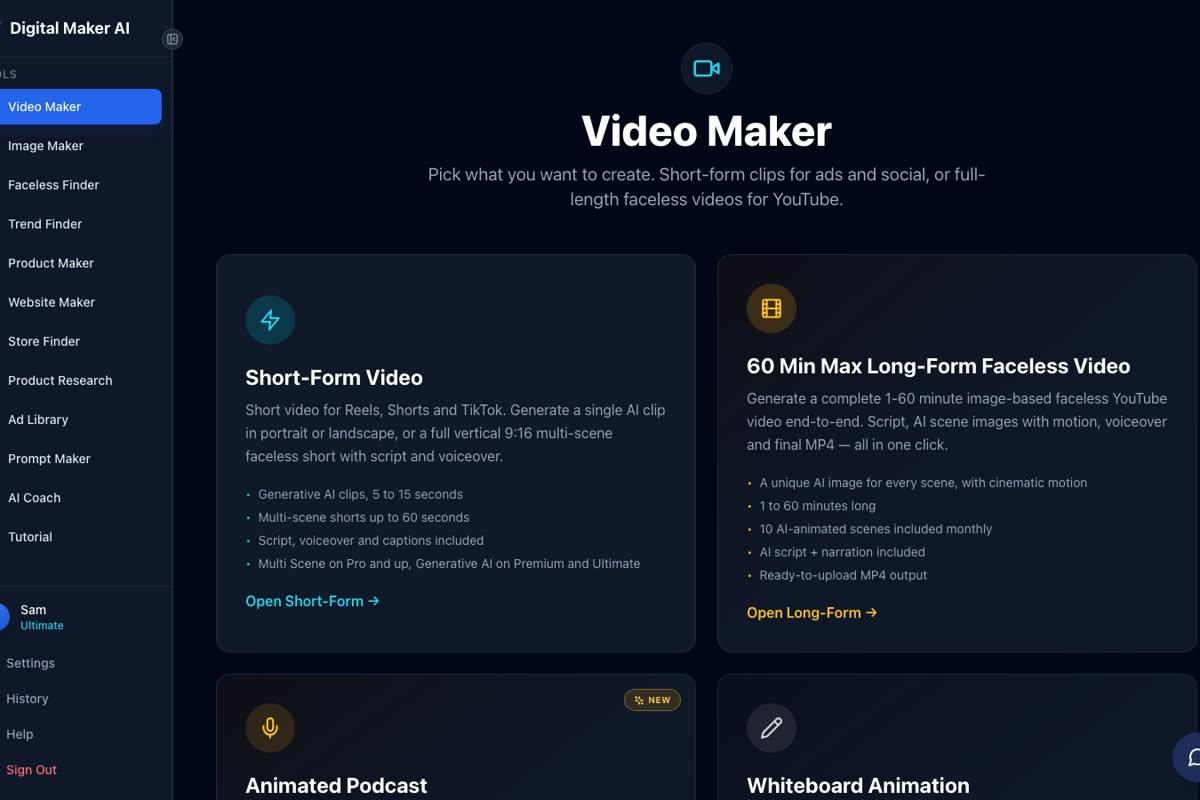
The long-form Video Maker produces landscape 16:9 videos built for YouTube. Seven visual styles are available, including Realistic, Animated or Cartoon, Finance or Luxury, and Space or Sci Fi. Six caption looks let you match the style of your channel. On paid plans, every scene image is generated fresh for your topic, so no two videos share the same visuals. You can also paste your own script on paid plans, regenerate any scene image after the video is built, or swap in a clip of your own.

Premium and Ultimate plans also include AI Presenters (in Beta, live since October 2026): a photoreal AI avatar who speaks the script on screen inside the video. Three layouts are available: Full screen, Split screen, and Corner circle. A slider controls how much of the video the presenter appears, and a timeline bar sets exactly where they show up.

One honest limit to name: Digital Maker AI does not have a stock footage library or a timeline editor for manual trimming and transitions. If you need to edit existing footage or cut together your own clips with fine control, tools like Descript or VEED will serve you better. The platform is built for creators who want to generate videos, not edit them.
Pricing as of September 2026: the Pro plan is $29 per month (or $249 per year), Premium is $59 per month (or $479 per year), and Ultimate is $99 per month (or $799 per year). Full details are at digitalmaker.ai/pricing. A permanent Free plan lets you try the platform with no card required, including one free long-form video of up to 8 minutes.
Veed Alternatives by Use Case
- Best for end-to-end faceless YouTube videos: Digital Maker AI. Type a topic, get a finished MP4 with script, scene images, narration and captions.
- Best for editing your own footage: VEED or Descript. Both handle existing recordings well, with strong caption and transcript tools.
- Best for repurposing blog content: Pictory. URL-to-video with stock footage matching is its core workflow.
- Best for multilingual presenter videos: HeyGen. Strong avatar quality and the company states support for over 175 languages.
- Best for corporate training videos: Synthesia. Established in the learning and development space with a large avatar library.
- Best for generative motion clips: InVideo AI. Access to the latest text-to-video models for short-form and mixed-format content.
- Best for podcast editing: Descript. Transcript-first editing is the fastest way to tighten a long recording.
- Best for animated podcast shows: Digital Maker AI. Two AI hosts, two voices, an animated studio, captions and sound bars, saved as a recurring show.

Which VEED Alternative Should You Choose?
The right answer depends entirely on what you are starting with. If you have footage and want to edit it, VEED and Descript are both solid. If you have a blog and want video versions of your posts, Pictory is the most direct path. If you want a talking-head presenter in many languages, HeyGen and Synthesia are the established options. But if you want to build a faceless YouTube channel where AI handles the script, the visuals, the narration and the captions from a single topic prompt, Digital Maker AI is the most complete end-to-end tool in this comparison. The 10 Best AI Tools for Automated YouTube Channels in 2026 post covers the wider landscape if you want to see how these tools fit into a full channel workflow.
The best way to test any of these tools is to try them before committing to a paid plan. Digital Maker AI's Free plan includes one free long-form video with no card required, so you can see exactly what the output looks like before spending anything. Start at the free course to learn the fastest way to build your first faceless channel from scratch.
Alex Stevens: Alex Stevens writes for the Digital Maker AI team about faceless YouTube channels, AI presenters and AI video tools.