Lumen5 vs Digital Maker AI: Which Is Better for Faceless YouTube?
By Alex Stevens
Lumen5 vs Digital Maker AI: The Short Answer
For faceless YouTube channels that need end-to-end automation, long videos and a usable free tier, Digital Maker AI is the stronger choice in the lumen5 vs digital maker ai comparison. If you want precise manual control over a slide-based editor backed by a large stock media library, Lumen5 still earns its place. The criterion here is straightforward: which tool does more of the work for a faceless YouTube creator, from blank page to ready-to-upload MP4?
To judge that, we looked at four things: how much of the production pipeline each tool handles on its own, the maximum video length, what the free tier actually lets you do, and the price you pay at each step. Both tools were searched and verified as of October 2026 before any claim was written below.
Lumen5: Best for Repurposing Blog Posts and Social Clips
Lumen5 pioneered the blog-to-video format. You paste a URL or a block of text, and the platform builds a slide-based video by matching sentences to stock footage clips or images from its library. Each slide shows a short line of text over a visual, and you drag and drop to rearrange, swap media, or tweak the timing. The interface is clean and intuitive, and the company states that it gives access to hundreds of millions of stock assets on its higher plans.
The slide-by-slide approach gives you granular control that some creators genuinely value. You decide exactly which stock clip sits under which sentence, you choose the font treatment, and you can brand every frame with your logo and colours. For a marketing team turning a weekly blog post into a 60-second social clip, that workflow is fast and familiar.
Where Lumen5 runs into limits for faceless YouTube is the maximum video length. According to Lumen5's own help documentation, the maximum length of a Lumen5 video is 10 minutes, regardless of plan. For a faceless channel publishing 15 to 30 minute explainer videos, that ceiling is a hard stop. The platform also does not offer AI-generated scene images: every visual comes from the stock library, so two creators covering the same topic will often land on the same clips. Based on third-party reviews, the platform does not include a native AI avatar or presenter feature as of October 2026.
Lumen5 pricing as of October 2026 (third-party sources confirm these figures, but check lumen5.com for the latest):
- Free (Community): watermarked videos, up to 2 minutes long, 5 videos a month
- Basic: around $29 per month, removes watermarks, unlocks AI voiceover
- Starter: around $79 per month, 1080p export, 50 million stock assets, brand kit
- Professional: around $199 per month, 500 million stock assets, multiple brand kits
- Team: custom pricing for larger organisations
Who should pick Lumen5: Content marketers and social media managers who need to repurpose written content into short branded clips quickly, and who want manual control over which stock footage appears in each scene.
Digital Maker AI: Best for Faceless YouTube from Script to MP4
Digital Maker AI is built around a different idea: give the platform a topic and it handles everything else. The AI long-form video generator writes the script, generates a unique image for every single scene, adds AI narration from more than 100 built-in voices, burns in captions and returns a finished, ready-to-upload MP4. Nothing is pulled from a stock library: every scene picture is created fresh for that video, on any topic you choose.
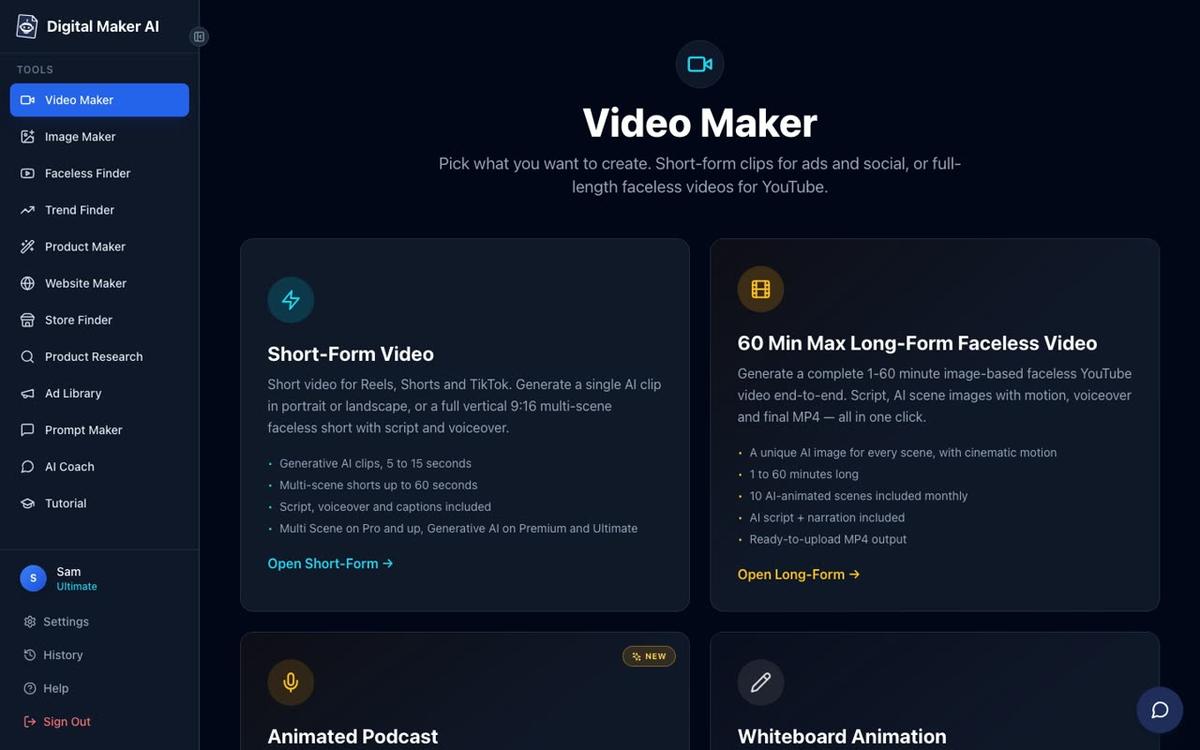
The maximum video length scales with your plan: up to 10 minutes on Pro, 30 minutes on Premium and 60 minutes on Ultimate. That means a faceless channel publishing half-hour deep dives or hour-long documentary-style videos can produce the whole thing inside a single tool, without stitching clips together manually. There is no timeline editor with manual trimming, but after a video is built you can regenerate any scene image, swap in your own image or a short clip, and edit the narration text before downloading.
Seven visual styles cover the main faceless niches: Realistic or Everyday Visuals, Animated or Cartoon, Motivational or Dark Moody, Finance or Luxury, History or Ancient, Space or Sci-Fi, and Minimalist or Clean. Six caption looks let you match the style of your channel. Optional slow zoom or pan motion effects and a film grain look add production texture without extra editing work.
AI Presenters on Premium and Ultimate
One of the biggest differentiators in the lumen5 vs digital maker ai comparison is the AI presenter feature, which launched fully in October 2026. On Premium and Ultimate plans, you describe your presenter and their setting in a sentence or two, the platform draws a photoreal picture of them, and you save them for reuse across every future video. When you build a video, you pick the presenter and choose from three layouts: Full screen (the presenter fills the frame), Split screen (presenter on the left, the scene on the right), or Corner circle (the scene with the presenter in a small round window in the corner). A slider controls what percentage of the video they appear in, and markers on a timeline bar set exactly where they show up.

This is a feature Lumen5 does not offer. For creators who want a consistent face on their channel without appearing on camera themselves, it is a meaningful advantage.
Animated Podcast and Shorts
Beyond long-form video, Digital Maker AI includes an animated podcast feature where two AI hosts in a cartoon studio discuss a topic in two voices, with animated sound bars and captions. Shows are saved so every new episode reuses the same hosts and studio. Premium handles episodes up to 30 minutes; Ultimate goes up to 60 minutes.

Vertical Shorts (9:16, 15 to 60 seconds) are built the same way as long-form videos: a new AI image every few seconds, narration and bold captions. Premium and Ultimate can also post finished videos directly to YouTube, TikTok and Instagram from inside the platform, either immediately or on a schedule, after connecting their accounts once in settings. Lumen5 does not include native social posting.
The Free Plan: No Card Needed
Digital Maker AI's free tier is genuinely usable. Free accounts get five free videos, one of each type: one long-form faceless video up to 8 minutes, one vertical Short, one drag-and-drop video from your own images, one drag-and-drop movie from your own clips, and one animated podcast up to 8 minutes. No credit card is required. Free videos carry a small watermark, and the long-form and Short options draw from a ready-made image library in set topic areas rather than generating fresh images, but the finished MP4 is real and downloadable. Commercial usage rights are included on every plan, including Free.
Compare that with Lumen5's free tier, which caps videos at 2 minutes and limits you to 5 videos a month with a watermark. For a creator who wants to test whether a tool actually fits their workflow before paying, Digital Maker AI's free tier is the more useful starting point.
Digital Maker AI Pricing as of October 2026
Full details are at digitalmaker.ai/pricing, but the plan structure as of October 2026 is:
- Free: five one-off free videos, no card needed, watermarked
- Pro: $29 per month (or $249 per year), 40 video minutes a month, up to 10 minutes per long-form video
- Premium: $59 per month (or $479 per year), 150 minutes a month, up to 30 minutes per video, AI presenters, animated podcast, social posting
- Ultimate: $99 per month (or $799 per year), 300 minutes a month, up to 60 minutes per video, all Premium features plus more avatar time and animated scenes
Who should pick Digital Maker AI: Faceless YouTube creators who want a single tool to go from topic idea to finished MP4 without manual editing, especially those building longer videos, using an AI presenter, or running an animated podcast alongside their main channel.
Recommendations by Use Case
Best for long-form faceless YouTube (10 to 60 minutes)
Digital Maker AI wins clearly. Lumen5 caps every video at 10 minutes. Digital Maker AI reaches 60 minutes on Ultimate, with unique AI-generated scene images throughout. For an in-depth history channel, a finance explainer series or a true crime deep dive, only one of these tools can actually produce the video.
Best for repurposing blog posts into short social clips
Lumen5 wins here. Its core feature, turning a URL or pasted article into a slide-based video, is fast and polished. If your main job is turning written content into 60-second clips for LinkedIn or Instagram, Lumen5's workflow is hard to beat.
Best for AI presenter videos
Digital Maker AI wins. Lumen5 does not offer an AI avatar or presenter feature. Digital Maker AI's presenter feature on Premium and Ultimate lets you build a photoreal host, choose from three on-screen layouts and control exactly when they appear. See more on the AI avatar video generator page.
Best for creators on a budget who want to test first
Digital Maker AI wins on free tier quality. Its free plan gives you a real 8-minute faceless video with no card required. Lumen5's free plan tops out at 2 minutes. At the $29 per month entry level, both tools cost the same, but Digital Maker AI's Pro plan produces videos up to 10 minutes long with AI-generated images, while Lumen5's Basic plan still relies on stock footage and has fewer automation features.
Best for an animated podcast alongside your channel
Digital Maker AI is the only option here. Lumen5 does not include an animated podcast tool. Digital Maker AI lets you build a recurring show with two AI hosts, saved voices and a consistent studio, with episodes up to 60 minutes on Ultimate.
Best for recurring characters across videos
Digital Maker AI again. On Premium and Ultimate, you can upload or build a character image, save it, and have that same character drawn into the scenes of every video you make. Lumen5 has no equivalent feature.
The Honest Limits of Digital Maker AI
No tool wins on every point. Digital Maker AI does not have a stock footage library, a timeline editor with manual trimming, or a blog-URL-to-video workflow. If you want to pick a specific stock clip for a specific moment, or drag scenes around on a traditional video timeline, it is not the right tool. The AI writes the script and places the visuals: you can regenerate or swap individual scenes, but you are not building the video shot by shot the way Lumen5 lets you. For creators who want that level of manual control, Lumen5 is genuinely the better fit.
Which Should You Choose?
The lumen5 vs digital maker ai decision comes down to what your channel actually needs. If you are repurposing blog content into short branded clips and you want to hand-pick every stock visual, Lumen5 is a solid, mature tool for that job. If you are building a faceless YouTube channel from scratch, publishing videos longer than 10 minutes, wanting an AI presenter, an animated podcast, or a one-click path from topic to uploaded MP4, Digital Maker AI does more of the work at a comparable price. The free tier costs nothing to try: sign up, make your first long-form video and see the output before you spend a penny. If you want to go deeper, the free faceless video course walks you through building a channel from the ground up with the right tools for each step.
Alex Stevens: Alex Stevens writes for the Digital Maker AI team about faceless YouTube channels, AI presenters and AI video tools.