Vidnoz vs Digital Maker AI: Free Plan and Long Form Compared
By Alex Stevens
The short answer: it depends on what you are building
If your search for Vidnoz vs Digital Maker AI started because you heard Vidnoz has a generous free tier and you want to know whether it beats Digital Maker AI for a faceless YouTube channel, the honest answer is: Vidnoz leads on avatar variety, while Digital Maker AI leads on the full production pipeline, long-form length and the free-to-paid upgrade path. The right choice comes down to whether you need a talking presenter clip or a complete, ready-to-upload YouTube video.
To judge them fairly, this comparison looks at three things: what the free plan actually lets you produce, how each tool handles AI presenters, and how far each goes on long-form video length. Pricing for Digital Maker AI is listed as of October 2026 alongside a link to the current pricing page, because plans change. For Vidnoz, figures come from third-party reviews and aggregator sites checked in October 2026, and you should verify current rates on Vidnoz's own site before paying.
Vidnoz: the avatar library benchmark
Vidnoz is built around one core idea: a very large library of pre-built talking avatars. Third-party reviews checked in October 2026 report more than 1,900 photorealistic avatars, more than 2,000 AI voices, and over 140 languages for voiceover and dubbing. The workflow is template-led: you pick an avatar, paste or generate a script, and the platform lip-syncs the avatar to it. That is genuinely impressive at this price point, and it is where Vidnoz wins outright.
The free plan refreshes daily credits with no credit card required, giving access to the core avatar and template library. The catches are real, though: free exports are 720p, carry a Vidnoz watermark, and are capped at around three minutes per video. Commercial rights on the free tier are disputed across review sites, so confirm the exact entitlement on Vidnoz's pricing page before using free exports for client work or monetised channels. Paid plans start at around $19.99 per month (billed yearly) for the Starter tier, which review sites report gives 15 minutes of video per month and a five-minute maximum per video. The Business tier, reported at around $56.99 per month billed yearly, raises that to 30 minutes per month and a 20-minute maximum per video. Always check vidnoz.com directly for current pricing, as tiers change often.
What Vidnoz is less focused on is the full pipeline: it does not write a multi-scene script, generate a fresh AI image for every scene, add narration and burned-in captions, and return a finished MP4 in one flow. It is a presenter and template tool first. If you want a talking head on screen, it has more avatar faces to choose from than almost anything else at this price. If you want a complete faceless YouTube video built from a topic sentence, it is not the primary use case.
Best for: creators who need a scripted presenter clip fast, marketers making short explainer or product videos, and anyone who wants to browse a huge avatar library before committing to a paid plan.
Who should look elsewhere: creators who want a full script-to-MP4 pipeline, long-form YouTube videos over five minutes on a Starter plan, or a free tier that produces a complete, usable video in one go rather than a few seconds of daily credit.
Digital Maker AI: the full pipeline for faceless YouTube
Digital Maker AI is built around producing complete, ready-to-upload YouTube videos end to end. You give it a topic, it writes the script, generates a unique AI image for every scene, adds AI narration, burns in captions, and returns a finished MP4. No editing required. The long-form video maker handles videos up to 60 minutes on the Ultimate plan, which is a different category from the five-minute ceiling on Vidnoz's Starter tier.
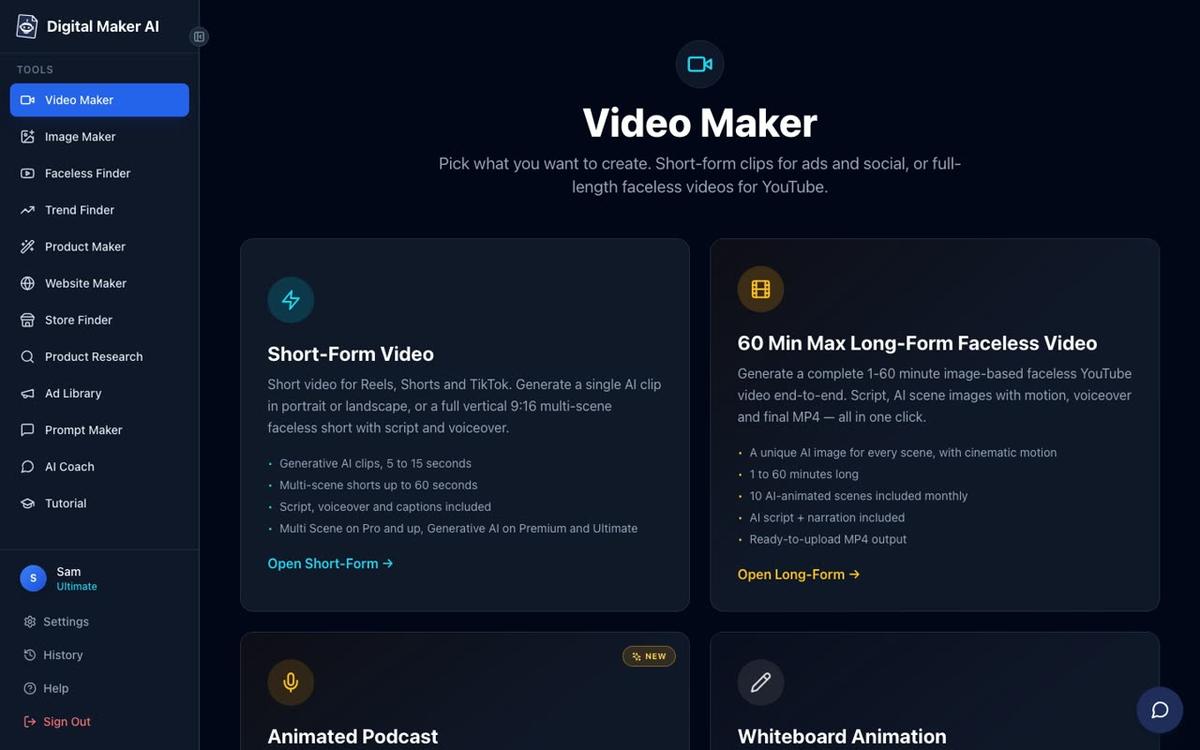
The free plan is generous in a different way from Vidnoz's daily credit model. Free accounts get five one-off videos, one of each type: one long-form faceless video (up to 8 minutes), one vertical Short (15 to 60 seconds), one drag-and-drop video from your own images, one drag-and-drop movie from your own clips, and one animated podcast (up to 8 minutes). No credit card is needed. Commercial usage rights are included on every plan, including Free, so you can monetise your channel from day one. The free videos do carry a small Digital Maker AI watermark, which upgrading removes.
Free long-form videos and Shorts are built from a ready-made image library across set topic areas including money and personal finance, business and side hustles, motivation, stoicism, history, true crime, psychology, space and health and fitness. Paid plans generate every scene image fresh on any topic. Free users also get English only, two visual styles, and standard voices, with no pasted script option.
On paid plans, the length limits scale clearly. Pro (USD 29 a month, or 249 a year, as of October 2026) gives 40 minutes of video per month with a 10-minute maximum per video. Premium (USD 59 a month, or 479 a year, as of October 2026) gives 150 minutes per month and a 30-minute maximum. Ultimate (USD 99 a month, or 799 a year, as of October 2026) gives 300 minutes per month and a 60-minute maximum. See the pricing page for current rates.
What Digital Maker AI does not do that Vidnoz does: it does not have a library of pre-built human avatar faces to browse and pick from. The AI Presenter feature (covered below) generates a custom presenter from your description rather than letting you scroll through thousands of ready-made faces. If you want to pick a specific face from a catalogue, Vidnoz wins on that criterion.
Best for: creators who want a complete faceless YouTube video from a topic, channels that need long-form content (10 to 60 minutes), and anyone who wants commercial rights from the first free video without touching a credit card.
Vidnoz vs Digital Maker AI: how each handles AI presenters
This is the feature most people are searching when they compare these two tools. Vidnoz's core product is a presenter: you pick from its library of pre-built avatars, and the platform lip-syncs them to your script. The avatar library is the main attraction, and it is genuinely large.
Digital Maker AI's AI Presenter feature works differently. Instead of browsing a catalogue, you describe who the presenter is and their setting in a sentence or two, and the AI draws a photoreal picture of them. You check it, save it, and reuse it across every video you make. You can create several presenters and switch between them. This approach means your presenter is unique to your channel rather than shared with every other Vidnoz user who picked the same avatar.
The presenter then appears inside a landscape Multi Scene long-form video, not as a standalone clip. You pick one, some or all of three layouts: Full screen (the presenter fills the frame), Split screen (presenter on the left, the scene image on the right), or Corner circle (the scene fills the frame with the presenter in a round window in the corner). The video rotates through whichever layouts you tick.

A slider sets how much of the video the presenter is on screen, from 5 percent up to the full video, and markers on a timeline bar set where they appear. The presenter speaks the same narration voice as the rest of the video, with captions. Presenter time runs on a separate pool called avatar time, counted in seconds. Premium plans start with 2 minutes of avatar time and Ultimate with 5 minutes, plus 3 minutes added every month on Ultimate. Avatar Packs add more as one-off purchases. The AI Presenter feature is available on Premium and Ultimate plans only, not on Free or Pro, and it works on landscape Multi Scene videos only.
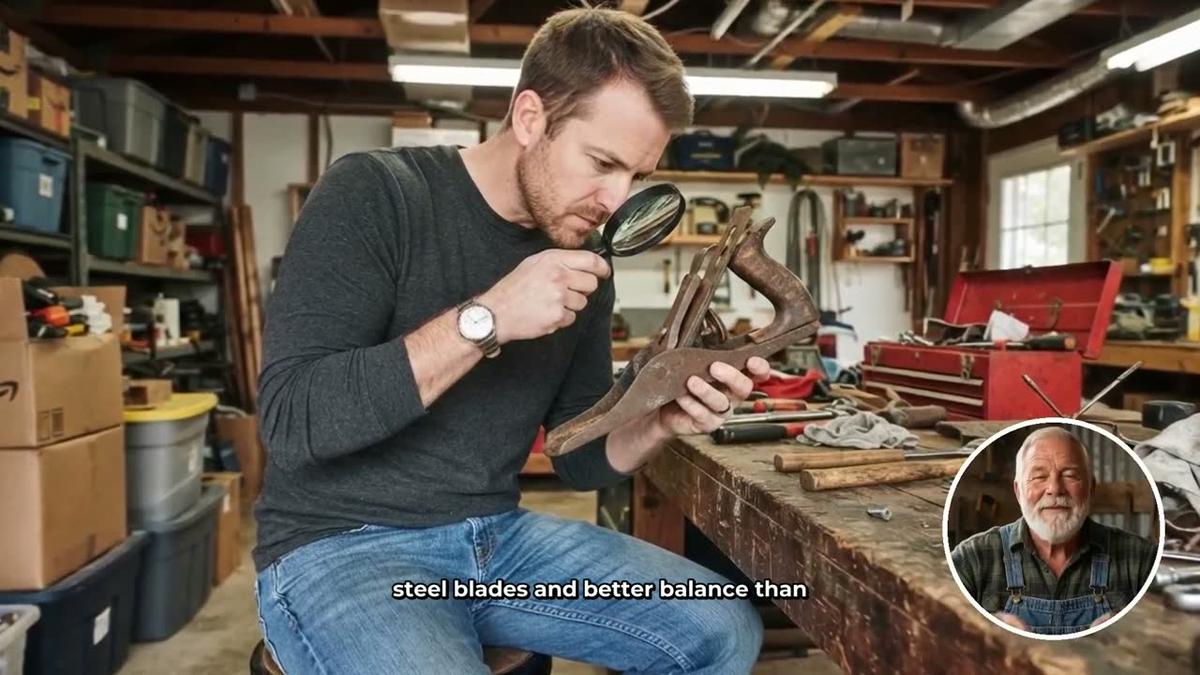
The honest comparison: Vidnoz wins on avatar variety if you want to browse and pick a face from a large catalogue. Digital Maker AI wins if you want a presenter woven into a complete long-form video with its own scenes, narration and captions, and you want that presenter to be a unique face for your channel.
Long-form video length: where the gap is largest
For a faceless YouTube channel, video length matters. Most successful faceless channels publish videos between 8 and 20 minutes, with some niches (history, true crime, finance) performing well at 30 to 60 minutes. Here is where the two tools sit very differently.
Vidnoz's Starter plan, based on third-party reviews checked in October 2026, caps each video at five minutes. The Business tier raises that to around 20 minutes. If you want a 30-minute history deep-dive, you would need to stitch clips together manually or upgrade to a higher tier.
Digital Maker AI's Pro plan allows up to 10 minutes per video. Premium goes to 30 minutes. Ultimate goes to 60 minutes. The platform builds the whole video in one go, with no manual stitching. For a creator whose content strategy depends on longer videos, this is a material difference.
Recommendations by use case
- Best for avatar variety and short presenter clips: Vidnoz. Its library of 1,900+ pre-built avatars and daily free credits make it the fastest way to produce a short talking-head video without spending anything.
- Best for long-form faceless YouTube videos: Digital Maker AI. The full script-to-MP4 pipeline, up to 60 minutes per video on Ultimate, and seven visual styles make it the stronger choice for channels that publish 10 to 60 minute content.
- Best free plan for a complete usable video: Digital Maker AI. Five free videos, one of each type, up to 8 minutes each, with commercial rights included and no credit card required. Vidnoz's free tier refreshes daily but gives only a few minutes of credit at a time, capped at around three minutes per video at 720p.
- Best for a unique AI presenter inside a full video: Digital Maker AI's AI Presenter feature on Premium or Ultimate. Three layout options, a custom-drawn face, and the presenter woven into the same video as the scene images.
- Best for short explainer and marketing clips: Vidnoz, especially if you need a face from a large template library and want to get something out in under 10 minutes.
- Best for the full content pipeline (script, scenes, voice, captions, posting): Digital Maker AI. Premium and Ultimate can post finished videos straight to YouTube, TikTok and Instagram from the platform. Vidnoz does not offer this kind of end-to-end publishing integration. You can also explore how Digital Maker AI compares to Elai for automated video production if you are evaluating several tools.
Summary comparison table
| Feature | Vidnoz | Digital Maker AI |
|---|---|---|
| Free plan | Daily credits, ~3 min max per video, 720p, watermark, no card needed | 5 one-off free videos (up to 8 min each), watermark, commercial rights included, no card needed |
| Commercial rights (free) | Disputed across sources; confirm on Vidnoz's pricing page | Included on every plan, including Free |
| Avatar / presenter approach | 1,900+ pre-built avatars to browse and pick | Custom AI-drawn presenter from your description; 3 layouts (Full, Split, Corner circle) |
| Full script-to-MP4 pipeline | No (template and avatar tool; you assemble the video) | Yes (script, scene images, narration, captions, MP4 in one flow) |
| Max video length (entry paid plan) | ~5 min (Starter, as reported by review sites, Oct 2026) | 10 min (Pro, as of October 2026) |
| Max video length (top plan) | ~20 min (Business, as reported by review sites, Oct 2026) | 60 min (Ultimate, as of October 2026) |
| Entry paid plan price | ~$19.99/mo billed yearly (verify on vidnoz.com) | $29/mo or $249/year (Pro, as of October 2026) |
| Post to YouTube / TikTok / Instagram | Not confirmed | Yes, Premium and Ultimate (schedule or post now) |
| Animated podcast | Not a feature | Yes, up to 60 min on Ultimate |
Both tools are worth trying for free before spending anything. If you are running a faceless YouTube channel and you want a complete video built from a topic, start with Digital Maker AI's free long-form video and see how far the pipeline takes you. If you want to browse a huge catalogue of avatar faces for a short clip, Vidnoz's daily free credits are a low-friction way to test it. For a deeper look at building a full faceless channel from scratch, the Digital Maker AI free course walks through the whole process, from picking a niche to publishing your first video.
Alex Stevens: Alex Stevens writes for the Digital Maker AI team about faceless YouTube channels, AI presenters and AI video tools.